

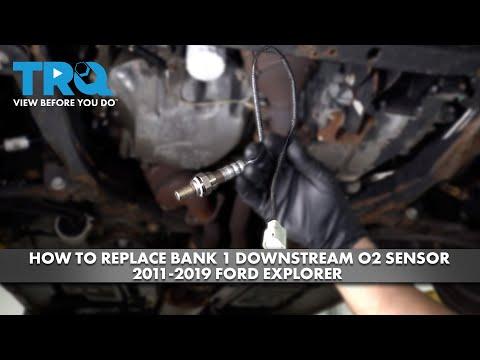





How to Replace the Oxygen Sensor on a 2018 Ford Explorer 3.5L V6
Step-by-step instructions with tools, parts, torque specs, and safety tips for 2016, 2017, 2018, 2019
How to Replace the Oxygen Sensor on a 2018 Ford Explorer 3.5L V6
Step-by-step instructions with tools, parts, torque specs, and safety tips for 2016, 2017, 2018, 2019


🔧 Oxygen Sensor - Replacement
Replacing the oxygen sensor on your Explorer means removing the failed sensor from the exhaust and installing a new one in the same location. On the 3.5L V6, the sensor may be upstream or downstream, so the exact access point depends on which sensor you’re changing.
Difficulty Level: Intermediate | Estimated Time: 1-2 hours
⚠️ Safety & Precautions
- The exhaust gets extremely hot. Let the vehicle cool completely before starting.
- Raise the vehicle securely if you need bottom access. Use jack stands; never rely on a jack alone.
- Keep the ignition off while unplugging the sensor connector.
- If the sensor harness runs near the exhaust, make sure the new harness is routed the same way and clipped away from heat.
- Disconnecting the battery is not required for this repair.
🔧 Required Tools
You'll need the following tools for this repair:
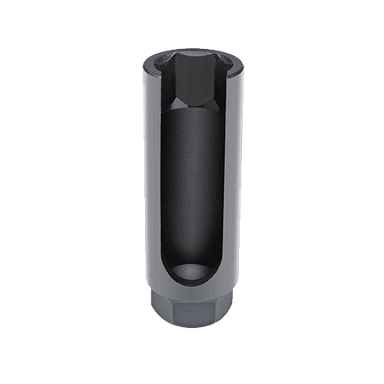
- Oxygen sensor socket 7/8-inch
- 3/8-inch ratchet
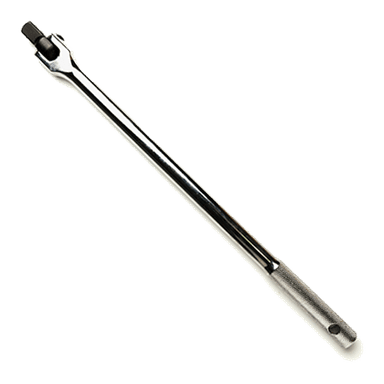
- 3/8-inch breaker bar
- Penetrating oil
- Floor jack (rated 3-ton minimum)
- Jack stands (rated 3-ton minimum)
- Wheel chocks
- Safety glasses
- Mechanic gloves
- Torque wrench
- Pick tool
🔩 Required Parts
HowToo sells all the parts you need for this repair:
- Oxygen sensor - Qty: 1
- Anti-seize compound - Qty: 1
📋 Before You Begin
- Park on level ground and set the parking brake.
- Let the exhaust cool fully.
- If you are replacing a lower sensor, raise the vehicle and support it with jack stands.
- Find the sensor you are replacing before loosening it. Upstream sensors are before the catalytic converter; downstream sensors are after it.
🔨 Step-by-Step Instructions
Follow these steps in order:
Step 1: Locate the sensor
- Open the hood or get under the vehicle, depending on sensor location.
- Find the oxygen sensor and trace its wire to the connector.
- Take a quick photo first.
Step 2: Unplug the connector
- Use a pick tool to release the connector lock if needed.
- Disconnect the sensor connector by hand.
- Do not pull on the wires.
Step 3: Loosen the old sensor
- Spray penetrating oil on the sensor threads if it looks rusty.
- Use a 7/8-inch oxygen sensor socket with a 3/8-inch breaker bar to loosen the sensor.
- Turn counterclockwise to remove it.
- If it is tight, work it back and forth slowly. Do not force a cold, rusty sensor.
Step 4: Install the new sensor
- Compare the old and new sensor to make sure they match.
- Thread the new sensor in by hand first to avoid cross-threading.
- Use the oxygen sensor socket 7/8-inch and a torque wrench to tighten it.
- Torque to 37 Nm (27 ft-lbs).
- If the new sensor does not have anti-seize already applied, put a small amount on the threads only. Do not get any on the sensing tip.
Step 5: Reconnect and secure the harness
- Plug the connector back in until it clicks.
- Route the harness exactly like the original.
- Make sure the wire is clipped away from the exhaust and steering parts.
Step 6: Lower the vehicle and verify
- If the vehicle was raised, use the floor jack to lift it slightly, remove the jack stands, then lower it fully.
- Start the engine and let it idle.
- Check for exhaust leaks, warning lights, or a loose connector.
✅ After Repair
- Clear diagnostic trouble codes with a scan tool if the check engine light stays on.
- Drive the vehicle through a normal mixed-speed drive cycle so the computer can verify the new sensor.
- If the light returns, recheck the connector, harness routing, and sensor location.
💰 DIY vs Shop Cost
Shop Cost: $220-$450 (parts + labor)
DIY Cost: $60-$140 (parts only)
You Save: $160-$310 by doing it yourself!
Shop labor rates vary but typically run $100-$150/hour. This repair takes a shop approximately 1-2 hours.
🎯 Ready to get started?
HowToo makes it easy: same-day/2-day shipping on every part, plus all the tools and specialty tools you need! Check out the parts and tools sections below to add everything to your cart.