






How to Replace the MAF Sensor on a 2013-2018 Ford Fusion (Trim: Energi Platinum | Engine: Inline 4 2.0L)
Step-by-step DIY guide with tools, parts, torque specs, and hybrid safety tips for 2013, 2014, 2015, 2016, 2017, 2018
How to Replace the MAF Sensor on a 2013-2018 Ford Fusion (Trim: Energi Platinum | Engine: Inline 4 2.0L)
Step-by-step DIY guide with tools, parts, torque specs, and hybrid safety tips for 2013, 2014, 2015, 2016, 2017, 2018


🔧 Fusion - Mass Air Flow Sensor Replacement
Your Fusion Energi uses a mass air flow sensor to measure incoming air so the engine computer can calculate fuel delivery correctly. Replacing it is a beginner-friendly job, but because your Fusion is a plug-in hybrid, you need to follow battery and key-off precautions so the engine cannot auto-start while you are working.
Difficulty Level: Beginner | Estimated Time: 15-30 minutes
⚠️ Safety & Precautions
- ⚠️ Your Fusion is a PHEV, so make sure the vehicle is fully OFF before opening the hood.
- ⚠️ Keep the key fob at least 15 feet away from the vehicle so the hybrid system cannot wake up unexpectedly.
- ⚠️ Do not touch orange high-voltage cables or connectors. This repair does not require high-voltage service.
- ⚠️ Let the engine bay cool before touching the intake duct or sensor.
- ⚠️ Disconnecting the 12V battery is recommended for first-time DIYers to prevent accidental electrical shorts.
🔧 Required Tools
You'll need the following tools for this repair:
- 8mm socket
- 10mm socket
- 1/4-inch ratchet
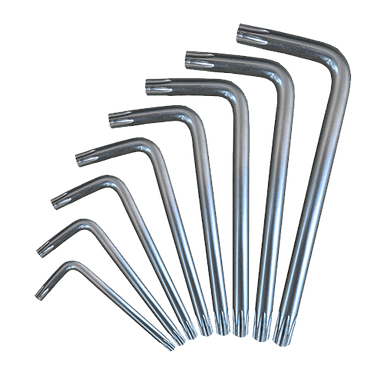
- Torx T20 screwdriver
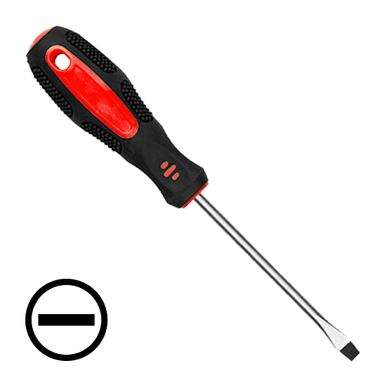
- Flathead screwdriver
- Needle-nose pliers
- Nitrile gloves
- Safety glasses
🔩 Required Parts
HowToo sells all the parts you need for this repair:
- Mass air flow sensor - Qty: 1
- MAF sensor seal or O-ring - Qty: 1
- MAF sensor cleaner - Qty: 1
📋 Before You Begin
- Park your Fusion on level ground and shift to Park.
- Set the parking brake.
- Press the START/STOP button once to turn the vehicle completely OFF.
- Remove the key fob from the vehicle and keep it away from the work area.
- Open the hood and allow the engine bay to cool.
- Use a 10mm socket to disconnect the negative 12V battery cable if you want the safest beginner approach. The 12V battery powers normal electronics; it is separate from the high-voltage battery.
🔨 Step-by-Step Instructions
Follow these steps in order:
Step 1: Locate the MAF Sensor
- Put on safety glasses and nitrile gloves.
- Open the hood and look at the air intake tube between the air filter box and throttle body.
- The mass air flow sensor is mounted in the intake tube near the air filter box and has an electrical connector plugged into it.
- Take a photo before unplugging.
Step 2: Disconnect the 12V Battery
- Use a 10mm socket and 1/4-inch ratchet to loosen the negative battery terminal clamp.
- Lift the negative cable off the battery post and position it so it cannot spring back onto the post.
- Wait 2 minutes before unplugging the sensor.
Step 3: Unplug the MAF Sensor Connector
- Use your fingers to press the locking tab on the electrical connector.
- If the tab is stiff, use a flathead screwdriver gently to help release it.
- Pull the connector straight back from the sensor. Do not pull on the wires.
- If a red or gray lock is present, use needle-nose pliers to slide the lock back first. This lock prevents the connector from coming loose.
Step 4: Remove the Old MAF Sensor
- Use a Torx T20 screwdriver to remove the MAF sensor mounting screws.
- Keep the screws in a safe place if the new sensor does not include replacements.
- Pull the sensor straight out of the intake tube.
- Do not twist hard. The seal can stick slightly.
Step 5: Inspect the Intake Opening
- Use a clean gloved finger to check that the old O-ring or seal did not stay stuck in the intake tube.
- Use MAF sensor cleaner only if the sensor opening area is dusty.
- Let the area dry fully before installing the new sensor.
- Do not use brake cleaner, carb cleaner, or compressed air on the MAF sensing element.
Step 6: Install the New MAF Sensor
- Lightly seat the new MAF sensor into the intake tube by hand.
- Make sure the seal or O-ring sits flat and does not pinch.
- Use a Torx T20 screwdriver to install the mounting screws.
- Tighten the screws snugly by hand. If using a small torque wrench, Torque to 2 Nm (18 in-lbs).
- Small screws strip easily.
Step 7: Reconnect the Sensor Connector
- Push the electrical connector straight onto the MAF sensor until it clicks.
- If equipped, use needle-nose pliers to slide the connector lock back into its locked position.
- Gently tug the connector by the plastic body to make sure it is secure.
Step 8: Reconnect the 12V Battery
- Place the negative battery cable back onto the battery post.
- Use a 10mm socket and 1/4-inch ratchet to tighten the clamp.
- Torque to 6 Nm (53 in-lbs).
- Do not overtighten the clamp because the battery post can be damaged.
Step 9: Start and Check Operation
- Bring the key fob back to the vehicle.
- Press the brake pedal and press START/STOP to power the vehicle on.
- The engine may not start right away because your Fusion can run in EV mode.
- If needed, select a drive mode or wait until the engine starts normally.
- Listen for smooth idle and check that the Check Engine light does not immediately return.
✅ After Repair
- Drive your Fusion for 10-15 minutes with a mix of low-speed and steady cruising.
- If the Check Engine light was on before, it may take several drive cycles to turn off unless codes are cleared with a scan tool.
- If idle is rough after installation, recheck the electrical connector and make sure the sensor seal is fully seated.
- If the battery was disconnected, reset the clock and any convenience settings that changed.
- Do not spray MAF cleaner into the intake while the engine is running.
💰 DIY vs Shop Cost
Shop Cost: $180-$350 (parts + labor)
DIY Cost: $60-$180 (parts only)
You Save: $120-$170 by doing it yourself!
Shop labor rates vary but typically run $100-$150/hour. This repair takes a shop approximately 0.5-1.0 hours.
🎯 Ready to get started?
HowToo makes it easy: same-day/2-day shipping on every part, plus all the tools and specialty tools you need! Check out the parts and tools sections below to add everything to your cart.