

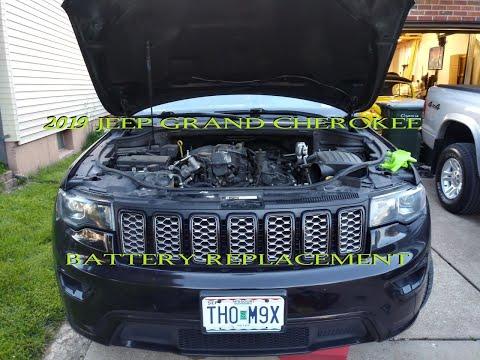





How to Replace the Battery on a 2005-2024 Jeep Grand Cherokee (Engine: V8 5.7L)
Step-by-step under-seat battery guide with tools, parts, torque specs, and safety tips for 2005, 2006, 2007, 2008, 2009, 2010
How to Replace the Battery on a 2005-2024 Jeep Grand Cherokee (Engine: V8 5.7L)
Step-by-step under-seat battery guide with tools, parts, torque specs, and safety tips for 2005, 2006, 2007, 2008, 2009, 2010


🔧 Grand Cherokee - Battery Replacement
Your Grand Cherokee uses a 12-volt starting battery mounted under the front passenger seat. Replacing it means moving the seat, disconnecting the old battery safely, installing the new one, and checking that the electrical systems wake up correctly.
Difficulty Level: Beginner | Estimated Time: 30-60 minutes
⚠️ Safety & Precautions
- ⚠️ Wear safety glasses and gloves; batteries contain acid and can spark if shorted.
- ⚠️ Always disconnect the negative cable first and reconnect it last to reduce spark risk.
- ⚠️ Do not let a metal tool touch both battery terminals or the positive terminal and vehicle metal at the same time.
- ⚠️ The battery is heavy; lift with both hands and keep it upright.
- ⚠️ Your Grand Cherokee may show temporary warning lights after battery power is restored; most clear after a short drive.
🔧 Required Tools
You'll need the following tools for this repair:
- 10mm socket
- 13mm socket
- Ratchet with 3/8-inch drive
- 6-inch socket extension
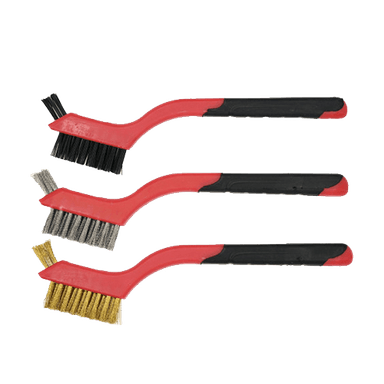
- Battery terminal brush
- Battery carrier strap
- Trim removal tool
- Memory saver 12V OBD-II adapter
- Torque wrench 3/8-inch drive
- Nitrile gloves
- Safety glasses
🔩 Required Parts
HowToo sells all the parts you need for this repair:
- 12V AGM battery, Group H7/94R - Qty: 1
- Battery terminal anti-corrosion protectant - Qty: 1
- Battery terminal felt washers - Qty: 1 set
📋 Before You Begin
- 🅿️ Park your Grand Cherokee on level ground, shift to Park, and set the parking brake.
- 🔑 Turn the ignition off and keep the key fob at least 15 feet away from the vehicle.
- 🪑 Move the front passenger seat fully rearward and raise it as high as possible using the seat switches.
- ⏱️ Wait at least 3 minutes after turning the vehicle off so control modules can go to sleep.
- 🔌 A memory saver is optional. A memory saver supplies low power through the OBD-II port to help keep radio presets and module memory alive.
- ⚠️ If using a memory saver, connect it before disconnecting the battery and follow the memory saver instructions exactly.
🔨 Step-by-Step Instructions
Follow these steps in order:
Step 1: Access the Battery
- Use the seat switch to confirm the front passenger seat is fully back and raised.
- Use a trim removal tool to lift the passenger-side floor battery access cover.
- Set the cover aside where it will not get stepped on.
- Work slowly around plastic trim.
Step 2: Identify the Battery Terminals
- Locate the negative terminal marked with a minus sign “-” and usually connected to a black cable.
- Locate the positive terminal marked with a plus sign “+” and usually protected by a red cover.
- Use your safety glasses and nitrile gloves before touching the battery area.
Step 3: Disconnect the Negative Cable First
- Use a 10mm socket, ratchet, and 6-inch extension to loosen the negative terminal clamp nut.
- Twist the negative cable clamp gently and lift it off the battery post.
- Move the negative cable aside so it cannot spring back and touch the battery post.
- Do not remove the nut completely unless needed.
Step 4: Disconnect the Positive Cable
- Flip open the red positive terminal cover by hand.
- Use a 10mm socket, ratchet, and 6-inch extension to loosen the positive terminal clamp nut.
- Lift the positive cable clamp off the battery post and move it aside carefully.
- Keep your ratchet away from nearby metal brackets while touching the positive terminal.
Step 5: Remove the Battery Hold-Down
- The hold-down is the bracket that clamps the battery so it cannot slide during driving.
- Use a 13mm socket, ratchet, and 6-inch extension to remove the battery hold-down bolt.
- Lift out the hold-down bracket and keep the bolt with it.
Step 6: Remove the Old Battery
- Attach a battery carrier strap to the battery, if the battery does not have a built-in handle.
- Lift the battery straight up and out using both hands.
- Keep the battery upright at all times.
- Place it on cardboard or another stable surface.
- Batteries are heavier than they look.
Step 7: Clean the Battery Cable Ends
- Use a battery terminal brush to clean the inside of both cable clamps.
- If there is white or green powder, avoid touching it with bare skin.
- Wipe loose debris away with a shop-safe disposable towel.
Step 8: Install the New Battery
- Use both hands or a battery carrier strap to lower the new 12V AGM battery, Group H7/94R into the battery tray.
- Make sure the positive and negative posts are positioned the same way as the old battery.
- Make sure the battery sits flat in the tray.
Step 9: Reinstall the Battery Hold-Down
- Install the hold-down bracket over the base of the battery.
- Use a 13mm socket, ratchet, and 6-inch extension to start the bolt by hand first.
- Use a torque wrench with 13mm socket to tighten the hold-down bolt.
- Torque to 20 Nm (15 ft-lbs)
- The battery should not move if you gently push it by hand.
Step 10: Connect the Positive Cable First
- Install one felt washer over the positive battery post if included.
- Place the positive cable clamp fully down onto the positive battery post.
- Use a 10mm socket and torque wrench to tighten the positive terminal clamp nut.
- Torque to 5 Nm (44 in-lbs)
- Close the red positive terminal cover by hand.
Step 11: Connect the Negative Cable Last
- Install one felt washer over the negative battery post if included.
- Place the negative cable clamp fully down onto the negative battery post.
- Use a 10mm socket and torque wrench to tighten the negative terminal clamp nut.
- Torque to 5 Nm (44 in-lbs)
- A small spark may happen as the cable touches the post. That can be normal.
Step 12: Protect the Terminals
- Use battery terminal anti-corrosion protectant on the battery cable clamps.
- Do not spray heavily into electrical connectors.
- Make sure both terminal covers and cable routing are secure.
Step 13: Reinstall the Access Cover
- Use your hands to place the passenger floor battery access cover back into position.
- Press the cover down evenly until it sits flat.
- Move the passenger seat back to a comfortable position using the seat switch.
✅ After Repair
- ✅ Start your Grand Cherokee and let it idle for 1-2 minutes.
- ✅ Turn the steering wheel fully left, then fully right, then center it. This helps steering-angle systems relearn after power loss.
- ✅ Check that the clock, radio presets, windows, seat memory, and climate settings work normally.
- ✅ If the auto-up window feature does not work, hold the window switch down until fully open, then hold it up until fully closed, and keep holding for 2 seconds.
- ✅ Drive gently for 10-15 minutes. Temporary warning lights may clear after the vehicle relearns system values.
- ✅ Recycle the old battery at a parts store or battery recycler. Do not put it in household trash.
💰 DIY vs Shop Cost
Shop Cost: $300-$500 (parts + labor)
DIY Cost: $190-$320 (parts only)
You Save: $110-$180 by doing it yourself!
Shop labor rates vary but typically run $100-$150/hour. This repair takes a shop approximately 0.5-1.0 hours.
🎯 Ready to get started?
HowToo makes it easy: same-day/2-day shipping on every part, plus all the tools and specialty tools you need! Check out the parts and tools sections below to add everything to your cart.