







How to Replace the 12V Battery on a 2009 Honda Civic (Group 51R)
Step-by-step DIY instructions with tools, parts list, safety tips, and torque specs for 1992, 1993, 1994, 1995, 2012, 2013, 2014, 2015, 2016, 2017, 2018, 2019, 2020, 2021
How to Replace the 12V Battery on a 2009 Honda Civic (Group 51R)
Step-by-step DIY instructions with tools, parts list, safety tips, and torque specs for 1992, 1993, 1994, 1995, 2012, 2013, 2014, 2015, 2016, 2017, 2018, 2019, 2020, 2021


🔧 Civic - Battery Replacement
Replacing the 12V battery restores reliable starting power and prevents random electrical glitches. On your Civic, it’s a straightforward job: remove the old battery, clean the terminals, and install the new one securely.
Difficulty Level: Beginner | Estimated Time: 0.5-1.0 hours
⚠️ Safety & Precautions
- ⚠️ Wear eye protection and gloves; batteries can leak acid and vent gas.
- ⚠️ Keep sparks/flames away; battery hydrogen gas is flammable.
- ⚠️ Always disconnect the negative (-) terminal first and reconnect it last.
- ⚠️ Do not let a tool touch the positive terminal and body metal at the same time.
- ⚠️ Battery disconnect is recommended for this repair (you will lose clock/radio presets).
🔧 Required Tools
You'll need the following tools for this repair:
- Safety glasses
- Nitrile gloves
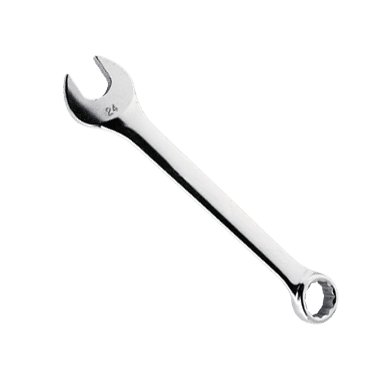
- 10mm wrench
- 10mm socket
- 3/8" ratchet
- 6" socket extension
- Battery terminal brush (specialty)
- Torque wrench (inch-pound)
- Shop rags
🔩 Required Parts
HowToo sells all the parts you need for this repair:
- 12V battery (Group size 51R) - Qty: 1
- Battery terminal anti-corrosion pads - Qty: 2
- Battery terminal protectant spray - Qty: 1
📋 Before You Begin
- Park on level ground, put the shifter in neutral, and set the parking brake.
- Turn everything off and remove the key.
- Open the hood and locate the battery (front driver-side area).
- Tip: Take a quick photo of terminal layout.
🔨 Step-by-Step Instructions
Follow these steps in order:
Step 1: Confirm terminal locations
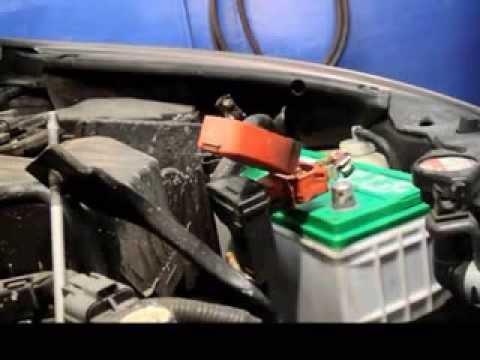
- Identify the negative (-) terminal (usually black cable) and positive (+) terminal (often has a red cover).
- Use shop rags to wipe off heavy dirt so your tools seat fully.
Step 2: Disconnect the negative (-) terminal
- Use a 10mm wrench to loosen the negative terminal clamp nut.
- Twist and lift the clamp straight up off the battery post.
- Tuck the cable aside so it cannot spring back onto the battery.
- Tip: Negative off first reduces short risk.
Step 3: Disconnect the positive (+) terminal
- Use a 10mm wrench to loosen the positive terminal clamp nut.
- Remove the positive clamp from the battery post and set it aside carefully.
Step 4: Remove the battery hold-down
- Locate the hold-down bar and the two J-bolts/nuts.
- Use a 10mm socket, 3/8" ratchet, and 6" socket extension to remove the hold-down nuts.
- Lift off the hold-down bracket and set it aside.
Step 5: Remove the old battery
- Carefully lift the battery straight up and out. Batteries are heavy—use both hands.
- Set it on the ground upright (do not tip it).
Step 6: Clean the terminals and tray
- Use a battery terminal brush (specialty) to clean the inside of both cable clamps until metal looks bright.
- Wipe the battery tray with shop rags.
- Install battery terminal anti-corrosion pads onto the new battery posts (one per post).
Step 7: Install the new battery
- Place the new Group size 51R battery into the tray in the same orientation as the old one (posts aligned with the cables).
- Reinstall the hold-down bracket using the 10mm socket, 3/8" ratchet, and 6" socket extension.
- Tighten evenly left and right so the battery sits flat.
- Torque the hold-down nuts to 9.8 Nm (87 in-lbs) using a torque wrench (inch-pound).
Step 8: Reconnect the positive (+) terminal
- Push the positive clamp fully down onto the positive post.
- Use a 10mm wrench to tighten the clamp.
- Torque the terminal clamp nut to 5.4 Nm (48 in-lbs) using a torque wrench (inch-pound).
Step 9: Reconnect the negative (-) terminal
- Push the negative clamp fully down onto the negative post.
- Use a 10mm wrench to tighten the clamp.
- Torque the terminal clamp nut to 5.4 Nm (48 in-lbs) using a torque wrench (inch-pound).
Step 10: Protect the terminals
- Spray a light coat of battery terminal protectant spray on both terminals to slow corrosion.
- Final check: battery should not move when you push it by hand.
✅ After Repair
- Start the engine and confirm it cranks strongly.
- Set the clock and restore radio presets as needed.
- Perform an idle relearn: warm the engine fully, then let it idle for 5 minutes with all accessories off (A/C off, lights off).
- Recheck terminal tightness after a short drive (no wiggling by hand).
💰 DIY vs Shop Cost
Shop Cost: ₹4,800-₹8,500 (parts + labor)
DIY Cost: ₹4,500-₹7,500 (parts only)
You Save: ₹300-₹1,000 by doing it yourself!
Local labor rates vary in Panipat; this job typically takes a shop about 0.5 hours.
🎯 Ready to get started?
HowToo makes it easy: same-day/2-day shipping on every part, plus all the tools and specialty tools you need! Check out the parts and tools sections below to add everything to your cart.