







How to Replace Rear Brake Pads and Rotors on a 2016 Ford Explorer (EPB Service Mode)
Step-by-step DIY instructions with required tools, parts list, torque specs, and safety tips for 2013, 2014, 2015, 2016
How to Replace Rear Brake Pads and Rotors on a 2016 Ford Explorer (EPB Service Mode)
Step-by-step DIY instructions with required tools, parts list, torque specs, and safety tips for 2013, 2014, 2015, 2016


🔧 Explorer - Rear Brake Pads & Rotor Replacement
You’ll remove the rear wheels, replace the rear brake pads and rotors, then reinstall everything with the correct torque. This restores braking performance and prevents noise/vibration when pads are worn or rotors are grooved/warped.
Difficulty Level: Intermediate | Estimated Time: 2-4 hours
⚠️ Safety & Precautions
- ⚠️ Support your Explorer on jack stands; never work under a vehicle held only by a jack.
- ⚠️ Brake dust is unhealthy—wear a dust mask and use brake cleaner, not compressed air.
- ⚠️ Brakes get hot—work on a cool brake system.
- ⚠️ If equipped with an Electronic Parking Brake (EPB), you must put the EPB in service mode (or retract with a scan tool) before compressing the piston.
- ⚠️ Do not let the caliper hang by the brake hose—support it with a hanger hook.
- ⚠️ Brake fluid can damage paint—wipe spills immediately.
🔧 Required Tools
You'll need the following tools for this repair:
- Floor jack (rated 3-ton minimum)
- Jack stands (rated 3-ton minimum)
- Wheel chocks
- Lug wrench or 21mm socket
- 1/2" drive ratchet
- 3/8" drive ratchet
- Breaker bar (1/2" drive)
- Torque wrench (10-200 ft-lbs range)
- Socket set (metric 10mm-21mm)
- Wrench set (metric 13mm-18mm)
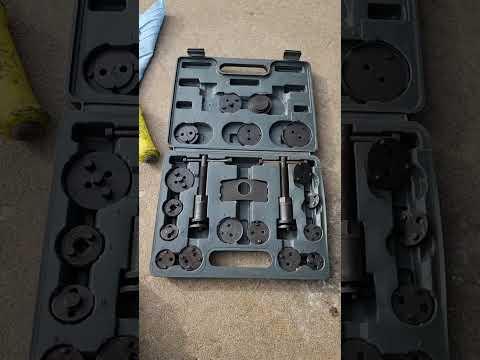
- Caliper piston compression tool (specialty)
- Caliper hanger hook
- Flathead screwdriver
- Wire brush
- Brake cleaner spray
- C-clamp (6")
- Bungee cord
- Safety glasses
- Nitrile gloves
- Dust mask
🔩 Required Parts
HowToo sells all the parts you need for this repair:
- Rear brake pad set - Qty: 1
- Rear brake rotors - Replace in pairs - Qty: 2
- Rear brake hardware kit (abutment clips) - Qty: 1
- Brake caliper slide pin boots (if torn) - Qty: 1
- High-temp brake lubricant - Qty: 1
- Threadlocker (medium strength) - Qty: 1
- Brake fluid (DOT 3) - Qty: 1 quart
📋 Before You Begin
- Park on level ground, shift to P, and chock the front wheels with wheel chocks.
- Loosen rear lug nuts 1/2 turn using a 21mm socket and breaker bar before lifting.
- Open the hood and remove the brake fluid reservoir cap (leave it sitting loosely). This helps the caliper piston push back easier.
- EPB note: If your Explorer has an EPB switch (button, not a foot pedal), use the EPB service mode steps below before compressing pistons.
🔨 Step-by-Step Instructions
Follow these steps in order:
Step 1: Lift and secure the rear
- Use a floor jack to lift the rear at the approved rear jacking point.
- Place jack stands under the rear support points and gently lower the vehicle onto them.
- Give the vehicle a firm shake to confirm it’s stable.
Step 2: Remove the rear wheels
- Remove lug nuts using a 21mm socket and 1/2" drive ratchet.
- Remove both rear wheels and set them aside.
Step 3: Put the Electronic Parking Brake (EPB) in service mode (if equipped)
- EPB service mode retracts the parking brake motor.
- If you have an EPB switch: follow the dash sequence in your owner display for brake service mode, or retract using a scan tool with EPB service function (specialty). If you can’t access service mode, do not force the piston.
- If you have a foot-operated parking brake pedal: you can skip this step (no EPB motor).
Step 4: Remove the caliper (outer portion)
- Turn the steering slightly if needed for access (rear access is usually straight-on).
- Remove the two caliper slide pin bolts using the correct socket set (metric) and 3/8" drive ratchet.
- Lift the caliper off the pads and support it with a caliper hanger hook (do not stretch the hose).
Step 5: Remove the old pads and hardware
- Pull the inner and outer pads out by hand.
- Remove the stainless abutment clips (hardware) using a flathead screwdriver.
- Clean the pad bracket “shelves” (where clips sit) using a wire brush and brake cleaner spray.
Step 6: Remove the caliper bracket
- Remove the two caliper bracket bolts using a breaker bar (1/2" drive) and appropriate socket set (metric).
- Set the bracket aside.
- When reinstalling later: apply threadlocker (medium strength) and Torque to 115 Nm (85 ft-lbs).
Step 7: Remove the old rotor
- If the rotor is stuck, spray the hub area with brake cleaner spray and tap the rotor hat evenly (front face) using controlled force with the side of a tool handle.
- Remove the rotor.
- Clean the wheel hub face with a wire brush so the new rotor sits flat.
Step 8: Install the new rotor
- Clean both sides of the new rotor with brake cleaner spray to remove protective oil.
- Slide the rotor onto the hub.
- Tip: Install one lug nut hand-tight to hold it.
Step 9: Reinstall the caliper bracket and hardware clips
- Reinstall the bracket using the socket set (metric) and 1/2" drive ratchet.
- Torque to 115 Nm (85 ft-lbs) using a torque wrench.
- Install new abutment clips from the hardware kit by hand (use a flathead screwdriver if needed to seat them fully).
- Apply a thin film of high-temp brake lubricant where pads contact the clips (metal-to-metal contact points only).
Step 10: Compress the caliper piston
- The piston is the round “push” part inside the caliper.
- Place an old pad against the piston face.
- Use a caliper piston compression tool (specialty) (or C-clamp (6") if applicable) to slowly compress the piston until it’s fully seated.
- Watch the brake fluid reservoir level as you compress; remove excess fluid if it nears the top.
- If the piston will not compress and you have EPB: stop and confirm EPB service mode was completed.
Step 11: Install the new brake pads
- Install the inner and outer pads into the bracket.
- Apply a small amount of high-temp brake lubricant to the pad backing plate contact points (where the caliper touches), not on the pad friction material.
Step 12: Reinstall the caliper
- Lower the caliper over the new pads.
- Install the caliper slide pin bolts using a 3/8" drive ratchet and correct socket set (metric).
- Torque to 35 Nm (26 ft-lbs) using a torque wrench.
- Repeat Steps 4–12 on the other rear wheel.
Step 13: Reinstall wheels and torque lug nuts
- Install wheels and hand-thread lug nuts.
- Lower the vehicle using the floor jack, remove jack stands, then fully lower.
- Tighten lug nuts in a star pattern using a torque wrench: Torque to 135 Nm (100 ft-lbs).
Step 14: Restore brake pedal and check fluid
- Pump the brake pedal slowly 10–15 times until it feels firm (this seats the pads against the rotors).
- Check brake fluid level and top off with DOT 3 if needed.
- Reinstall the reservoir cap securely.
✅ After Repair
- Start the engine and confirm the brake pedal remains firm.
- If equipped with EPB: apply and release the parking brake several times to confirm normal operation.
- Road test at low speed first; confirm no pulling, grinding, or warning lights.
- Pad bed-in: Make 6–10 moderate stops from ~30 mph to 5 mph, allowing short cool-down between stops. Avoid hard braking for the first 200 miles.
- Recheck lug nut torque with a torque wrench after 25–50 miles: Torque to 135 Nm (100 ft-lbs).
💰 DIY vs Shop Cost
Shop Cost: $450-$850 (parts + labor)
DIY Cost: $160-$380 (parts only)
You Save: $290-$470 by doing it yourself!
Shop labor rates vary but typically run $100-$150/hour. This repair takes a shop approximately 2-3 hours.
🎯 Ready to get started?
HowToo makes it easy: same-day/2-day shipping on every part, plus all the tools and specialty tools you need! Check out the parts and tools sections below to add everything to your cart.