











How to Replace Windshield Wiper Blades on a 2020 Tesla Model S
Step-by-step wiper service mode guide with blade sizes, tools, and safety tips
How to Replace Windshield Wiper Blades on a 2020 Tesla Model S
Step-by-step wiper service mode guide with blade sizes, tools, and safety tips


🔧 Model S - Windshield Wiper Blade Replacement
This repair replaces the windshield wiper blades on your Model S so the windshield clears properly without streaking, skipping, or chattering. Tesla uses a wiper service position so the arms can be safely lifted away from the glass.
Assumption: “wsw” means windshield wipers.
Difficulty Level: Beginner | Estimated Time: 10-20 minutes
⚠️ Safety & Precautions
- ⚠️ Do not let a bare metal wiper arm snap back onto the windshield. It can crack the glass.
- ⚠️ Use the touchscreen wiper service mode before lifting the arms.
- ⚠️ Turn off the wipers before starting. Never work on the blades while they can move automatically.
- ⚠️ Battery disconnect is not required for this repair.
🔧 Required Tools
You'll need the following tools for this repair:
- Safety glasses
- Microfiber towel
- Small flat plastic trim tool
🔩 Required Parts
HowToo sells all the parts you need for this repair:
- Front wiper blades - Driver: 26", Passenger: 20" - Qty: 2
📋 Before You Begin
- Park your Model S on level ground.
- Put the vehicle in Park.
- Make sure the windshield is clean so dirt does not scratch the glass.
- Open the touchscreen menu: Controls > Service > Wiper Service Mode.
- A trim tool is a small plastic pry tool used to release clips without scratching parts.
🔨 Step-by-Step Instructions
Follow these steps in order:
Step 1: Turn On Wiper Service Mode
- Use the center touchscreen and go to Controls > Service > Wiper Service Mode.
- The wiper arms will move to a service position on the windshield.
- Wait until the wipers stop moving completely before touching them.
Step 2: Protect the Windshield
- Use a microfiber towel and place it on the windshield under the wiper arm area.
- This protects the glass if the arm slips from your hand.
- Hold the arm the whole time.
Step 3: Lift the Driver Wiper Arm
- Use your hand to gently lift the driver-side wiper arm away from the windshield.
- Do not pull it higher than it naturally wants to go.
- Keep one hand on the metal arm while working.
Step 4: Remove the Driver Wiper Blade
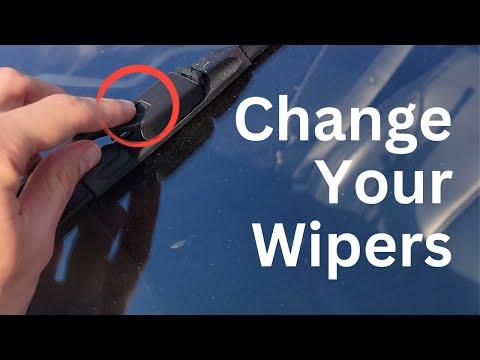
- Use your fingers to press the release tab on the wiper blade adapter.
- If the tab is tight, use a small flat plastic trim tool gently to help press the release tab.
- Slide the wiper blade downward and away from the hooked end of the wiper arm.
- Remove the blade from the arm.
- No torque spec applies because this blade clips on and does not use bolts.
Step 5: Install the New Driver Wiper Blade
- Use your hands to line up the new 26" driver wiper blade with the wiper arm hook.
- Slide the blade into the hook until it clicks into place.
- Gently pull on the blade by hand to confirm it is locked.
- A click means it is seated.
Step 6: Lower the Driver Wiper Arm
- Use your hand to slowly lower the wiper arm back onto the windshield.
- Do not drop it.
- Make sure the rubber blade sits flat against the glass.
Step 7: Replace the Passenger Wiper Blade
- Use the same process on the passenger-side wiper arm.
- Lift the arm by hand while keeping control of it.
- Use your fingers or a small flat plastic trim tool to press the release tab.
- Slide off the old blade.
- Install the new 20" passenger wiper blade until it clicks.
- Gently pull on the blade by hand to confirm it is locked.
- Slowly lower the arm back onto the windshield.
Step 8: Turn Off Wiper Service Mode
- Use the center touchscreen and return to Controls > Service > Wiper Service Mode.
- Turn Wiper Service Mode off.
- The wipers will return to their normal parked position.
✅ After Repair
- Spray windshield washer fluid and run the wipers at low speed.
- Check that both blades wipe smoothly with no streaking, skipping, or noise.
- If a blade chatters, wipe the rubber edge with a damp microfiber towel.
- Confirm the blades are fully clipped in before driving.
💰 DIY vs Shop Cost
Shop Cost: $80-$160 parts + labor
DIY Cost: $25-$60 parts only
You Save: $55-$100 by doing it yourself!
Shop labor rates vary but typically run $100-$150/hour. This repair takes a shop approximately 0.2-0.4 hours.
🎯 Ready to get started?
HowToo makes it easy: same-day/2-day shipping on every part, plus all the tools and specialty tools you need! Check out the parts and tools sections below to add everything to your cart.