














How to Replace the MAP or IAT “MAF” Sensor on a 2014-2015 Honda Civic 1.8L
Step-by-step instructions with tools, parts list, sensor locations, torque specs, and code-clearing tips
How to Replace the MAP or IAT “MAF” Sensor on a 2014-2015 Honda Civic 1.8L
Step-by-step instructions with tools, parts list, sensor locations, torque specs, and code-clearing tips for 2014, 2015


🔧 Civic - Intake Air Metering Sensor Replacement (MAP/IAT)
Assumption: Your Civic with the 1.8L engine typically uses a MAP sensor (manifold absolute pressure) and an IAT sensor (intake air temperature), not a traditional MAF sensor. The “MAF” people refer to on this engine is usually one of these sensors.
You’ll replace the sensor by unplugging the connector, removing the fastener (MAP) or twisting the sensor out (IAT), then reinstalling and clearing the check-engine light if needed.
Difficulty Level: Beginner | Estimated Time: 0.3-0.8 hours
⚠️ Safety & Precautions
- ⚠️ Work on a cool engine; hot parts can burn you.
- ⚠️ Keep dirt out of the intake; cover openings with a clean rag if needed.
- ⚠️ If you disconnect the battery, you may reset radio/clock settings.
- ⚠️ Do not spray “MAF cleaner” into sensors on this engine unless you are sure it’s a true MAF; MAP/IAT sensors are usually replaced, not cleaned.
🔧 Required Tools
You'll need the following tools for this repair:
- 10mm socket
- 1/4" ratchet
- 3" socket extension (1/4")
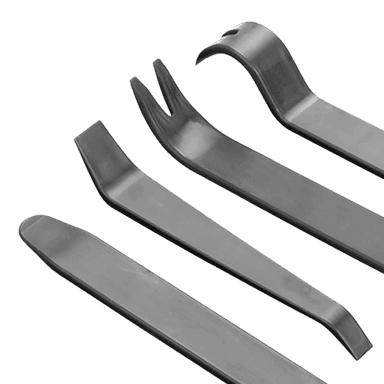
- Flat trim tool
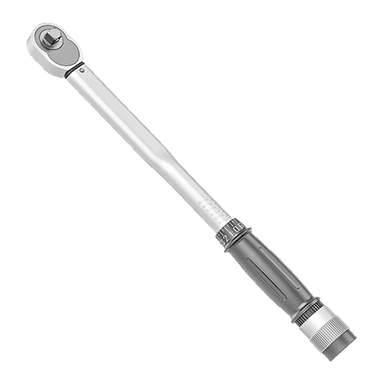
- Torque wrench (inch-pound or low-range Nm)
- OBD2 scan tool (specialty)
- Nitrile gloves
- Safety glasses
- Shop rags
🔩 Required Parts
HowToo sells all the parts you need for this repair:
- MAP sensor - Qty: 1
- IAT sensor - Qty: 1
- Intake sensor O-ring seal - Qty: 1
📋 Before You Begin
- Park on level ground, shift to Park, and set the parking brake.
- Open the hood and remove any loose items around the intake area.
- If you choose to disconnect power: use a 10mm socket to remove the negative battery terminal and isolate it so it can’t spring back.
- Have your OBD2 scan tool ready; it plugs into the diagnostic port under the driver’s side dash.
🔨 Step-by-Step Instructions
Follow these steps in order:
Step 1: Locate the correct sensor
- Find the intake tube from the air box to the engine.
- The IAT sensor is commonly mounted in/near the intake duct and has a small 2-wire connector.
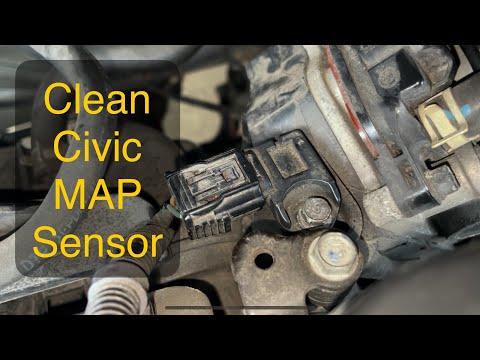
- The MAP sensor is mounted on the intake manifold (plastic/metal housing on the engine) and has an electrical connector plus a single small retaining bolt.
- If it’s on the manifold, it’s usually MAP.
Step 2: Unplug the electrical connector
- Use a flat trim tool to gently help lift the connector tab if it’s tight.
- Pull the connector straight off—do not pull on the wires.
- Wiggle gently; don’t force the lock tab.
Step 3A: Replace the MAP sensor (intake manifold-mounted)
- Use a 10mm socket, 1/4" ratchet, and 3" extension to remove the MAP sensor retaining bolt.
- Pull the MAP sensor straight out of the manifold.
- Inspect the old sensor’s seal; remove any stuck O-ring material with a shop rag (do not scrape the manifold opening).
- Install the new MAP sensor straight in, making sure it seats evenly.
- Reinstall the bolt and Torque to 10 Nm (7 ft-lbs).
Step 3B: Replace the IAT sensor (intake duct-mounted)
- Grasp the sensor body and rotate it to unlock (typically about a quarter-turn), then pull it straight out.
- If it’s secured with a bolt instead: use a 10mm socket and 1/4" ratchet to remove the bolt, then pull the sensor out.
- Install a new O-ring seal if the new sensor doesn’t come with one.
- Push the sensor in fully and twist to lock (or reinstall the bolt if equipped).
- If bolted: Torque to 10 Nm (7 ft-lbs).
Step 4: Reconnect the connector and recheck your work
- Push the connector on until it clicks.
- Lightly tug on the connector to confirm it’s locked.
- Make sure no tools or rags are left in the engine bay.
Step 5: Clear codes (if the check-engine light was on)
- Plug in your OBD2 scan tool (specialty) and follow its prompts to clear DTCs (trouble codes).
- If you disconnected the battery, reconnect it using a 10mm socket and tighten snugly.
✅ After Repair
- Start the engine and let it idle for 1–2 minutes; it should run smoothly.
- Check that the check-engine light stays off.
- Take a short test drive with gentle acceleration; verify no hesitation or stalling.
- If the light returns, use the OBD2 scan tool to read the code—there may be an intake air leak or wiring issue.
💰 DIY vs Shop Cost
Shop Cost: $180-$350 (parts + labor)
DIY Cost: $30-$140 (parts only)
You Save: $140-$210 by doing it yourself!
Shop labor rates vary but typically run $100-$150/hour. This repair takes a shop approximately 0.5-1.0 hours.
🎯 Ready to get started?
HowToo makes it easy: same-day/2-day shipping on every part, plus all the tools and specialty tools you need! Check out the parts and tools sections below to add everything to your cart.
Guide for Manifold Absolute Pressure Sensor replace for these Honda vehicles
| Year Make Model | Sub Model | Engine | Body Style |
|---|---|---|---|
| 2015 Honda Civic | - | - | - |
| 2014 Honda Civic | - | - | - |