













How to Replace the Main Battery on a 2022 Jeep Grand Cherokee WK
Step-by-step DIY interior battery change under the passenger seat with tools, parts list, safety tips, and torque specs for 2022
How to Replace the Main Battery on a 2022 Jeep Grand Cherokee WK
Step-by-step DIY interior battery change under the passenger seat with tools, parts list, safety tips, and torque specs for 2022


🔧 Grand Cherokee WK - Main Battery Replacement
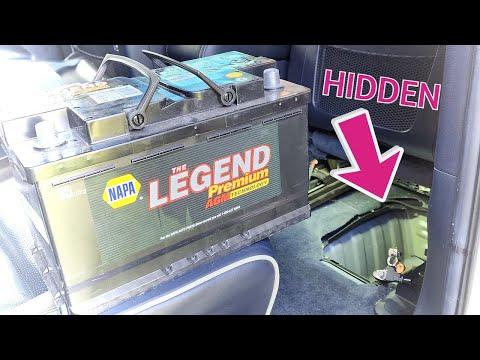
The main battery on your Grand Cherokee WK sits under the front passenger seat, not in the engine bay. You’ll slide the seat, remove a plastic cover, disconnect the old battery, and install the new one carefully.
Difficulty Level: Beginner | Estimated Time: 1–1.5 hours
⚠️ Safety & Precautions
- ⚠️ Always work with the ignition OFF and the key fob away from the vehicle.
- ⚠️ Disconnect the negative battery cable first and reconnect it last to reduce the risk of short circuits.
- ⚠️ Batteries are heavy and contain acid; wear gloves and safety glasses and lift with your legs, not your back.
- ⚠️ Keep metal tools away from both battery terminals at the same time to avoid sparks.
- ⚠️ Your Jeep may have an auxiliary (small) battery for the auto start/stop system. Here we’re replacing the main starting battery only.
- ⚠️ You do not need to disconnect the 12V system at the jump posts under the hood; all work is done at the interior battery.
🔧 Required Tools
You'll need the following tools for this repair:
- 🧰 10mm socket
- 🧰 13mm socket
- 🧰 1/4" drive ratchet
- 🧰 3/8" drive ratchet
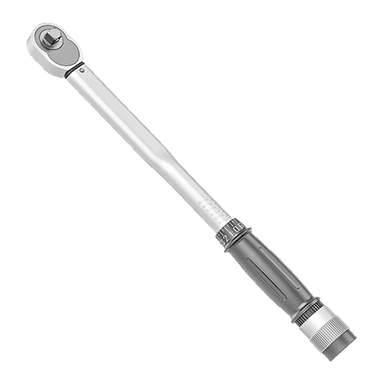
- 🧰 3/8" drive torque wrench (5–30 ft-lbs range)
- 🧰 150mm (6") socket extension
- 🧰 Plastic trim removal tool (a non-metal pry tool for panels)
- 🧰 Flathead screwdriver (small)
- 🧰 Battery terminal brush or small wire brush (for cleaning terminals)
- 🧰 Shop towels or rags
- 🧰 Work gloves
- 🧰 Safety glasses
- 🧰 OBD2 memory saver (specialty, optional) (keeps settings while battery is disconnected)
🔩 Required Parts
HowToo sells all the parts you need for this repair:
- 🔩 Main AGM battery (Group H7/94R, correct for your Jeep) - Qty: 1
- 🔩 Battery vent tube elbow or grommet - Qty: 1 (only if damaged)
- 🔩 Battery terminal protection spray or grease - Qty: 1
- 🔩 Battery hold-down bolt and clamp - Qty: 1 set (optional, if existing is rusty or damaged)
- 🔩 Interior trim clips - Qty: 2–4 (optional, if any clips break during removal)
📋 Before You Begin
- 🧭 Park on level ground, shift to Park, and set the parking brake.
- 🔌 Make sure all lights, radio, blower, and accessories are turned OFF.
- 📱 If you have an OBD2 memory saver, plug it into the OBD2 port under the dash and connect it to a small backup power source before disconnecting the battery.
- 🛋 Move the front passenger seat fully rearward and raise it to its highest position for better access to the front floor area.
🔨 Step-by-Step Instructions
Follow these steps in order:
Step 1: Access the battery under the passenger seat
- 🧰 Use the seat controls to move the passenger seat all the way back and up to its highest position.
- 🧰 Look at the front edge of the passenger seat area, on the floor; you’ll see a plastic duct/cover in front of the seat base.
- 🧰 Use the plastic trim removal tool to gently pry up the front floor air duct and any plastic cover over the battery compartment. Work slowly to avoid breaking clips.
- 🧰 Set the plastic duct and cover aside in a safe place.
Step 2: Identify the battery connections
- 🧰 You’ll see the top of the battery, with a plastic top shield and two main cables: negative (black, “–”) and positive (red, “+” under a cover).
- 🧰 Note the vent tube on one side of the battery—a small plastic tube that lets gas escape safely.
- Take a quick photo for reference before disconnecting.
Step 3: Remove the battery top cover
- 🧰 Use the plastic trim removal tool or small flathead screwdriver to carefully unclip and lift off the plastic battery top cover (if equipped).
- 🧰 Set it aside where it won’t get stepped on.
Step 4: Disconnect the negative (black) cable
- 🧰 Use a 10mm socket and 1/4" drive ratchet to loosen the nut on the negative (–) terminal clamp.
- 🧰 Once loose, wiggle the clamp and lift it off the battery post. Do not pry hard with metal tools on the post itself.
- 🧰 Wrap the negative clamp in a rag and tuck it to the side so it cannot spring back onto the terminal.
- Torque on reassembly: Tighten terminal clamp to 5–6 Nm (44–53 in-lbs)—snug, not crushing.
Step 5: Disconnect the positive (red) cable
- 🧰 Flip open the red plastic cover over the positive terminal.
- 🧰 Use the 10mm socket and 1/4" drive ratchet to loosen the nut on the positive (+) terminal clamp.
- 🧰 Lift the positive clamp straight up off the post and move it aside, making sure it does not touch any metal on the body or the negative cable.
- Torque on reassembly: Tighten positive terminal clamp to 5–6 Nm (44–53 in-lbs).
Step 6: Disconnect the battery vent tube
- 🧰 On the side of the battery, gently pull the vent tube out of its fitting using your fingers or the plastic trim tool if needed.
- 🧰 Do not yank the tube; you don’t want to pull it out from the body side.
Step 7: Remove the battery hold-down clamp
- 🧰 Look near the bottom/front of the battery for a small metal hold-down clamp with a bolt going into the floor or tray.
- 🧰 Use a 13mm socket, 150mm (6") extension, and 3/8" drive ratchet to remove the hold-down bolt and clamp.
- 🧰 Set the bolt and clamp aside in a safe spot; you’ll reuse them.
- Torque on reassembly: Tighten hold-down bolt to 8–10 Nm (71–89 in-lbs).
Step 8: Remove the old battery
- 🧰 Grip the battery by the built-in handles (if present). If there are no handles, hold the sides firmly.
- 🧰 Carefully lift the battery straight up and out of the tray. It is heavy—around 25–30 kg.
- 🧰 Set the old battery upright on the ground. Keep it away from children and pets.
- Ask someone to help lift if it feels too heavy.
Step 9: Clean the battery tray and terminals
- 🧰 Use shop towels to wipe any dirt or moisture from the battery tray/area.
- 🧰 Use the battery terminal brush or small wire brush to gently clean the inside of both cable clamps if they look dirty or corroded.
- 🧰 Do not let debris fall into any electrical connectors.
Step 10: Install the new battery
- 🧰 Carefully lower the new battery into the tray in the same orientation as the old one (terminals in the same position).
- 🧰 Make sure it sits flat and fully down in the tray; no rocking.
- 🧰 Reinstall the metal hold-down clamp and start the bolt by hand.
- 🧰 Use the 13mm socket, extension, and 3/8" drive ratchet to snug the bolt, then use the torque wrench to tighten to 8–10 Nm (71–89 in-lbs).
Step 11: Reconnect the vent tube
- 🧰 Push the vent tube into the vent port on the side of the new battery until it is fully seated.
- 🧰 Make sure it is not kinked or pinched.
Step 12: Reconnect the positive (red) cable
- 🧰 Place the positive (+) terminal clamp fully down onto the positive battery post.
- 🧰 Use the 10mm socket and 1/4" drive ratchet to tighten the nut until the clamp does not move when you twist it by hand.
- 🧰 Use the torque wrench to tighten to 5–6 Nm (44–53 in-lbs).
- 🧰 Close the red plastic protective cover over the positive terminal.
Step 13: Reconnect the negative (black) cable
- 🧰 Place the negative (–) terminal clamp fully down onto the negative battery post.
- 🧰 Use the 10mm socket to tighten the clamp nut until the clamp is secure and does not rotate.
- 🧰 Use the torque wrench to tighten to 5–6 Nm (44–53 in-lbs).
- 🧰 Lightly spray battery terminal protection spray or apply a small amount of terminal grease on the clamps if you have it.
Step 14: Reinstall the battery cover and floor duct
- 🧰 Refit the plastic battery top cover and press it down until all clips snap into place.
- 🧰 Reinstall the front floor air duct and trim cover. Line up the tabs and push down until the clips click.
- 🧰 Move the passenger seat back to your preferred position.
Step 15: Electrical checks and basic resets
- 🧰 Sit in the driver’s seat and press the start/stop button (with foot on brake) to start the engine. It may crank a little longer the first time; this is normal.
- 🧰 Check that headlights, interior lights, radio, blower fan, and windows all operate.
- 🧰 If the one-touch up/down on a window doesn’t work, hold the switch to fully close the window, keep it held for 3–5 seconds, then fully open and hold again for 3–5 seconds. Repeat for each window that needs relearning.
- 🧰 If the power liftgate behaves oddly, open it fully, then close it using the button to help it relearn its positions.
✅ After Repair
- ✅ Start the engine and let it idle for a few minutes while the charging system stabilizes.
- ✅ Check the instrument cluster for any warning lights (battery, ABS, traction). Many will clear on their own after a short drive.
- ✅ Take a short test drive (10–15 minutes) with a mix of city and highway so the charging system can relearn.
- ✅ If you have access to a scan tool, you can perform a battery replacement / battery reset function for the most accurate charging. Your Jeep will still operate without this, but it’s ideal.
- ✅ Re-enter radio station presets, navigation home address, and any seat/mirror memory positions if they were lost.
💰 DIY vs Shop Cost
Shop Cost: $350–$450 (parts + labor)
DIY Cost: $180–$260 (parts only, depending on battery brand)
You Save: $170–$190 by doing it yourself!
Shop labor rates often run $100–$150/hour. This repair takes a shop about 0.7–1.0 hours.
🎯 Ready to get started?
HowToo makes it easy: same-day/2-day shipping on every part, plus all the tools and specialty tools you need! Check out the parts and tools sections above to add everything to your cart.