














How to Replace the MAF Sensor on a 2016 Volkswagen Golf
Step-by-step instructions with tools, parts, torque specs, and safety tips
How to Replace the MAF Sensor on a 2016 Volkswagen Golf
Step-by-step instructions with tools, parts, torque specs, and safety tips


🔧 Golf - Mass Air Flow Sensor Replacement
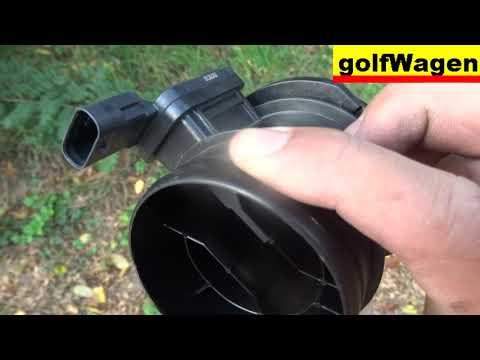
The MAF sensor on your Golf is mounted in the air intake stream and can be replaced quickly once the air intake tube is opened up. A failing MAF can cause rough idle, poor acceleration, or fuel trim issues, so replacing it is a good first step if you have airflow-related trouble codes.
Difficulty Level: Beginner | Estimated Time: 0.5-1 hour
⚠️ Safety & Precautions
- Work with the engine off and fully cooled down.
- Disconnect the negative battery cable before unplugging the MAF sensor.
- Do not touch the sensor wire or sensing element inside the MAF.
- Keep dirt, leaves, and tools out of the intake tube.
- If a check engine light returns after replacement, the intake system may have another fault.
🔧 Required Tools
You'll need the following tools for this repair:
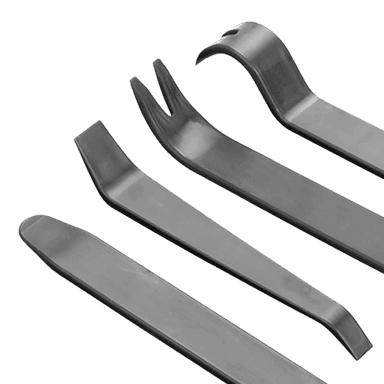
- Flat-blade trim tool
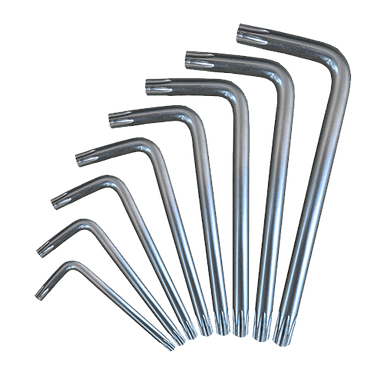
- Torx T20 screwdriver
- 7mm socket
- Ratchet
- Extension bar
- 10mm wrench
- Safety glasses
- Nitrile gloves
🔩 Required Parts
HowToo sells all the parts you need for this repair:
- Mass air flow sensor - Qty: 1
- MAF sensor O-ring or seal - Qty: 1
📋 Before You Begin
- Park on a flat surface and set the parking brake.
- Turn the ignition off and remove the key or fob from the vehicle.
- Let the engine cool fully before opening the intake system.
- Disconnect the negative battery cable with a 10mm wrench.
🔨 Step-by-Step Instructions
Follow these steps in order:
Step 1: Open the intake area
- Use a flat-blade trim tool to release any plastic covers or clips blocking access to the air box and intake tube.
- Set the parts aside in order so they go back in the same place.
Step 2: Disconnect the MAF electrical connector
- Press the connector lock and unplug the MAF sensor harness by hand.
- If the connector is tight, gently help the tab with a flat-blade trim tool.
- Do not pull on the wires.
Step 3: Remove the intake tube or sensor housing fasteners
- Use a Torx T20 screwdriver or 7mm socket with a ratchet and extension bar to loosen the intake clamp or sensor housing screws, depending on the style installed on your Golf.
- Remove the fasteners and keep them organized.
- Loosen the clamp just enough to slide the tube.
Step 4: Remove the old MAF sensor
- Pull the sensor straight out of the housing or air intake tube.
- If it has a small seal, remove the old MAF sensor O-ring carefully by hand.
- Inspect the intake bore for dirt or damage.
Step 5: Install the new MAF sensor
- Install the new MAF sensor with the airflow arrow or marking facing the correct direction of airflow.
- Make sure the seal is seated fully and evenly.
- Reinstall the sensor housing screws or clamp fastener.
- Torque to 3-5 Nm (27-44 in-lbs) for small sensor screws, if applicable.
Step 6: Reconnect the intake parts
- Slide the intake tube back into place if it was moved.
- Tighten the clamp with a 7mm socket or Torx T20 screwdriver.
- Torque to 4-6 Nm (35-53 in-lbs) for typical intake clamps, if applicable.
- Reconnect the MAF electrical connector until it clicks.
Step 7: Restore battery power
- Reconnect the negative battery cable with a 10mm wrench.
- Make sure the terminal is snug and clean.
✅ After Repair
- Start the engine and let it idle for a minute.
- Check that the check engine light is off.
- Listen for air leaks or hissing around the intake tube.
- Take a short test drive and confirm throttle response feels normal.
- If you have a scan tool, clear stored fault codes and recheck for returning codes.
💰 DIY vs Shop Cost
Shop Cost: $180-$350 (parts + labor)
DIY Cost: $60-$180 (parts only)
You Save: $120-$170 by doing it yourself!
Shop labor rates vary but typically run $100-$150/hour. This repair takes a shop approximately 0.5-1 hour.
🎯 Ready to get started?
HowToo makes it easy: same-day/2-day shipping on every part, plus all the tools and specialty tools you need! Check out the parts and tools sections below to add everything to your cart.