














How to Replace the MAF Sensor on a 2015 Chevy Silverado 1500 5.3L
Step-by-step DIY MAF sensor replacement with tools, safety tips, torque specs, and post-install checks for 2014, 2015, 2016, 2017, 2018
How to Replace the MAF Sensor on a 2015 Chevy Silverado 1500 5.3L
Step-by-step DIY MAF sensor replacement with tools, safety tips, torque specs, and post-install checks for 2014, 2015, 2016, 2017, 2018


Silverado 1500 - Mass Air Flow (MAF) Sensor Replacement 🚚
This guide is for your 2015 Silverado 1500 LT 5.3L (K2XX truck). The MAF is easy to reach and a good first DIY job 👍.
Safety First ⚠️
- 🧯 Engine off, key out before you start.
- 🔋 For extra safety, disconnect the negative battery cable (10 mm) so you don’t short anything or trigger codes while unplugging sensors.
- 🌬️ Work on a cool engine so you don’t burn your hands.
What the MAF Sensor Does 📏
The MAF sensor measures how much air goes into the engine so the computer can adjust fuel correctly. A bad MAF can cause rough idle, poor power, and bad fuel economy.
Location on Your Silverado 📍
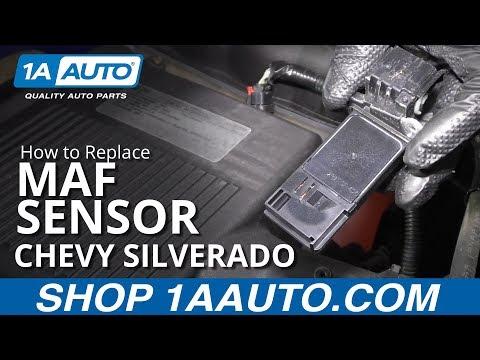
- 🧩 The MAF is mounted in the air intake tube between the air filter box and the throttle body.
- Look for a small black sensor with a 5‑wire electrical connector and two screws holding it into the plastic tube.
Tools & Parts You’ll Need 🧰
- 🔧 Ratchet (small 1/4" drive is fine)
- 🔧 Socket set:
- 10 mm socket (for battery terminal)
- 🪛 Torx driver (star-shaped bit):
- Most 2015 Silverados use a T20 Torx for the MAF screws. If yours looks different, it may be T15 or T25.
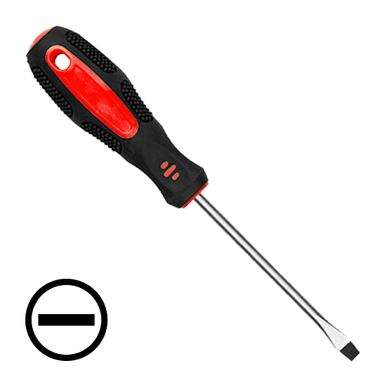
- 🪛 Small flat-blade screwdriver (to gently lift connector lock if needed)
- 🧤 Nitrile or mechanic gloves (keeps oils off the sensor)
- 🧴 Optional: MAF cleaner spray (special electrical-safe cleaner, not brake cleaner or carb cleaner)
- 📦 New MAF sensor for 2015 Silverado 1500 5.3L (match the connector and mounting style)
Prep Steps 🔌
- Open the hood and secure it with the prop rod.
- Disconnect the negative battery cable:
- Use a 10 mm socket to loosen the nut on the negative (black) terminal.
- Lift the cable off and tuck it aside so it can’t spring back.
Removing the Old MAF Sensor 🛠️
- Locate the MAF on the intake tube:
- Follow the big black tube from the air filter box toward the engine.
- The MAF is near the air box, sticking out of the tube with a connector on top.
- Unplug the electrical connector:
- Find the locking tab on the connector.
- Press the tab down with your thumb; if it’s stiff, gently help it with a small flat screwdriver.
- Pull the connector straight off. Don’t pull on the wires.
- Remove the MAF mounting screws:
- Use your T20 Torx driver (or the size that fits snugly).
- Remove the two screws holding the sensor to the intake tube.
- Set the screws aside somewhere clean; you’ll reuse them unless the new sensor came with new ones.
- Remove the MAF sensor from the tube:
- Gently pull the sensor straight up/out of the tube.
- If it feels stuck, wiggle it slightly—do not twist hard or pry with force, you don’t want to crack the plastic tube.
Optional: Cleaning the MAF Bore 🧼
You’re not cleaning the old sensor (since you’re replacing it), but you can:
- 🧴 Wipe the sealing surface on the intake tube with a clean, dry cloth so the new sensor seals well.
- Do not spray cleaner into the intake tube with the new sensor installed.
Installing the New MAF Sensor 🔄
- Compare old and new sensors:
- Check that the connector shape, mounting holes, and O‑ring match.
- Make sure the arrow or airflow marking on the new sensor points the same direction as the old one (usually toward the engine).
- Install the new sensor into the intake tube:
- Carefully insert the sensor into the opening.
- Make sure the O‑ring seats evenly and is not pinched.
- Reinstall the screws:
- Start both screws by hand to avoid cross-threading.
- Tighten with the Torx driver until snug.
- Do not overtighten—these go into plastic. Just firm, not “gorilla tight.”
- Reconnect the electrical connector:
- Push the connector straight onto the sensor until it clicks.
- Gently tug to confirm it’s locked.
Reconnect Battery & Start-Up 🔁
- Reconnect the negative battery cable:
- Place the cable back on the negative terminal.
- Tighten the 10 mm nut until snug; don’t overtighten.
- Turn the key to ON (engine off) for about 10 seconds:
- This lets the engine computer see the new sensor.
- Start the engine:
- Let it idle for a few minutes.
- Idle may be slightly different at first; it should smooth out quickly.
Clearing Check Engine Light & Codes 💡
- 📟 If you have a basic OBD2 scanner:
- Plug it into the port under the dash (driver’s side).
- Turn key to ON, read and then clear codes.
- If you don’t clear them, the light may go off on its own after a few drive cycles if the problem is fixed.
Quick Test Drive Checklist 🚗
- ✅ Smooth idle in Park and in Drive
- ✅ No hesitation or stumbling when you accelerate
- ✅ No new warning lights on the dash
- ✅ Fuel smell or black smoke from exhaust should not be present
Torque Specs (Reference) 🔩
- 🔧 Battery terminal nut (10 mm): about 5–7 N·m (44–62 in‑lb) – just snug.
- 🔧 MAF screws: light hand-tight with Torx driver; GM does not specify a high torque here because it’s plastic.
Tips & Common Mistakes 💡
- 🧠 Do not touch the tiny sensing elements on the new MAF with your fingers or tools; oils can damage it.
- 🧩 Make sure the MAF is installed in the correct direction (arrow toward engine).
- 🧵 If a screw feels like it’s stripping, stop and back it out; start it again gently.
If you tell me whether you’re getting any specific trouble codes (like P0101, P0102, etc.), I can help you confirm that replacing the MAF was the right move and what else to check if needed.
HowToo makes it easy: below this answer you’ll see the correct MAF sensor options and any tools you might need. You can add them to your cart right from the parts section for fast shipping. 🚀