









![[HOW TO] Replace the battery on a 2015-2022 Chevy Colorado/GMC Canyon (Gas & Diesel)](/_next/image?url=https%3A%2F%2Fimg.youtube.com%2Fvi%2FEuUAoJwFq9o%2Fhqdefault.jpg&w=3840&q=75)





How to Replace the Battery on a 2015-2025 Chevrolet Colorado Pickup (Engine: Inline 4 2.5L)
Step-by-step 2018 Chevy Colorado battery change guide with tools, safety tips, torque specs, and post-install reset steps
How to Replace the Battery on a 2015-2025 Chevrolet Colorado Pickup (Engine: Inline 4 2.5L)
Step-by-step 2018 Chevy Colorado battery change guide with tools, safety tips, torque specs, and post-install reset steps for 2015, 2016, 2017, 2018, 2019, 2020, 2021, 2022


Colorado - Battery Replacement 🔋
Below is a beginner-friendly guide to change the battery on your Colorado. Read everything once before starting.
Safety First ⚠️
- 🧤 Work safely: Engine off, key out, parking brake on, truck in gear, and headlights OFF.
- 🛑 No flames or sparks: Don’t smoke near the battery; it can release explosive gas.
- 🧯 Wear protection: Safety glasses and gloves. Battery acid can burn skin and eyes.
Tools & Parts You’ll Need 🧰
- 🔧 Tools:
- 10 mm socket and ratchet (for terminals and hold-down).
- 6" extension for the ratchet (helps reach the hold-down bolt).
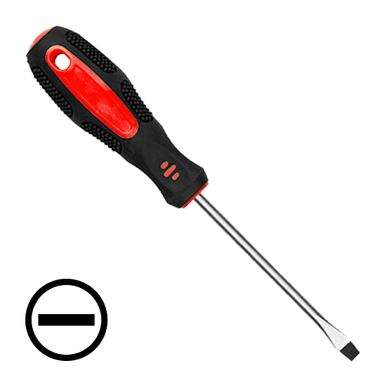
- Flat screwdriver (to help lift covers or clips if needed).
- Battery terminal brush or small wire brush (to clean terminals).
- Gloves and safety glasses.
- 🔋 New battery:
- Group size commonly used: H6 / 48 (verify against your old battery label for exact match).
- Match the polarity layout (positive and negative posts in same positions as old battery).
- Equal or higher CCA (cold cranking amps) than original.
- 🧴 Optional:
- Battery terminal protector spray or a light coat of grease (to reduce corrosion).
- Memory saver (small device that plugs into OBD or 12V socket to keep radio/clock settings). Not required, but nice to have.
Battery Location 🔎
- 📍 The battery is in the engine bay, front right (passenger side) near the fender, under a plastic cover on many trucks.
Step 1 – Prepare the Truck 🧱
- 🛑 Park on a flat surface, set the parking brake, and put the truck in 1st gear.
- 🔑 Turn the ignition OFF and remove the key.
- 🌡️ Let the engine cool if it was just running; you’ll be leaning over it.
- 💾 If you have a memory saver, plug it in now (OBD port under the dash or 12V socket) and follow its instructions.
Step 2 – Access the Battery 🧩
- 🧰 Open the hood and secure it with the prop rod.
- 🧊 If there is a plastic battery cover:
- Lift it straight up or release the small clips with your fingers or a flat screwdriver.
- 👀 Identify:
- Positive (+) terminal: Usually has a red cover or red cable.
- Negative (–) terminal: Usually black cable, often going to the body or engine.
Step 3 – Disconnect the Battery Terminals 🔌
Always remove negative first and install negative last. This reduces the chance of short circuits.
- ➖ Remove negative (–) cable:
- Use the 10 mm socket to loosen the clamp bolt on the negative terminal.
- Twist the clamp gently and lift it off the battery post.
- Move the cable aside so it cannot spring back onto the terminal (tuck it to the side).
- ➕ Remove positive (+) cable:
- Flip open any red plastic cover over the positive terminal.
- Use the 10 mm socket to loosen the clamp bolt.
- Lift the clamp off the post and move it aside.
Step 4 – Remove the Battery Hold-Down 🔩
- 🔎 Look at the base of the battery for a metal or plastic clamp holding it down, usually on the front or side.
- 🔧 Use your 10 mm socket + extension to remove the hold-down bolt.
- 📦 Lift the hold-down bracket out and set it aside.
Step 5 – Remove the Old Battery 🏋️
- ⚠️ Batteries are heavy (around 18–22 kg). Lift with your legs, not your back.
- 🤲 Grab the battery by the built-in handle (if it has one) or from the sides.
- ⬆️ Lift it straight up and out of the tray. Take your time and keep it level to avoid spilling any acid (sealed batteries usually don’t spill, but still be careful).
Step 6 – Clean the Area 🧼
- 🧽 Check the battery tray for dirt or corrosion (white/green powder). Wipe it out with a rag.
- 🧹 Use the terminal brush or wire brush to clean the inside of the cable clamps until shiny metal is visible.
- ⚠️ If there is heavy corrosion, avoid breathing the dust; wipe gently with a damp rag.
Step 7 – Install the New Battery 🆕
- 📐 Compare the new battery to the old one:
- Same size or very close.
- Same position of positive and negative posts.
- ⬇️ Place the new battery into the tray with the positive and negative posts in the same orientation as the old one.
- 📏 Make sure it sits flat and fully down in the tray.
- 🔩 Reinstall the hold-down bracket and bolt:
- Tighten the 10 mm bolt snugly. Typical torque is about 15–20 N·m (11–15 lb-ft) – firm, but don’t overdo it.
Step 8 – Reconnect the Terminals (Reverse Order) 🔁
Now we connect positive first, then negative.
- ➕ Connect positive (+) cable:
- Place the positive clamp fully down on the positive post.
- Tighten the 10 mm clamp bolt until the clamp does not move if you twist it by hand.
- Close the red cover if there is one.
- ➖ Connect negative (–) cable:
- Place the negative clamp on the negative post.
- Tighten the 10 mm clamp bolt until the clamp is snug and does not move.
- 🛡️ Optional: Lightly spray terminal protector or apply a thin coat of grease on the clamps to reduce corrosion.
Step 9 – Refit Covers and Check 🧪
- 🧊 Reinstall any plastic battery cover you removed earlier.
- 👂 Look and listen:
- Make sure no tools are left in the engine bay.
- Check that cables are not rubbing on sharp edges or moving parts.
- 🔑 Start the engine:
- Turn the key to start. It should crank strongly.
- If it clicks or is weak, one of the terminals may be loose.
Step 10 – Infotainment & Settings After Battery Change 📻
Your Colorado does not need battery “coding” or registration like some European cars, but you may need to reset a few things.
- 📻 Radio & clock:
- Set the time: Home > Settings > Time and Date on the touchscreen.
- Re-enter radio presets if they were lost.
- 🪟 Power windows auto-up/down: If auto function doesn’t work:
- Close the window fully using the switch and hold the switch up for about 2–3 seconds.
- Repeat for each window with auto function.
- ⚠️ Warning lights: If any warning lights stay on (battery, ABS, etc.), turn the truck off and back on once. If they remain, tell me which lights you see.
Disposal of Old Battery 🌍
- ♻️ Do not throw the old battery in the trash.
- 🏪 Take it to an auto parts store or recycling center; most will accept it for free and may even give a small credit.
Need Help While Doing It? 🤝
If you want, tell me:
- 🧩 Whether your battery has a plastic cover or extra cables on top.
- 🧷 If any bolt feels stuck or you’re unsure which is positive/negative.
I can then walk you through that exact step with more detail.
HowToo makes it easy: below this answer you’ll see compatible batteries, terminal brushes, and tools. You can add them to your cart right from the parts section for fast shipping! 🚚
Guide for Vehicle Battery replace for these Chevrolet vehicles
| Year Make Model | Sub Model | Engine | Body Style |
|---|---|---|---|
| 2025 Chevrolet Colorado | - | Inline 4 2.7L | - |
| 2024 Chevrolet Colorado | - | Inline 4 2.7L | - |
| 2023 Chevrolet Colorado | - | Inline 4 2.7L | - |
| 2022 Chevrolet Colorado | - | Inline 4 2.5L | - |
| 2022 Chevrolet Colorado | - | V6 3.6L | - |
| 2021 Chevrolet Colorado | - | Inline 4 2.5L | - |
| 2021 Chevrolet Colorado | - | V6 3.6L | - |
| 2020 Chevrolet Colorado | - | Inline 4 2.5L | - |
| 2020 Chevrolet Colorado | - | V6 3.6L | - |
| 2019 Chevrolet Colorado | - | Inline 4 2.5L | - |
| 2019 Chevrolet Colorado | - | V6 3.6L | - |
| 2018 Chevrolet Colorado | - | Inline 4 2.5L | - |
| 2018 Chevrolet Colorado | - | V6 3.6L | - |
| 2017 Chevrolet Colorado | - | Inline 4 2.5L | - |
| 2017 Chevrolet Colorado | - | V6 3.6L | - |
| 2016 Chevrolet Colorado | - | Inline 4 2.5L | - |
| 2016 Chevrolet Colorado | - | V6 3.6L | - |
| 2015 Chevrolet Colorado | - | Inline 4 2.5L | - |
| 2015 Chevrolet Colorado | - | V6 3.6L | - |