









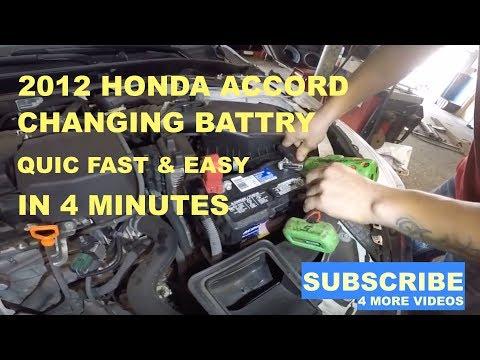





How to Replace the Battery on a 2003-2017 Honda Accord (Group 51R) (Engine: Inline 4 2.4L)
Step-by-step DIY instructions with tools, parts list, safety tips, and terminal torque specs
How to Replace the Battery on a 2003-2017 Honda Accord (Group 51R) (Engine: Inline 4 2.4L)
Step-by-step DIY instructions with tools, parts list, safety tips, and terminal torque specs for 2003, 2004, 2005, 2006, 2007, 2008, 2009, 2010, 2011, 2012, 2013, 2014, 2015, 2016, 2017


🔧 Accord - Battery Replacement
Replacing the battery on your Accord is a straightforward job: you’ll remove the hold-down bracket, disconnect the cables, swap the battery, then reconnect everything in the correct order. This restores reliable starting power and prevents low-voltage issues that can cause warning lights or rough idle.
Difficulty Level: Beginner | Estimated Time: 0.5-1.0 hours
⚠️ Safety & Precautions
- ⚠️ Work with the engine OFF and key removed; keep metal tools away from both battery posts at once.
- ⚠️ Disconnect negative (-) first and reconnect negative (-) last to reduce short-circuit risk.
- ⚠️ Batteries can vent explosive gas; avoid sparks/flames and wear eye protection.
- ⚠️ If your Accord has memory settings you want to keep, use a memory saver before disconnecting.
🔧 Required Tools
You'll need the following tools for this repair:
- 10mm socket
- 1/4" drive ratchet
- 6" extension (1/4" drive)
- 10mm combination wrench
- Torque wrench (in-lb)
- Battery terminal brush (specialty)
- Battery strap handle (specialty)
- Gloves
- Safety glasses
🔩 Required Parts
HowToo sells all the parts you need for this repair:
- 12V battery (Group Size 51R) - Qty: 1
- Battery terminal anti-corrosion felt washers - Qty: 2
- Battery terminal protectant spray - Qty: 1
📋 Before You Begin
- Park on level ground, shift to neutral, set the parking brake, and open the hood.
- If you’re using a memory saver (a device that keeps vehicle memory powered during battery replacement), connect it now per its instructions.
- Note: After battery disconnect, your Accord may need a quick window “relearn” and idle stabilization (covered below).
🔨 Step-by-Step Instructions
Follow these steps in order:
Step 1: Locate the battery and remove any covers
- Open the hood and locate the battery at the front of the engine bay.
- If there’s a protective cover/insulator, lift it off by hand.
Step 2: Disconnect the negative (-) terminal
- Use a 10mm wrench to loosen the nut on the negative (-) terminal clamp.
- Twist the clamp gently and lift it straight up off the post.
- Push the cable end aside so it cannot spring back onto the battery post.
- Tip: Tuck it behind a safe bracket.
- Torque on install: Torque to 5 Nm (44 in-lbs)
Step 3: Disconnect the positive (+) terminal
- Use a 10mm wrench to loosen the nut on the positive (+) terminal clamp.
- Lift the clamp off the post and move it aside.
- Torque on install: Torque to 5 Nm (44 in-lbs)
Step 4: Remove the battery hold-down bracket
- Use a 10mm socket, ratchet, and extension to remove the hold-down nuts/bolts at the base of the bracket.
- Lift the hold-down bracket off and set it aside.
- Torque on install: Torque to 9 Nm (80 in-lbs)
Step 5: Remove the old battery
- Use a battery strap handle (specialty) to lift the battery straight up and out.
- Keep it upright to avoid spilling any electrolyte (battery acid).
Step 6: Clean the battery terminals and tray
- Use a battery terminal brush (specialty) to clean corrosion from the inside of both cable clamps.
- If the tray area is dirty, wipe it down with a dry rag (do not soak with water).
- Install anti-corrosion felt washers onto the battery posts (one per post).
Step 7: Install the new battery
- Place the new Group 51R battery into the tray in the same orientation as the old one (posts positioned the same).
- Reinstall the hold-down bracket and tighten using a 10mm socket and ratchet.
- Torque: Torque to 9 Nm (80 in-lbs)
Step 8: Reconnect the terminals (positive first)
- Install the positive (+) clamp first. Use a 10mm wrench to tighten.
- Torque: Torque to 5 Nm (44 in-lbs)
- Install the negative (-) clamp last. Use a 10mm wrench to tighten.
- Torque: Torque to 5 Nm (44 in-lbs)
- Spray a light coat of battery terminal protectant on the connections.
Step 9: Final check
- Use a 10mm wrench to confirm both terminal nuts are snug (not over-tight).
- Gently wiggle each terminal by hand—there should be no movement.
- Make sure the battery cannot move in the tray.
✅ After Repair
- Start the engine and confirm normal cranking and no flickering dash lights.
- If the idle is a little rough at first, let the engine idle for a few minutes with all accessories OFF (AC, headlights, rear defogger OFF) to stabilize.
- Power window reset (if auto-up/down stops working): with the car ON, fully lower the driver window, then fully raise it and keep holding the switch UP for 2 seconds.
- Reset the clock and radio presets if they were lost.
💰 DIY vs Shop Cost
Shop Cost: $220-$380 (parts + labor)
DIY Cost: $150-$260 (parts only)
You Save: $70-$120 by doing it yourself!
Shop labor rates vary but typically run $100-$150/hour. This repair takes a shop approximately 0.5-1.0 hours.
🎯 Ready to get started?
HowToo makes it easy: same-day/2-day shipping on every part, plus all the tools and specialty tools you need! Check out the parts and tools sections below to add everything to your cart.
Assumption: Your Accord uses the common Group 51R battery configuration.
Guide for Vehicle Battery replace for these Honda vehicles
| Year Make Model | Sub Model | Engine | Body Style |
|---|---|---|---|
| 2017 Honda Accord | - | Inline 4 2.4L | - |
| 2016 Honda Accord | - | Inline 4 2.4L | - |
| 2015 Honda Accord | - | Inline 4 2.4L | - |
| 2014 Honda Accord | - | Inline 4 2.4L | - |
| 2013 Honda Accord | - | Inline 4 2.4L | - |
| 2012 Honda Accord | - | Inline 4 2.4L | - |
| 2011 Honda Accord | - | Inline 4 2.4L | - |
| 2010 Honda Accord | - | Inline 4 2.4L | - |
| 2009 Honda Accord | - | Inline 4 2.4L | - |
| 2008 Honda Accord | - | Inline 4 2.4L | - |
| 2007 Honda Accord | - | Inline 4 2.4L | - |
| 2006 Honda Accord | - | Inline 4 2.4L | - |
| 2005 Honda Accord | - | Inline 4 2.4L | - |
| 2004 Honda Accord | - | Inline 4 2.4L | - |
| 2003 Honda Accord | - | Inline 4 2.4L | - |