













How to Replace the Battery on a 1978-2007 Chevrolet Malibu (Under Hood or Trunk) (Engine: V6 3.9L)
Step-by-step DIY instructions with tools, parts list, safety tips, and GM side-terminal torque spec
How to Replace the Battery on a 1978-2007 Chevrolet Malibu (Under Hood or Trunk) (Engine: V6 3.9L)
Step-by-step DIY instructions with tools, parts list, safety tips, and GM side-terminal torque spec for 1978, 1979


🔧 Malibu - Battery Replacement
Replacing the battery restores proper starting power and stable voltage for your A/C, lights, and computer systems. On your Malibu, the battery may be in the engine bay or in the trunk depending on equipment, so the access steps can differ.
Difficulty Level: Beginner | Estimated Time: 0.5-1.0 hours
⚠️ Safety & Precautions
- ⚠️ Keep sparks/flames away; batteries can vent explosive gas.
- ⚠️ Wear eye protection and gloves; battery acid is corrosive.
- ⚠️ Always disconnect negative (-) first, reconnect negative (-) last.
- ⚠️ Do not let a tool bridge between the battery terminal and metal body parts.
- ⚠️ If your battery is in the trunk, keep the trunk open while working so you don’t lock yourself out.
🔧 Required Tools
You'll need the following tools for this repair:
- Safety glasses
- Nitrile gloves
- 8mm socket
- 10mm socket
- Ratchet (3/8")
- 3" extension (3/8")
- Battery terminal brush
- Torque wrench (in-lb or Nm)
- Shop towels
- Battery strap or carry handle
- Memory saver (OBD-II) (specialty)
🔩 Required Parts
HowToo sells all the parts you need for this repair:
- 12V battery (correct group size for your Malibu) - Qty: 1
- Battery terminal protector spray - Qty: 1
- Battery terminal felt washers (optional) - Qty: 1 kit
- Anti-corrosion battery grease (optional) - Qty: 1
📋 Before You Begin
- 🔧 Park on level ground, shift to P, and set the parking brake.
- 🔧 Turn everything off, remove the key, and wait 2 minutes for modules to go to sleep.
- 🔧 If you want to keep radio presets, use a memory saver (a small device that powers the car through the OBD-II port while the battery is disconnected).
- 🔧 Open the hood and also the trunk before starting (helpful if the battery is in the trunk).
🔨 Step-by-Step Instructions
Follow these steps in order:
Step 1: Locate the battery (two common locations)
- Look under the hood first for a battery with side terminals (bolts going into the side of the battery, common on GM).
- If you don’t see a battery under the hood, check the trunk (typically behind a side trim panel near the rear corner).
- Battery location decides your access steps.
Step 2: If using a memory saver, connect it now
- Plug in the memory saver (OBD-II) (specialty) under the dash, then follow the device instructions.
- Do not start the engine with a memory saver installed.
Step 3: Access the battery
- Under-hood: Use an 8mm socket or 10mm socket with a ratchet to remove any air duct/cover pieces blocking the battery (if equipped).
- Trunk-mounted: Use a 10mm socket with a ratchet and extension to remove the fasteners/clips for the battery access panel, then pull the trim back carefully.
Step 4: Disconnect the battery cables (negative first)
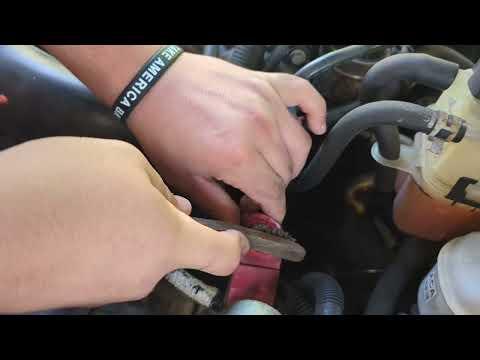
- Use an 8mm socket with a ratchet to loosen the negative (-) terminal bolt (usually marked “-” or has a black cable).
- Lift the cable off and move it aside so it cannot spring back to the terminal.
- Use an 8mm socket with a ratchet to loosen the positive (+) terminal bolt (usually marked “+” or has a red cover), then remove it.
- If your Malibu uses side terminals: the bolt threads into the battery; turn slowly and keep the bolt straight to avoid cross-threading.
Step 5: Remove the battery hold-down
- Find the battery hold-down (a bracket that clamps the battery so it can’t move).
- Use a 10mm socket with a ratchet and extension to remove the hold-down bolt(s).
- Set the bracket and bolt(s) aside where they won’t be lost.
Step 6: Remove the old battery
- Use a battery strap to lift the battery straight up and out.
- Keep it upright (tilting can spill residue).
- Wipe the tray area with shop towels if needed.
Step 7: Clean the terminals and tray
- Use a battery terminal brush to clean the inside of both cable ends until the metal is bright.
- If you’re installing felt washers, place them on the terminals now (one per terminal).
Step 8: Install the new battery
- Place the new battery into the tray in the same orientation as the old one (positive and negative must match the cable reach).
- Reinstall the hold-down bracket.
- Use a torque wrench to tighten the hold-down fastener snugly (do not crush the battery case). If you don’t have the exact spec, tighten firmly but stop once the battery cannot move.
Step 9: Reconnect the cables (positive first)
- Install the positive (+) cable first and tighten using an 8mm socket with a ratchet.
- Then install the negative (-) cable and tighten using an 8mm socket with a ratchet.
- If equipped with GM side-terminal bolts, use a torque wrench: Torque to 13 N·m (115 in-lb).
- Apply battery terminal protector spray after everything is tight and dry.
Step 10: Reinstall any covers/trim
- Under-hood: Reinstall any ducting/covers using the same 8mm or 10mm socket you removed earlier.
- Trunk-mounted: Refit the trim panel and fasteners using a 10mm socket with a ratchet.
✅ After Repair
- ✅ Start your Malibu and confirm it cranks strongly and idles normally.
- ✅ Check that headlights, blower motor, and hazard lights work.
- ✅ Reset the clock and radio presets if they were lost.
- ✅ If the idle is a little rough at first, let it idle for a few minutes; the computer may need a short relearn after power loss.
- ✅ Make sure the battery is secure and cannot move in the tray.
💰 DIY vs Shop Cost
Shop Cost: $220-$420 (parts + labor)
DIY Cost: $140-$280 (parts only)
You Save: $80-$160 by doing it yourself!
Shop labor rates vary but typically run $100-$150/hour. This repair takes a shop approximately 0.5-1.0 hours.
🎯 Ready to get started?
HowToo makes it easy: same-day/2-day shipping on every part, plus all the tools and specialty tools you need! Check out the parts and tools sections below to add everything to your cart.
Quick check (1 question): Is the battery on your Malibu under the hood, or behind a panel in the trunk? If you tell me which, I’ll tailor the access steps exactly to your layout.
Guide for Vehicle Battery replace for these Chevrolet vehicles
| Year Make Model | Sub Model | Engine | Body Style |
|---|---|---|---|
| 2007 Chevrolet Malibu | - | Inline 4 2.2L | - |
| 2007 Chevrolet Malibu | - | V6 3.5L | - |
| 2007 Chevrolet Malibu | - | V6 3.9L | - |
| 2006 Chevrolet Malibu | - | Inline 4 2.2L | - |
| 2006 Chevrolet Malibu | - | V6 3.5L | - |
| 2006 Chevrolet Malibu | - | V6 3.9L | - |
| 2005 Chevrolet Malibu | - | Inline 4 2.2L | - |
| 2005 Chevrolet Malibu | - | V6 3.5L | - |
| 2004 Chevrolet Malibu | - | Inline 4 2.2L | - |
| 2004 Chevrolet Malibu | - | V6 3.5L | - |
| 2003 Chevrolet Malibu | - | V6 3.1L | - |
| 2002 Chevrolet Malibu | - | V6 3.1L | - |
| 2001 Chevrolet Malibu | - | V6 3.1L | - |
| 2000 Chevrolet Malibu | - | V6 3.1L | - |
| 1999 Chevrolet Malibu | - | Inline 4 2.4L | - |
| 1999 Chevrolet Malibu | - | V6 3.1L | - |
| 1998 Chevrolet Malibu | - | Inline 4 2.4L | - |
| 1998 Chevrolet Malibu | - | V6 3.1L | - |
| 1997 Chevrolet Malibu | - | Inline 4 2.4L | - |
| 1997 Chevrolet Malibu | - | V6 3.1L | - |
| 1983 Chevrolet Malibu | - | V6 3.8L | - |
| 1983 Chevrolet Malibu | - | V8 5.0L | - |
| 1983 Chevrolet Malibu | - | V8 5.7L | - |
| 1983 Chevrolet Malibu | - | V6 4.3L | - |
| 1982 Chevrolet Malibu | - | V6 3.8L | - |
| 1982 Chevrolet Malibu | - | V8 5.0L | - |
| 1982 Chevrolet Malibu | - | V8 5.7L | - |
| 1982 Chevrolet Malibu | - | V8 4.4L | - |
| 1982 Chevrolet Malibu | - | V6 4.3L | - |
| 1981 Chevrolet Malibu | - | V6 3.8L | - |
| 1981 Chevrolet Malibu | - | V8 5.0L | - |
| 1981 Chevrolet Malibu | - | V8 5.7L | - |
| 1981 Chevrolet Malibu | - | V8 4.4L | - |
| 1980 Chevrolet Malibu | - | V6 3.8L | - |
| 1980 Chevrolet Malibu | - | V8 5.0L | - |
| 1980 Chevrolet Malibu | - | V8 5.7L | - |
| 1980 Chevrolet Malibu | - | V8 4.4L | - |
| 1979 Chevrolet Malibu | - | V6 3.3L | - |
| 1979 Chevrolet Malibu | - | V6 3.8L | - |
| 1979 Chevrolet Malibu | - | V8 5.0L | - |
| 1979 Chevrolet Malibu | - | V8 5.7L | - |
| 1979 Chevrolet Malibu | - | V8 4.4L | - |
| 1978 Chevrolet Malibu | - | V6 3.3L | - |
| 1978 Chevrolet Malibu | - | V6 3.8L | - |
| 1978 Chevrolet Malibu | - | V8 5.0L | - |
| 1978 Chevrolet Malibu | - | V8 5.7L | - |