









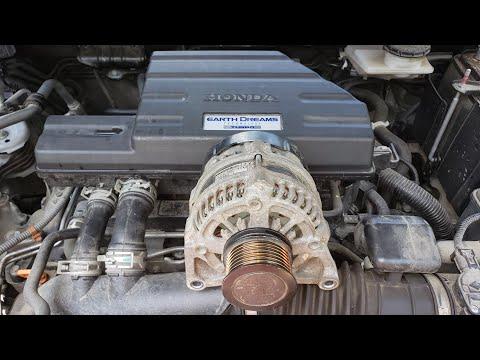




How to Replace the Alternator on a 2017-2023 Honda CR‑V 1.5L Turbo (Engine: Inline 4 1.5L)
Step-by-step DIY alternator swap with tools, parts list, torque specs, safety tips, and charging system check
How to Replace the Alternator on a 2017-2023 Honda CR‑V 1.5L Turbo (Engine: Inline 4 1.5L)
Step-by-step DIY alternator swap with tools, parts list, torque specs, safety tips, and charging system check for 2017, 2018, 2019, 2020, 2021, 2022, 2023


🔧 CR-V - Alternator Replacement
You’ll be removing the old alternator, swapping in a new one, and reinstalling the belt that drives it. This restores proper charging of the battery and prevents no-start or low-voltage problems.
Difficulty Level: Intermediate | Estimated Time: 2-3 hours
⚠️ Safety & Precautions
- ⚠️ Always disconnect the battery before working on the alternator to avoid shocks and short circuits.
- ⚠️ Your CR-V has a battery sensor on the negative terminal; avoid prying on or striking this sensor.
- ⚠️ Let the engine cool fully before starting; you’ll be working near hot metal parts.
- ⚠️ Keep metal tools away from the battery positive post once the alternator wiring is exposed.
- ⚠️ Wear safety glasses and gloves; there are sharp edges and tight spaces.
🔧 Required Tools
You'll need the following tools for this repair:
- 3/8" drive ratchet
- 1/4" drive ratchet
- 10mm socket
- 12mm socket
- 14mm socket
- 10mm combination wrench
- 14mm combination wrench
- 3/8" drive torque wrench (10-80 Nm range)
- 1/4" drive torque wrench (5-20 Nm range)
- 6" socket extension
- Serpentine belt tool or long 14mm wrench (specialty)
- Flathead screwdriver (medium size)
- Trim clip removal tool
- Needle-nose pliers
- Work light
- Mechanic’s gloves
- Safety glasses
- Fender cover or thick towel
🔩 Required Parts
HowToo sells all the parts you need for this repair:
- Alternator (correct for 1.5L turbo AWD Touring) - Qty: 1
- Serpentine drive belt - Qty: 1
- Alternator mounting bolt set (if needed) - Qty: 1
- Battery terminal cleaning brush - Qty: 1
- Dielectric grease - Qty: 1 small tube
- Anti-seize compound - Qty: 1 small tube
- Cable ties - Qty: 4-6
📋 Before You Begin
- Park your CR-V on level ground, shift to Park, and set the parking brake.
- Open the hood and support it with the hood prop rod.
- Note or take a photo of the belt routing before removal; this helps during reinstallation.
- Make sure you have radio presets and Bluetooth info backed up in case power is lost.
- Turn ignition OFF and remove the key; wait at least 2 minutes before disconnecting the battery.
🔨 Step-by-Step Instructions
Follow these steps in order:
Step 1: Disconnect the battery safely
- Use the 10mm socket and 1/4" ratchet to loosen the nut on the negative (black) battery cable clamp.
- Carefully lift the negative cable off the battery post and tuck it aside so it cannot spring back.
- Do not twist or pry on the plastic sensor ring on the negative cable.
- If access is tight, use the 10mm combination wrench instead of the socket.
Step 2: Remove the engine cover and air ducting for access
- Lift up the plastic engine cover by hand; it pops off rubber mounts. Set it aside.
- Use the trim clip removal tool to release any plastic clips holding the intake duct near the radiator.
- Use the 10mm socket to remove any bolts holding the upper air duct or resonator that blocks access to the alternator.
- Gently pull off the ducting and set it aside. Note where it was seated for reassembly.
Step 3: Relieve tension from the serpentine belt
- The serpentine belt is the long belt that runs across the front of the engine and drives the alternator.
- Locate the belt tensioner pulley (a small pulley on a spring-loaded arm).
- Place the 14mm socket with 3/8" ratchet or your serpentine belt tool on the tensioner bolt.
- Rotate the tensioner in the direction that loosens the belt (usually clockwise when viewed from the front on this engine).
- While holding tension off, slip the belt off the alternator pulley with your free hand.
- Slowly release the tensioner back to its rest position.
- Take another photo of belt routing before pulling it off.
- You can remove the belt fully now if you are replacing it; just note the path.
Step 4: Disconnect alternator electrical connections
- Locate the alternator on the front of the engine (top/front area, near the belt).
- Use the flathead screwdriver to gently lift the locking tab on the small electrical connector at the back of the alternator, then pull the plug straight off.
- Use the 10mm socket and 1/4" ratchet to remove the nut holding the thick charging cable to the alternator terminal.
- Pull the cable eyelet off the stud and move the cable aside.
- If there is a rubber boot over the stud, slide it back first using your fingers or needle-nose pliers.
Step 5: Remove alternator mounting bolts
- Locate the upper and lower alternator mounting bolts.
- Use the 14mm socket, extension, and 3/8" ratchet to loosen the upper mounting bolt; do not remove it completely yet.
- Use the same tools to loosen and remove the lower mounting bolt(s) and any bracket bolts.
- Now remove the upper mounting bolt fully while supporting the alternator with your other hand.
- Keep track of any spacers or brackets as they come off.
Step 6: Remove the alternator from the engine bay
- Wiggle the alternator free from its bracket by hand; it may be snug in its locating sleeves.
- If needed, gently pry at the mounting ears using the flathead screwdriver, but do not bend the bracket.
- Lift the alternator up and out of the engine bay, rotating it as needed to clear hoses or wiring.
- Set it on the ground away from your work area.
Step 7: Prepare and position the new alternator
- Compare the new alternator to the old one: check mounting ears, pulley size, and electrical connectors.
- Lightly coat the mounting bolt shanks with a thin film of anti-seize compound to prevent future seizing.
- Carefully lower the new alternator into place, aligning it with the bracket.
- Install the upper mounting bolt by hand a few turns to hold it in position.
Step 8: Install and torque the alternator bolts
- Install the lower mounting bolt(s) by hand, making sure the alternator sits flush in the bracket.
- Use the 14mm socket and 3/8" ratchet to snug all mounting bolts.
- Then use the 3/8" torque wrench and 14mm socket to torque the alternator mounting bolts to 44 Nm (32 ft-lbs).
- Check that the alternator does not rock or move; it should be solid.
Step 9: Reconnect alternator wiring
- Place the thick charging cable eyelet onto the alternator terminal stud.
- Install the nut by hand, then tighten it with the 10mm socket and 1/4" ratchet.
- Use the 1/4" torque wrench and 10mm socket to torque this nut to 9 Nm (80 in-lbs).
- Apply a tiny dab of dielectric grease on the small connector pins if desired, then firmly push the connector onto the alternator until it clicks.
- Slide the rubber boot back over the charging stud if equipped.
Step 10: Reinstall the serpentine belt
- Route the belt according to your photo or the belt routing diagram under the hood. Ensure it sits inside the grooves on all ribbed pulleys.
- Leave the alternator pulley for last so you can slip the belt on there while holding the tensioner.
- Place the 14mm socket and 3/8" ratchet (or belt tool) on the tensioner and rotate it to relieve tension again.
- Slip the belt over the alternator pulley with your other hand.
- Slowly let the tensioner return to its normal position to tighten the belt.
- Visually check the belt on every pulley. It must be centered on each pulley and seated fully in the grooves.
Step 11: Reinstall air ducting and engine cover
- Reposition the air ducting or resonator you removed earlier.
- Install any bolts with the 10mm socket and 1/4" ratchet and snug them to about 9 Nm (80 in-lbs).
- Reinstall plastic clips using your fingers or the trim clip removal tool to push them fully in.
- Press the engine cover back onto its rubber mounting grommets by hand until it clicks into place.
Step 12: Reconnect the battery
- Clean the negative battery terminal with the battery terminal cleaning brush if it shows corrosion.
- Place the negative cable clamp back onto the negative battery post.
- Use the 10mm socket and 1/4" ratchet to tighten the clamp nut securely; do not overtighten.
- Clamp should not rotate if you twist it by hand.
Step 13: Initial start-up and charging check
- Remove tools from the engine bay and close the hood loosely (do not latch fully yet).
- Start the engine and let it idle.
- Listen for any belt squeal or unusual noises around the alternator area.
- If you have a multimeter, set it to DC volts and measure across the battery: it should read around 13.8–14.5 volts with the engine running.
- If everything is normal, fully close and latch the hood.
✅ After Repair
- 🧪 Turn on headlights, rear defogger, and blower fan; confirm there are no dimming lights or warning messages on the dash.
- 🔁 Drive your CR-V for 10–15 minutes with mixed speeds; watch for battery or charging warning lights.
- 📲 You may need to reset clock and radio presets after battery disconnection.
- 🔍 Over the next few days, open the hood and recheck the belt alignment and alternator mounting bolts visually.
💰 DIY vs Shop Cost
Shop Cost: $750-$1,000 (parts + labor)
DIY Cost: $250-$450 (parts only)
You Save: $300-$750 by doing it yourself!
Shop labor rates vary but typically run $100-$150/hour. This repair takes a shop approximately 1.5-2.0 hours.
🎯 Ready to get started?
HowToo makes it easy: same-day/2-day shipping on every part, plus all the tools and specialty tools you need! Check out the parts and tools sections above to add everything to your cart.
Guide for Alternator replace for these Honda vehicles
| Year Make Model | Sub Model | Engine | Body Style |
|---|---|---|---|
| 2023 Honda CR-V | - | Inline 4 1.5L | - |
| 2022 Honda CR-V | - | Inline 4 1.5L | - |
| 2021 Honda CR-V | - | Inline 4 1.5L | - |
| 2020 Honda CR-V | - | Inline 4 1.5L | - |
| 2019 Honda CR-V | - | Inline 4 1.5L | - |
| 2018 Honda CR-V | - | Inline 4 1.5L | - |
| 2017 Honda CR-V | - | Inline 4 1.5L | - |