









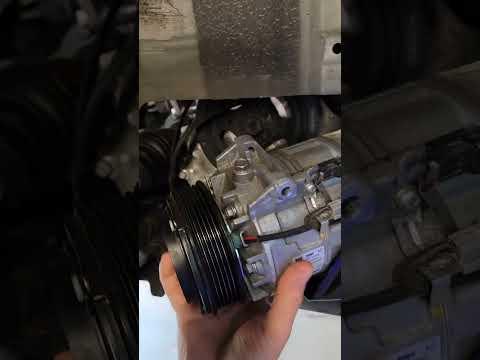







How to Replace the AC Compressor on a 2020 Nissan Altima
Step-by-step DIY AC compressor replacement with tools, parts list, safety tips, and recharge guidance for 2019, 2020, 2021, 2022
How to Replace the AC Compressor on a 2020 Nissan Altima
Step-by-step DIY AC compressor replacement with tools, parts list, safety tips, and recharge guidance for 2019, 2020, 2021, 2022


🔧 Altima - AC Compressor Replacement
You’ll be removing the AC compressor from your Altima and installing a new one, then the system must be evacuated and recharged with the correct refrigerant and oil. The physical removal is doable at home, but refrigerant handling legally requires proper equipment and usually a licensed AC shop.
Difficulty Level: Advanced | Estimated Time: 4-6 hours (plus AC shop time for evac/recharge)
⚠️ Safety & Precautions
- ⚠️ Do NOT vent refrigerant to the atmosphere. It’s illegal and dangerous; have a shop recover the refrigerant before you start.
- ⚠️ Refrigerant is under high pressure and can cause frostbite and eye injury if released suddenly.
- ⚠️ Always disconnect the negative battery cable before working near the serpentine belt, starter, or alternator.
- ⚠️ Support the car securely on jack stands; never work under a car supported only by a jack.
- ⚠️ Let the engine cool completely; you’ll be working near hot engine and exhaust parts otherwise.
- ⚠️ Wear safety glasses and gloves at all times when working under the car.
- ⚠️ If the system has been open to air for a long time (weeks), moisture may be inside; consider having a professional flush the system.
🔧 Required Tools
You'll need the following tools for this repair:
- 🛠️ Floor jack (rated 3-ton minimum)
- 🛠️ Jack stands (rated 3-ton minimum)
- 🛠️ Wheel chocks
- 🛠️ Metric socket set (8mm-19mm)
- 🛠️ 3/8" drive ratchet
- 🛠️ 1/2" drive ratchet
- 🛠️ Short and long socket extensions (3" and 6")
- 🛠️ Metric combination wrench set (8mm-19mm)
- 🛠️ Serpentine belt tool or long-handled 3/8" drive breaker bar
- 🛠️ Torque wrench (3/8" drive, 5-80 ft-lbs range)
- 🛠️ Torque wrench (1/2" drive, 30-150 ft-lbs range)
- 🛠️ Flathead screwdriver (medium)
- 🛠️ Trim clip removal tool
- 🛠️ Needle-nose pliers
- 🛠️ Pick tool set (for O-ring removal)
- 🛠️ Drain pan (for incidental coolant or oil drips)
- 🛠️ Shop towels or rags
- 🛠️ Safety glasses
- 🛠️ Mechanic gloves
- 🛠️ AC manifold gauge set (R-1234yf compatible) (specialty)
- 🛠️ AC vacuum pump (R-1234yf compatible) (specialty)
- 🛠️ Refrigerant recovery/recharge machine (R-1234yf) (specialty)
- 🛠️ OBD2 scan tool (basic)
🔩 Required Parts
HowToo sells all the parts you need for this repair:
- 🔩 AC compressor (new, not remanufactured, for 2.5L AWD) - Qty: 1
- 🔩 PAG refrigerant oil (Nissan spec for R-1234yf system) - Qty: As specified for compressor (usually 120-150 ml total system, follow compressor label)
- 🔩 AC compressor mounting bolts (if one-time-use per Nissan TSB) - Qty: 4
- 🔩 AC line O-rings for compressor connections (R-1234yf compatible) - Qty: 2-4
- 🔩 Serpentine drive belt - Qty: 1 (recommended while you’re there)
- 🔩 AC condenser with integrated desiccant (receiver-drier) - Qty: 1 (recommended if compressor failed internally)
- 🔩 AC system flush solvent (if metal debris present) - Qty: As needed
- 🔩 Engine under-cover push clips (plastic retainers) - Qty: 4-8 (to replace any that break)
- 🔩 R-1234yf refrigerant (pre-filled can or cylinder) - Qty: As per under-hood label (charge amount in grams)
📋 Before You Begin
- Park your Altima on a level surface, engage the parking brake, and place wheel chocks behind the rear wheels.
- Have an AC shop recover the refrigerant from the system; tell them you’ll be replacing the compressor and coming back for a recharge.
- Open the hood and let the engine cool fully.
- Disconnect the negative battery cable using a 10mm socket and move the cable aside so it cannot touch the terminal.
- Locate the under-hood AC label; note the specified R-1234yf charge amount and PAG oil type/amount.
- Take clear photos before disconnecting lines and connectors.
🔨 Step-by-Step Instructions
Follow these steps in order:
Step 1: Raise and support the front of the car
- Loosen the front wheel lug nuts 1/2 turn using the appropriate lug wrench or 19mm socket while the car is on the ground.
- Position the floor jack (3-ton) under the front center jacking point and lift the front of the car.
- Place jack stands under the factory pinch welds or frame points on both sides; lower the car gently onto the stands.
- Remove the front wheels using the 19mm socket and 1/2" drive ratchet if you need extra access through the wheel wells.
Step 2: Remove the lower engine splash shield
- Use a 10mm socket and 3/8" ratchet to remove the bolts securing the front lower engine cover (splash shield).
- Use a trim clip removal tool to pop out any plastic push clips.
- Lower the splash shield and set it aside; keep track of bolts and clips.
- Store fasteners in labeled containers for each panel.
Step 3: Relieve tension and remove the serpentine belt
- From under the car (and/or through the right wheel well), locate the belt tensioner; it will have a square drive or bolt head.
- Use a serpentine belt tool or a long 3/8" breaker bar in the tensioner to rotate it and relieve belt tension.
- While holding tension off, slide the belt off the AC compressor pulley first, then off the remaining pulleys.
- Carefully release the tensioner back to its rest position.
- Take a photo of belt routing before removal.
Step 4: Disconnect electrical connector at the compressor
- Locate the AC compressor at the lower front of the engine (usually passenger side).
- Find the electrical connector on the compressor body.
- Press the locking tab and pull the connector off by hand; if tight, use needle-nose pliers gently, avoiding wire damage.
Step 5: Disconnect AC lines from the compressor
- Verify that the system has been properly evacuated by a shop; there should be no hiss or pressure if you gently press a service port Schrader with safety glasses on. If pressure remains, stop and return to the shop.
- Use the correct size metric socket (usually 10mm-13mm) and 3/8" ratchet to remove the bolts holding the refrigerant lines to the compressor manifold.
- Gently wiggle and pull the lines away from the compressor. Do not bend or kink them.
- Immediately cover the open line ends and compressor ports with clean caps or wrap with tape and clean plastic to reduce moisture entry.
- Remove the old O-rings using a pick tool, being careful not to scratch the sealing surfaces.
Step 6: Remove the AC compressor
- Locate the four compressor mounting bolts where the compressor attaches to the engine block or bracket.
- Use a 14mm socket and 3/8" or 1/2" ratchet to loosen and remove the bolts. Support the compressor with your hand as you remove the last bolt.
- Lower the compressor out of the engine bay, usually through the bottom.
- If it is stuck, gently pry with a flathead screwdriver at the mounting ears, taking care not to damage the block or bracket.
Step 7: Inspect for metal debris and decide on flushing
- Pour a small amount of oil out of the old compressor into a clean container.
- Look for shiny metal flakes or sludge. If you see metal debris, you should replace the condenser with integrated drier and have the system flushed with AC flush solvent.
- Debris left in lines can destroy the new compressor.
Step 8: Prepare the new compressor
- Check the label on the new compressor for the required amount of PAG oil and type.
- If the compressor comes pre-filled, you may need to drain and adjust the oil amount to match Nissan’s spec, especially if you also replace other components.
- To drain, remove the drain plug (if present) or rotate the compressor by hand and pour oil out into a measuring cup.
- Measure and refill the compressor with fresh PAG oil using the exact amount required for this system, subtracting amounts for any additional components replaced per manufacturer instructions.
Step 9: Install the new compressor
- Position the new compressor in place from below.
- Install the compressor mounting bolts by hand to avoid cross-threading.
- Use a 14mm socket and ratchet to snug all bolts evenly.
- Using a torque wrench and 14mm socket, tighten the compressor bolts to manufacturer torque spec (consult service data; typically in the 25-40 ft-lbs range).
Step 10: Install new O-rings and reconnect AC lines
- Lightly coat each new O-ring with clean PAG oil; this helps sealing and prevents tearing.
- Install the new O-rings onto the line ends, making sure they sit in the correct grooves.
- Align the lines with the compressor ports and press them straight in by hand; avoid prying or twisting excessively.
- Install the line retaining bolts by hand, then tighten with the correct size metric socket and 3/8" ratchet.
- Use a torque wrench to tighten the line bolts to manufacturer torque spec (usually in the 7-15 ft-lbs range; do not overtighten).
Step 11: Reconnect the electrical connector
- Plug the compressor electrical connector back in until it clicks.
- Make sure the harness is routed away from the belt and moving parts.
Step 12: Install the serpentine belt
- Route the new or existing belt according to the belt routing diagram (usually on a sticker under the hood or in the owner’s manual).
- Use the serpentine belt tool or breaker bar to rotate the tensioner and slip the belt over the final pulley, usually the AC compressor or an idler.
- Slowly release the tensioner, letting it take up the slack.
- Visually inspect all pulleys to ensure the belt ribs sit correctly in each groove.
Step 13: Reinstall splash shield and wheels
- Reposition the lower engine splash shield.
- Install bolts using a 10mm socket and 3/8" ratchet and any new clips with the trim clip tool.
- If you removed the wheels, reinstall them using the 19mm socket and snug the lug nuts.
- Raise the car slightly with the floor jack, remove the jack stands, and lower the car to the ground.
- Torque the wheel lug nuts in a star pattern using a torque wrench and