








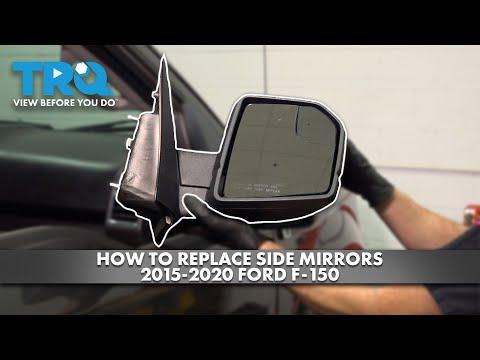



How to Replace Side View Mirrors on a 2016 Ford F-150 (Front Doors)
Step-by-step 2016 F-150 mirror replacement guide with tools, safety tips, wiring, torque specs, and reassembly instructions
How to Replace Side View Mirrors on a 2016 Ford F-150 (Front Doors)
Step-by-step 2016 F-150 mirror replacement guide with tools, safety tips, wiring, torque specs, and reassembly instructions


F-150 - Side View Mirror Replacement 🚙
Got it—you want to replace the side mirrors on your Lariat. I’ll walk you through the OEM-style process for the front doors.
Quick Questions Before We Start ❓
- 🔧 Do your mirrors have power fold and/or memory (they fold in with a button and store seat/mirror positions)?
- 🔧 Do they have BLIS (blind spot warning) and/or turn signal / puddle lamps in the mirror?
If you’re not sure, I’ll give the full “loaded mirror” procedure that covers all wiring—just plug in what you have.
Tools & Supplies 🧰
- 🔧 Socket set with:
- 8 mm socket (mirror nuts)
- 7 mm socket (door panel screws)
- 🔧 Ratchet and short extension
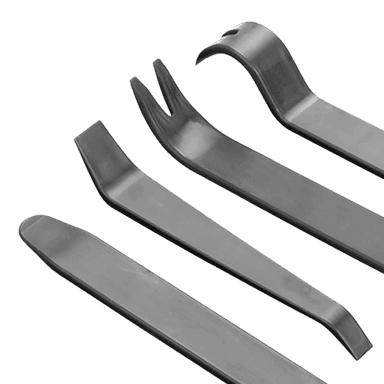
- 🔧 Trim removal tool (plastic pry tool to pop clips without scratching)
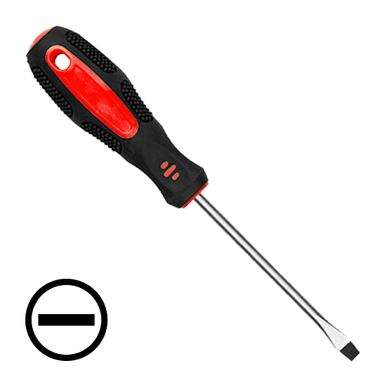
- 🔧 Small flat screwdriver (for electrical connector locks)
- 🔧 Torx T20 driver (for some door handle screws if needed)
- 🔧 Painter’s tape (to protect paint at mirror base)
- 🔧 Magnet pickup tool (handy if a nut drops inside the door)
- 🔧 Safety glasses and mechanic gloves
Safety & Prep ⚠️
- ⚠️ Park on level ground, set the parking brake, and turn ignition OFF.
- ⚠️ If your mirrors are power fold / memory / BLIS, disconnect the negative battery cable (10 mm) to avoid any electrical glitches or short circuits.
- ⚠️ Keep the window fully up so you don’t hit the glass when working near the top of the door.
F-150 - Door Panel Removal (Front Door) 🚪
You need the door panel off to reach the mirror wiring and mounting nuts.
- Protect the paint 🙂
- Apply painter’s tape around the mirror base on the door outside. This helps prevent chips if the mirror shifts while you remove it.
- Remove the sail panel trim (small triangle inside by the mirror)
- Use a plastic trim tool and gently pry the small triangular cover at the top front of the door panel (inside, near the mirror).
- Pull straight toward you; it’s held by clips. Set it aside.
- Remove door panel screws
- Behind the interior door handle, pop off the small trim cover with the trim tool; remove the 7 mm screw behind it.
- In the door pull/armrest pocket, remove the rubber mat and the two 7 mm screws underneath.
- On some trucks, there may be a lower edge 7 mm screw—check along the bottom of the panel and remove any you see.
- Release the door panel clips
- Starting at the bottom corner, slide the trim tool between the panel and the metal door.
- Gently pry outward to pop the plastic clips. Work your way around the sides and bottom.
- It will sound “poppy”—that’s normal.
- Lift the door panel off
- Once all clips are loose, lift the panel straight up to unhook it from the top edge by the window.
- Support the panel with one hand; don’t yank it away yet—wires are still attached.
- Disconnect wiring and cables
- Unplug the window/mirror switch connector (press the tab and pull).
- At the back of the interior door handle, you’ll see two cables (latch and lock). Note their routing, then:
- Flip the plastic retainers out of their brackets.
- Rotate the cable ends out of the handle levers.
- Unplug any courtesy light connector at the bottom of the panel if equipped.
- Set the door panel somewhere safe, face up.
F-150 - Mirror Removal 🔧
- Locate the mirror connector
- At the top front of the door (behind where the sail panel was), find the mirror wiring connector.
- Press the locking tab and unplug it. If there’s a red secondary lock, slide it back first with a small screwdriver.
- Support the mirror
- From outside, hold the mirror housing with one hand so it doesn’t fall when the nuts come off.
- If you’re alone, you can loosely thread one nut off last to keep it from dropping.
- Remove mirror mounting nuts
- Using an 8 mm socket and extension, remove the three nuts holding the mirror to the door.
- Be careful not to drop them inside the door; use a magnet if one falls.
- Remove the mirror
- Feed the mirror wiring out through the hole.
- Carefully pull the mirror away from the door, watching the paint and tape area.
- Set the old mirror aside.
F-150 - New Mirror Installation 🆕
- Compare old and new mirrors
- Check:
- Same number and shape of mounting studs
- Same connector type and number of pins
- Same features: heat, power fold, turn signal, puddle lamp, BLIS if equipped
- If anything doesn’t match, don’t force it—wrong part.
- Check:
- Install the new mirror
- Feed the new mirror wiring through the door opening.
- Align the studs with the holes and seat the mirror against the door.
- From inside, install the three 8 mm nuts by hand first to avoid cross-threading.
- Tighten mirror nuts
- Use the 8 mm socket to snug them evenly.
- Torque spec: about 8–10 N·m (71–89 in-lb)—just firm hand tight, not gorilla tight, or you can crack the mirror base.
- Reconnect the mirror wiring
- Plug the connector back in until it clicks.
- Re-engage any red secondary lock if present.
- Secure the harness in its clips so it doesn’t rattle.
Door Panel Reinstallation 🔁
- Reconnect cables and wiring
- Reattach the door latch and lock cables to the interior handle:
- Hook the cable ends into the levers.
- Snap the plastic retainers back into their brackets.
- Plug in the window/mirror switch connector.
- Reconnect any courtesy light connector at the bottom.
- Reattach the door latch and lock cables to the interior handle:
- Hang the door panel
- Hook the top edge of the panel over the door flange by the window.
- Once it’s seated at the top, push the panel straight in so the clips line up.
- Seat the clips
- Firmly smack around the edges of the panel with the heel of your hand to snap all clips back in.
- Reinstall screws and trim
- Reinstall the 7 mm screws in:
- Door pull/armrest (2 screws)
- Behind the interior handle (1 screw)
- Any lower edge screw if your truck had one
- Reinstall the small trim cover behind the handle.
- Snap the sail panel trim back over the mirror area.
- Reinstall the 7 mm screws in:
Electrical & Feature Check 🔌
- Reconnect the battery (if you disconnected it)
- Reattach the negative cable and tighten the 10 mm nut snugly.
- Test mirror functions
- Turn ignition to RUN.
- Check:
- Power adjustment (all directions)
- Heated mirror (turn on rear defrost; mirror should warm after a few minutes)
- Power fold (if equipped)
- Turn signal in mirror (if equipped)
- Puddle lamp (if equipped; unlock truck at night)
- BLIS (if equipped; warning icon should light briefly at startup)
Tips & Tricks 💡
- 🧰 Do one side at a time so you can look at the other door as a reference for clip and cable routing.
- 🧰 If a clip stays in the door instead of the panel, pry it out with the trim tool and snap it back onto the panel before reinstalling.
- 🧰 If you get a window or lock behaving oddly after reconnecting the battery, cycle the window fully down and up and lock/unlock a few times—this often “relearns” positions.
If you tell me whether your mirrors are power-fold, memory, and/or BLIS, I can add any extra feature-specific notes (like memory reset) for your exact setup.
HowToo makes it easy: below this answer you’ll see compatible replacement mirrors and any trim tools you might need. You can add them to your cart right from the parts section for fast shipping.