













How to Replace Rear Brakes and Rotors on a 2011-2018 Ram 1500
Step-by-step instructions with tools, parts, torque specs, and safety tips
How to Replace Rear Brakes and Rotors on a 2011-2018 Ram 1500
Step-by-step instructions with tools, parts, torque specs, and safety tips for 2011, 2012, 2013, 2014, 2015, 2016, 2017, 2018


🔧 Rear Brakes and Rotors - Replacement
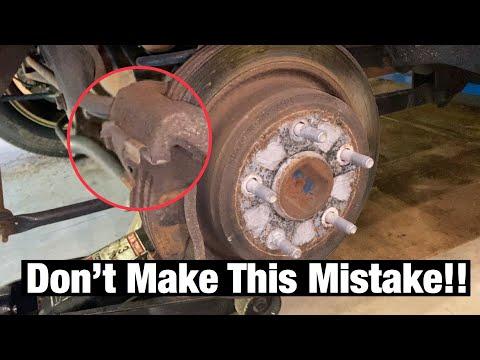
Rear brake pads and rotors wear together, so it’s best to replace them as a set on both sides. On your Ram, the rear rotor also contains the parking brake drum section, so the parking brake shoes and hardware must be handled carefully during the job.
Difficulty Level: Intermediate | Estimated Time: 2-4 hours
⚠️ Safety & Precautions
- Work on a level surface and chock the front wheels before lifting the truck.
- Support the truck with jack stands. Never rely on a floor jack alone.
- Do not press the brake pedal with a caliper removed.
- The parking brake must be fully released before removing the rear rotors.
- If the rotor is stuck, do not pry against the backing plate or parking brake shoes.
- Keep grease and brake cleaner off the rotor friction surface and pads.
🔧 Required Tools
You'll need the following tools for this repair:
- Floor jack (rated 3-ton minimum)
- Jack stands
- Wheel chocks
- Safety glasses
- Nitrile gloves
- 19mm socket
- 13mm socket
- 18mm socket
- Ratchet
- Breaker bar
- Torque wrench
- C-clamp or brake piston tool
- Flat-blade screwdriver
- Bungee cord or wire hanger
- Wire brush
- Brake cleaner
- Micrometers or ruler
- Rubber mallet
🔩 Required Parts
HowToo sells all the parts you need for this repair:
- Rear brake pad set - Qty: 1
- Rear brake rotors - Replace in pairs - Qty: 2
- Brake pad hardware kit - Qty: 1
- Brake caliper slide pin grease - Qty: 1
- Brake cleaner - Qty: 1
📋 Before You Begin
- Park on level ground and set the parking brake before lifting.
- Loosen the rear lug nuts slightly before raising the truck.
- Release the parking brake fully before removing the rotors.
- If the rotor will not come off, back off the parking brake adjuster through the access slot after removing the rotor if needed.
🔨 Step-by-Step Instructions
Follow these steps in order:
Step 1: Lift and secure the rear of the truck
- Use a 19mm socket to loosen the rear lug nuts 1/2 turn while the truck is on the ground.
- Lift the rear with a floor jack (rated 3-ton minimum) and place it securely on jack stands.
- Remove both rear wheels with the 19mm socket.
Step 2: Remove the caliper
- Use a 13mm socket to remove the caliper slide bolts.
- Lift the caliper off the bracket and support it with a bungee cord or wire hanger.
- Do not let the caliper hang by the hose.
Step 3: Remove the caliper bracket
- Use an 18mm socket and breaker bar to remove the two caliper bracket bolts.
- Remove the bracket and set it aside.
- Torque on reassembly: 129 Nm (95 ft-lbs)
Step 4: Remove the rotor
- Pull the rotor straight off by hand.
- If it is stuck, tap the rotor hat with a rubber mallet and wiggle it free.
- If the rotor still will not move, the parking brake shoes may be holding it. Use a flat-blade screwdriver to back off the parking brake adjuster through the access slot.
- Be gentle around the parking brake shoes.
Step 5: Inspect the parking brake hardware
- Look at the parking brake shoes inside the rotor hat for cracking, heavy wear, or broken springs.
- If the lining is thin or the hardware is rusty, replace the parking brake hardware before reinstalling the rotor.
- Clean the backing plate lightly with brake cleaner.
Step 6: Prepare the new rotor
- Clean the new rotor with brake cleaner to remove shipping oil.
- Install the rotor onto the hub and make sure it seats flat.
- If the parking brake drum is tight, adjust the shoes slightly until the rotor slides on without dragging hard.
Step 7: Replace the brake pads
- Use the 13mm socket to remove the caliper slide pins if needed for cleaning.
- Remove the old inner and outer pads from the bracket.
- Clean the pad contact points with a wire brush.
- Apply a thin coat of brake caliper slide pin grease to the slide pins and pad contact ears.
- Install the new pads in the bracket.
Step 8: Compress the caliper piston and reinstall the caliper
- Use a C-clamp or brake piston tool to slowly push the caliper piston back in.
- Make sure the brake fluid reservoir does not overflow.
- Reinstall the caliper over the new pads.
- Install the slide bolts with the 13mm socket.
- Torque to 35 Nm (26 ft-lbs)
Step 9: Reinstall the caliper bracket
- Install the caliper bracket over the new rotor.
- Use the 18mm socket to tighten the bracket bolts.
- Torque to 129 Nm (95 ft-lbs)
Step 10: Reinstall the wheels
- Install both rear wheels and snug the lug nuts with the 19mm socket.
- Lower the truck to the ground.
- Use a torque wrench to tighten the lug nuts in a star pattern.
- Torque to 176 Nm (130 ft-lbs)
Step 11: Set the pads and test the brakes
- Before moving the truck, press the brake pedal several times until it feels firm.
- Apply and release the parking brake several times.
- Check brake fluid level and top off if needed.
✅ After Repair
- Test the brakes at low speed in a safe area.
- Listen for rubbing or clicking from the rear wheels.
- Check for brake fluid leaks around both calipers.
- For the first 200 miles, avoid hard stops unless needed for safety.
💰 DIY vs Shop Cost
Shop Cost: $450-$850 (parts + labor)
DIY Cost: $180-$350 (parts only)
You Save: $270-$500 by doing it yourself!
Shop labor rates vary but typically run $100-$150/hour. This repair takes a shop approximately 2-4 hours.
🎯 Ready to get started?
HowToo makes it easy: same-day/2-day shipping on every part, plus all the tools and specialty tools you need! Check out the parts and tools sections below to add everything to your cart.
Guide for Disc Brake Pad Set replace for these Ram vehicles
| Year Make Model | Sub Model | Engine | Body Style |
|---|---|---|---|
| 2018 Ram 1500 | - | - | - |
| 2017 Ram 1500 | - | - | - |
| 2016 Ram 1500 | - | - | - |
| 2015 Ram 1500 | - | - | - |
| 2014 Ram 1500 | - | - | - |
| 2013 Ram 1500 | - | - | - |
| 2012 Ram 1500 | - | - | - |
| 2011 Ram 1500 | - | - | - |