














How to Replace Rear Brake Pads & Rotors on a 2018 Chevrolet Camaro (EPB Service Mode)
Step-by-step DIY rear brake job with tools, parts list, parking brake tips, and torque specs
How to Replace Rear Brake Pads & Rotors on a 2018 Chevrolet Camaro (EPB Service Mode)
Step-by-step DIY rear brake job with tools, parts list, parking brake tips, and torque specs


🔧 Camaro - Rear Brake Pads & Rotor Replacement
You’ll be removing the rear wheels, taking off the rear brake calipers and brackets, replacing the rotors, and installing new brake pads. On your Camaro, the biggest “gotcha” is the parking brake system—if it’s electronic, the rear calipers must be put into service mode before compressing the pistons.
Difficulty Level: Intermediate | Estimated Time: 2-4 hours
⚠️ Safety & Precautions
- ⚠️ Support your Camaro with jack stands; never rely on a jack alone.
- ⚠️ Brakes get hot; work only when parts are cool to the touch.
- ⚠️ Do not press the brake pedal with a caliper removed.
- ⚠️ If your Camaro has an electronic parking brake (EPB), you must put it in service mode before pushing the rear pistons in, or you can damage the caliper motor.
- ⚠️ Brake dust is harmful; use brake cleaner, not compressed air.
🔧 Required Tools
You'll need the following tools for this repair:
- Floor jack (rated 3-ton minimum)
- Jack stands (rated 3-ton minimum)
- Wheel chocks
- 22mm socket
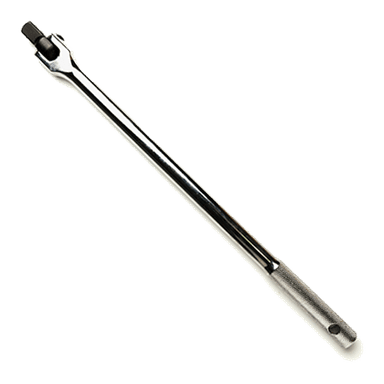
- Breaker bar (1/2" drive)
- Torque wrench (10-200 Nm range)
- Ratchet (3/8" drive)
- 13mm socket
- 18mm socket
- Torx T30 bit
- Flathead screwdriver
- Brake caliper piston compressor tool
- Bungee cord
- Wire brush
- Brake cleaner
- High-temp silicone brake grease
- Threadlocker (blue)
- Gloves
- Safety glasses
- Scan tool with EPB service mode (specialty)
🔩 Required Parts
HowToo sells all the parts you need for this repair:
- Rear brake pad set - Qty: 1
- Rear brake rotors - Replace in pairs - Qty: 2
- Brake parts cleaner - Qty: 1
- Brake fluid (DOT 3) - Qty: 1 quart
- Rear caliper bracket bolt set - Optional if originals are damaged - Qty: 1
- Rear rotor retaining screw set - Optional if originals strip - Qty: 1
📋 Before You Begin
- Park on level ground, transmission in 1st gear, and place wheel chocks at the front wheels.
- Release the parking brake fully before lifting the rear.
- Open the hood and remove the brake fluid reservoir cap (leave it sitting on top) so fluid can move back when you compress pistons.
- If your Camaro has an EPB switch on the center console: plan to use EPB service mode with a scan tool before you try to compress the rear pistons.
Quick check (2 questions so I can tailor this perfectly):
- Does your Camaro have an electronic parking brake switch (a small switch/button), or a manual lever/foot pedal?
- Do you have access to a scan tool that can run EPB service mode?
🔨 Step-by-Step Instructions
Follow these steps in order:
Step 1: Loosen lug nuts and lift the rear
- Use a 22mm socket and breaker bar to loosen the rear lug nuts about 1/2 turn (don’t remove yet).
- Use a floor jack to lift the rear at the correct rear jacking point.
- Set the car down onto jack stands and confirm it’s stable before you work.
Step 2: Remove rear wheels
- Remove the lug nuts with a 22mm socket and pull both rear wheels off.
Step 3: Put the parking brake system in service mode (if equipped)
- If your Camaro has EPB: connect the scan tool with EPB service mode (specialty) and run the rear EPB pad replacement/service mode function.
- If you can’t retract EPB, stop here.
- If your Camaro does not have EPB: skip this step.
Step 4: Remove the rear caliper
- Turn the steering wheel slightly if it helps access, but keep the car stable on jack stands.
- Use a 13mm socket and ratchet to remove the caliper guide pin bolts.
- Carefully lift the caliper off the bracket.
- Support the caliper with a bungee cord so the brake hose isn’t stretched.
Step 5: Remove old pads and inspect hardware
- Remove the pads from the bracket by hand or with a flathead screwdriver (gentle prying).
- Clean the pad contact points on the bracket with a wire brush and brake cleaner.
Step 6: Remove the caliper bracket
- Use an 18mm socket and breaker bar to remove the two caliper bracket bolts.
- Set the bracket aside.
- During reassembly: apply threadlocker (blue) to clean bolt threads and Torque to 175 Nm (129 ft-lbs).
Step 7: Remove the rotor
- If equipped with a retaining screw, remove it using a Torx T30 bit.
- Pull the rotor straight off the hub. If it’s stuck, tap the rotor hat lightly (use controlled taps) and try again.
- Clean the hub face with a wire brush and spray with brake cleaner to help prevent rotor wobble.
Step 8: Install the new rotor
- Clean both sides of the new rotor using brake cleaner to remove shipping oil.
- Install the rotor onto the hub.
- If you removed a retaining screw, reinstall it with a Torx T30 bit and Torque to 9 Nm (80 in-lbs).
Step 9: Compress the rear caliper piston
- Use a brake caliper piston compressor tool to slowly push the piston straight back into the caliper.
- Watch the brake fluid reservoir level as you compress; if it gets too high, remove some fluid safely.
- Go slow to avoid damaging seals.
Step 10: Install new pads and reassemble
- Apply a thin film of high-temp silicone brake grease where pads slide on the bracket (not on the pad friction material).
- Install the new pads into the bracket.
- Reinstall the caliper over the pads.
- Install the guide pin bolts using a 13mm socket and ratchet, then Torque to 35 Nm (26 ft-lbs).
Step 11: Reinstall wheels and torque lug nuts
- Reinstall both rear wheels and hand-thread the lug nuts.
- Lower the car off the jack stands with the floor jack.
- Torque lug nuts in a star pattern using a torque wrench: Torque to 140 Nm (103 ft-lbs).
Step 12: Exit EPB service mode (if used)
- If you used a scan tool, follow prompts to end EPB service mode with the scan tool with EPB service mode (specialty).
- Apply and release the parking brake using the vehicle switch to confirm normal operation.
✅ After Repair
- Pump the brake pedal slowly 10-15 times before driving until it feels firm.
- Check brake fluid level and top off with DOT 3 if needed.
- Test at low speed first: confirm normal braking, no grinding, and the parking brake holds.
- Bed-in the pads: do 6-10 medium stops from 35-5 mph, allowing short cool-down between stops.
- If an EPB warning light appears, re-check that service mode was ended and scan for codes.
💰 DIY vs Shop Cost
Shop Cost: $500-$900 (parts + labor)
DIY Cost: $180-$450 (parts only)
You Save: $320-$450 by doing it yourself!
Shop labor rates vary but typically run $100-$150/hour. This repair takes a shop approximately 2-3 hours.
🎯 Ready to get started?
HowToo makes it easy: same-day/2-day shipping on every part, plus all the tools and specialty tools you need! Check out the parts and tools sections below to add everything to your cart.