













How to Replace Rear Brake Pads on a 2018 Chevrolet Colorado
Step-by-step DIY rear disc brake pad replacement with tools, torque specs, safety tips, and break-in procedure
How to Replace Rear Brake Pads on a 2018 Chevrolet Colorado
Step-by-step DIY rear disc brake pad replacement with tools, torque specs, safety tips, and break-in procedure


Colorado - Rear Brake Pad Replacement 🛠️
Got it—you want to replace the rear brake pads on your Colorado. I’ll walk you through it step by step in beginner-friendly language.
Quick check first:
- ✅ Does your Colorado have drum brakes (solid metal drum behind the wheel) or disc brakes (visible shiny rotor and caliper) on the rear?
If you’re not sure, look through the wheel: if you see a flat shiny disc and a clamp (caliper), you have disc brakes. I’ll assume rear disc brakes below, which is common on many Colorados. If you actually have drums, tell me and I’ll switch the guide.
Safety First ⚠️
- 🧯 Work on level ground, parking brake OFF, transmission in gear (1st) and front wheels chocked (blocks in front and behind).
- 🧱 Always use jack stands. A floor jack alone is not safe.
- 😷 Avoid breathing brake dust. Don’t blow it with air; use brake cleaner.
- 🧤 Wear gloves and eye protection.
Tools & Supplies You’ll Need 🧰
- 🔧 Floor jack and jack stands (2)
- 🔧 Wheel chocks (or bricks/blocks) for front wheels
- 🔧 Lug wrench or 22 mm socket (Chevy truck lug size is typically 22 mm)
- 🔧 Socket set:
- 13 mm socket – rear caliper guide pin bolts
- 18 mm socket – rear caliper bracket bolts (if removing bracket)
- Ratchet and short extension
- 🔧 Wrench (13 mm) if you prefer a wrench on caliper bolts
- 🔧 C-clamp or disc brake piston tool – to push the caliper piston back
- 🪛 Flathead screwdriver – to gently pry pads/caliper
- 🧴 Brake cleaner spray
- 🧴 High-temp brake grease – for pad contact points and slide pins
- 🧴 Rag/shop towels
- 📏 Torque wrench – to tighten bolts correctly:
- Wheel lug nuts: 140 N·m (103 lb-ft)
- Rear caliper guide pin bolts: 30 N·m (22 lb-ft)
- Rear caliper bracket bolts: 175 N·m (129 lb-ft)
- 🧩 New rear brake pads – for your 2018 Colorado (rear disc, base trim)
- 🧩 Optional: new pad hardware kit (stainless clips that the pads slide in)
Prep Steps 🚗
- Loosen rear wheel lug nuts (just crack them loose 1/2 turn) while the truck is on the ground.
- Set front wheel chocks in front and behind at least one front tire.
- Release the parking brake – very important for rear disc brakes.
- Open the hood and remove the cap on the brake fluid reservoir (on driver side near firewall). Place a rag around it.
This lets fluid move back when you push the pistons in.
Lift and Support the Rear 🔺
- Place the floor jack under the rear axle tube near the wheel you’re working on.
- Lift until the tire is off the ground.
- Place a jack stand under the frame or axle at a solid jacking point.
- Lower the truck gently onto the stand. Repeat for the other side if doing both (you should replace pads on both sides).
- Remove the rear wheels completely.
Remove Rear Caliper & Pads 🔩
- Turn the steering wheel is not needed for rear; just access from behind the wheel area.
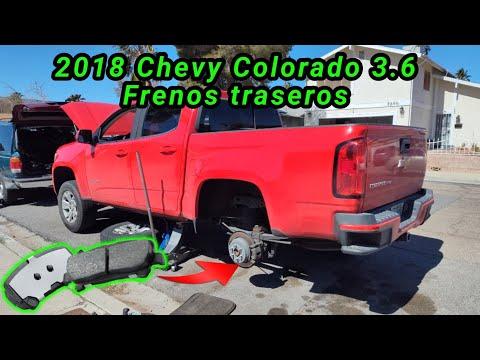
- Locate the rear caliper:
- You’ll see two small bolts on the back of the caliper – these are the guide pin bolts (13 mm).
- Remove the lower guide pin bolt (13 mm), then the upper one.
- Gently wiggle and lift the caliper off the bracket. If it’s stuck, use a flathead screwdriver to pry slightly at the edge, but don’t damage the rubber boots.
- Support the caliper with a wire, bungee cord, or set it on something.
Do not let it hang by the brake hose. - Slide the old pads out of the bracket. Note which side had the pad with the wear indicator (small metal tab).
- If your new pads came with new hardware clips, remove the old stainless clips from the bracket.
Inspect & Clean 🧼
- Spray the caliper bracket and rotor area with brake cleaner. Let it drip onto a catch pan or cardboard.
- Check the rotor surface:
- Deep grooves, cracks, or heavy lip at the edge = rotor should be replaced or machined.
- Pull the caliper slide pins (the smooth pins the bolts go into) out one at a time:
- Wipe old grease off.
- Apply a thin coat of brake grease and slide them back in until they move smoothly.
Install New Hardware & Pads 🧩
- Install the new stainless hardware clips into the caliper bracket (if included). Make sure they snap fully into place.
- Apply a very thin layer of brake grease on:
- The spots where the pad ears contact the hardware clips.
- Do NOT get grease on the pad friction surface or rotor.
- Slide the new pads into the bracket:
- The pad with the wear indicator tab usually goes on the inside (against the piston) on GM trucks.
Compress the Caliper Piston 🔧
- Look at the caliper piston (round part that pushes the inner pad).
- Place an old brake pad against the piston face.
- Use a C-clamp:
- One side on the back of the caliper body, the other on the old pad.
- Slowly tighten to push the piston back into the caliper until it’s flush with the housing.
- Watch the brake fluid reservoir under the hood:
- If fluid gets close to the top, remove some with a clean syringe or turkey baster so it doesn’t overflow.
Reinstall Caliper 🪛
- Position the caliper back over the new pads and bracket.
- Line up the caliper with the slide pin holes.
- Install the upper and lower guide pin bolts by hand first to avoid cross-threading.
- Tighten with a ratchet, then torque to:
- 30 N·m (22 lb-ft) for each guide pin bolt.
Repeat on the Other Side 🔁
Repeat the same steps on the other rear wheel. Always replace brake pads in pairs (both sides of the axle).
Reinstall Wheels & Lower Truck 🚙
- Put the wheels back on the hubs.
- Thread lug nuts by hand.
- Snug them in a star pattern with the wheel off the ground.
- Jack the truck slightly, remove jack stands, and lower the truck to the ground.
- Torque lug nuts in a star pattern to:
- 140 N·m (103 lb-ft)
Final Steps & Brake Pedal Check ✅
- Pump the brake pedal slowly 10–15 times until it feels firm.
This seats the pads against the rotors. - Check the brake fluid level and adjust to the “MAX” line if needed. Reinstall the cap.
- Now apply and release the parking brake a few times to make sure it feels normal.
- Look around each rear wheel for:
- No leaks
- No loose parts or rubbing noises when you spin the wheel by hand (if still lifted)
Test Drive & Pad Bedding 🧪
- Drive in a safe, low-traffic area.
- Do 5–8 gentle stops from about 30–40 km/h down to 5–10 km/h, letting the brakes cool for 30–60 seconds between stops.
- Avoid hard panic stops for the first 200–300 km if possible. This helps the pads and rotors wear in smoothly.
Infotainment / Settings Note 📱
Your Colorado doesn’t require any special infotainment or scan-tool steps for a simple rear pad change, so you’re all set there.
Parts & Tools from HowToo 🧩
You’ll see recommended rear brake pads, hardware kits, brake cleaner, grease, C-clamp, jack stands, and torque wrench in the HowToo parts section below. You can add them to your cart directly from there for fast shipping.
If you can, reply with whether your rear brakes are definitely disc or drum. If they’re drums, I’ll give you a different, specific guide for those.
HowToo makes it easy: same-day/2-day shipping on every part, plus all the tools and specialty tools you need! 🚚