















How to Replace Rear Brake Pads on a 2016-2021 Mercedes-Benz GLC300 (EPB Service Mode)
Step-by-step DIY guide with required tools, parts, EPB service position steps, and torque specs
How to Replace Rear Brake Pads on a 2016-2021 Mercedes-Benz GLC300 (EPB Service Mode)
Step-by-step DIY guide with required tools, parts, EPB service position steps, and torque specs for 2016, 2017, 2018, 2019, 2020, 2021


🔧 GLC300 - Rear Brake Pad Replacement
Replacing the rear brake pads on your GLC300 restores safe stopping and prevents rotor damage when pads wear thin. Because your GLC300 uses an electronic parking brake (EPB), you must put the rear brakes into a service position before compressing the caliper.
Difficulty Level: Intermediate | Estimated Time: 1.5-3 hours
⚠️ Safety & Precautions
- ⚠️ Never work under a vehicle supported only by a jack; use jack stands.
- ⚠️ Do not press the brake pedal with the rear calipers removed.
- ⚠️ EPB must be placed in brake service mode (pad change position) before pushing pistons back.
- ⚠️ Brake dust is harmful; avoid blowing it out, use brake cleaner.
- ⚠️ Let brakes cool fully; hot rotors/calipers can burn you.
- ⚠️ If you open the brake fluid cap, watch for overflow when compressing pistons.
🔧 Required Tools
You'll need the following tools for this repair:
- Floor jack (rated 3-ton minimum)
- Jack stands (rated 3-ton minimum)
- Wheel chocks
- 17mm socket
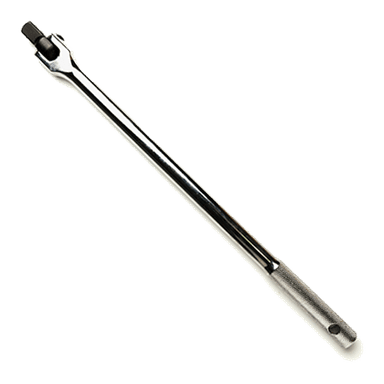
- 1/2" drive breaker bar
- 1/2" drive torque wrench (20-200 Nm range)
- 3/8" drive ratchet
- 3/8" drive torque wrench (5-60 Nm range)
- E-Torx socket set (E12, E14)
- Flat trim tool
- Brake caliper piston compressor tool
- Wire brush
- Brake cleaner
- Catch pan
- Bungee cord
- Nitrile gloves
- Safety glasses
🔩 Required Parts
HowToo sells all the parts you need for this repair:
- Rear brake pad set - Qty: 1
- Rear brake pad wear sensor - Qty: 1
- Brake caliper hardware kit (clips) - Qty: 1
- Brake grease (silicone/ceramic) - Qty: 1
📋 Before You Begin
- Park on level ground, steering straight, and place wheel chocks at the front wheels.
- Turn ignition on (engine off) and set the EPB into service mode using the vehicle menu so the rear calipers can retract.
- Open the hood and check brake fluid level; if it’s near MAX, plan for a small rise when pistons are pushed in.
🔨 Step-by-Step Instructions
Follow these steps in order:
Step 1: Put the EPB into brake service mode
- Turn ignition on (engine off).
- On the dash controls, go to Service > Brakes > Brake pad replacement (Service position) and confirm.
- Wait until the cluster confirms service position is active.
- If menu differs, use brake service function on scan tool.
Step 2: Loosen rear wheel bolts
- Use a 17mm socket and 1/2" drive breaker bar to crack each rear wheel bolt loose 1/4 turn.
Step 3: Raise and support the rear
- Lift the rear using the floor jack at the proper rear jack point.
- Set the vehicle onto jack stands (rated 3-ton minimum).
- Give the vehicle a gentle shake to confirm it’s stable.
Step 4: Remove the rear wheels
- Remove wheel bolts using the 17mm socket and 3/8" drive ratchet or breaker bar.
- Set the wheels aside, flat on the ground.
Step 5: Locate the wear sensor (one side only)
- Find the small wire going into the brake pad on one rear wheel.
- Use a flat trim tool to gently unclip the sensor wire from its holders.
- Unplug the connector (do not pull on the wire).
- Wear sensor is a “one-time” part.
Step 6: Remove the caliper guide bolts
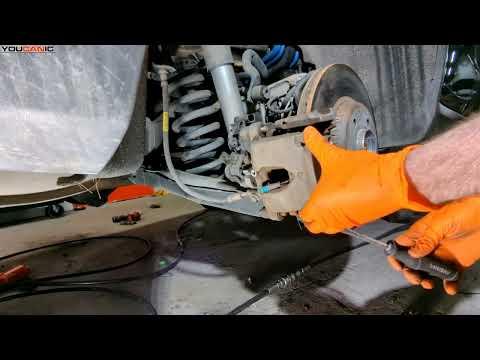
- On the back of the caliper, remove the two guide bolts using the correct E-Torx socket (E12, E14) and a 3/8" drive ratchet.
- Support the caliper immediately with a bungee cord so it doesn’t hang by the brake hose.
Step 7: Remove the old pads and hardware
- Slide the old pads out by hand.
- Remove the stainless pad clips (hardware) from the caliper bracket.
- Clean the pad contact areas using a wire brush and brake cleaner with a catch pan underneath.
Step 8: Compress the caliper piston
- Install the old inner pad back against the piston (as a buffer).
- Use a brake caliper piston compressor tool to slowly push the piston fully back into the caliper.
- Watch the brake fluid reservoir while compressing; stop if it looks like it will overflow.
- Slow pressure prevents seal damage.
Step 9: Install new pad hardware and pads
- Install new stainless clips from the brake caliper hardware kit (clips).
- Apply a thin film of brake grease (silicone/ceramic) to pad ears where they touch the clips (do not get any on pad friction material or rotor).
- Slide the new pads into place.
Step 10: Reinstall the caliper
- Lower the caliper over the new pads by hand.
- Install the guide bolts using the E-Torx socket and 3/8" drive ratchet.
- Tighten guide bolts with a torque wrench: Torque to 30 Nm (22 ft-lbs).
Step 11: Install the new wear sensor
- Press the new sensor into the pad until it clicks in.
- Route the wire exactly like the original and snap it into the clips.
- Reconnect the electrical connector firmly.
Step 12: Reinstall wheels
- Install wheel bolts finger-tight.
- Lower the vehicle off the jack stands using the floor jack.
- Torque wheel bolts in a star pattern: Torque to 130 Nm (96 ft-lbs) using a 1/2" drive torque wrench.
Step 13: Exit EPB service mode
- With ignition on, exit service mode via Service > Brakes > End service position.
- Confirm the EPB operates normally.
✅ After Repair
- Press the brake pedal slowly 10-15 times until it feels firm before driving.
- Check brake fluid level and top off only if needed.
- Start the engine and verify no brake warning lights remain.
- Do a low-speed test in a safe area: gentle stops, listen for grinding or clunks.
- Brake pad bedding: make 6-10 moderate stops from 30-5 mph, then drive to cool the brakes.
💰 DIY vs Shop Cost
Shop Cost: $350-$650 (parts + labor)
DIY Cost: $80-$200 (parts only)
You Save: $270-$450 by doing it yourself!
Shop labor rates vary but typically run $100-$150/hour. This repair takes a shop approximately 1.5-3 hours.
🎯 Ready to get started?
HowToo makes it easy: same-day/2-day shipping on every part, plus all the tools and specialty tools you need! Check out the parts and tools sections below to add everything to your cart.