














How to Replace Rear Brake Pads on a 2002-2005 Honda Civic (Rear Disc Brakes) (Trim: EX-L | Engine: Inline 4 1.8L | Body: Sedan)
Step-by-step DIY instructions with tools, parts list, safety tips, and torque specs
How to Replace Rear Brake Pads on a 2002-2005 Honda Civic (Rear Disc Brakes) (Trim: EX-L | Engine: Inline 4 1.8L | Body: Sedan)
Step-by-step DIY instructions with tools, parts list, safety tips, and torque specs for 2002, 2003, 2004, 2005


🔧 Civic - Rear Brake Pad Replacement
You’ll be removing the rear wheels, opening the rear calipers, swapping the pads (and hardware), then compressing the caliper pistons so everything fits back together. Rear pads wear from normal braking and can squeal, grind, or feel weak when they’re due.
Difficulty Level: Intermediate | Estimated Time: 1.5-3.0 hours
Assumption: your Civic has rear disc brakes with a mechanical parking brake.
⚠️ Safety & Precautions
- 🧯 Support the car with jack stands; never rely on a floor jack alone.
- 🧤 Brake dust is harmful—wear a mask and avoid blowing dust with air.
- 🔥 Brakes can be hot—let the rear brakes cool before touching parts.
- 🛑 Release the parking brake before starting (rear calipers won’t come off correctly if it’s applied).
- 🧪 Don’t let brake fluid overflow when compressing pistons; check the reservoir level.
🔧 Required Tools
You'll need the following tools for this repair:
- Floor jack (rated 2-ton minimum)
- Jack stands (rated 2-ton minimum)
- Wheel chocks
- 19mm socket
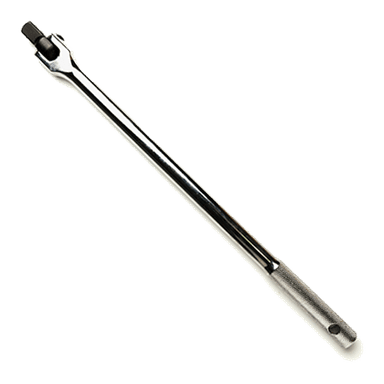
- 1/2" drive breaker bar
- 1/2" drive torque wrench (20-150 ft-lbs range)
- 3/8" drive ratchet
- 12mm socket
- 14mm socket
- Flat trim tool
- C-clamp (6")
- Brake caliper hanger hook
- Wire brush
- Brake parts cleaner spray
- Nitrile gloves
- Safety glasses
- Disposable shop towels
🔩 Required Parts
HowToo sells all the parts you need for this repair:
- Rear brake pad set - Qty: 1
- Rear brake pad hardware kit (clips/shims) - Qty: 1
- Brake caliper grease (silicone) - Qty: 1
📋 Before You Begin
- 🅿️ Park on level ground, turn the car off, and put the shifter in Park.
- 🧱 Place wheel chocks in front of both front tires.
- 🛑 Fully release the parking brake (it’s a foot pedal on your Civic).
- 🧴 Open the hood and locate the brake fluid reservoir; keep the cap seated (don’t remove it unless needed), and watch the fluid level during piston compression.
🔨 Step-by-Step Instructions
Follow these steps in order:
Step 1: Loosen the rear wheel lug nuts
- Use a 19mm socket with a 1/2" drive breaker bar to loosen each rear wheel’s lug nuts about 1 turn while the car is still on the ground.
Step 2: Lift and support the rear of the car
- Use a floor jack to lift the rear at the correct jacking point.
- Place jack stands under the rear support points and lower the car onto them.
- Give the car a gentle push to confirm it’s stable before working.
Step 3: Remove both rear wheels
- Remove the lug nuts using a 19mm socket and take off both rear wheels.
- Doing both sides helps you compare parts.
Step 4: Locate the rear caliper bolts
- Turn the steering wheel is not needed for the rear; just look behind the rotor for the caliper.
- You’ll see the caliper (the clamp) and the caliper bracket (the larger mount holding the pads).
Step 5: Remove the caliper (not the bracket)
- Use a 12mm socket with a 3/8" drive ratchet to remove the two caliper slide pin bolts.
- Lift the caliper off the bracket.
- Hang the caliper using a brake caliper hanger hook. Never let it hang by the hose.
- Torque to 34 Nm (25 ft-lbs) when reinstalling the caliper slide pin bolts.
Step 6: Remove the old brake pads and hardware
- Pull the inner and outer pads out of the bracket by hand.
- Use a flat trim tool to carefully pop the old stainless hardware clips out of the bracket.
Step 7: Clean the pad contact points
- Spray the bracket pad lands (where the clips sit) with brake parts cleaner spray.
- Use a wire brush to remove rust buildup so the new pads can slide freely.
- Wipe clean with disposable shop towels.
Step 8: Install new hardware clips and grease them lightly
- Snap the new clips from the rear brake pad hardware kit into the bracket by hand.
- Apply a very thin film of brake caliper grease (silicone) where the pad “ears” contact the clips.
- Grease on metal-to-metal only—never on pad friction.
Step 9: Compress the rear caliper piston
- Place one old pad against the piston face.
- Use a C-clamp (6") to slowly press the piston fully back into the caliper.
- Watch the brake fluid reservoir under the hood while compressing; stop if it nears the max line.
- Slow pressure prevents seal damage.
Step 10: Install the new rear pads
- Install the new inner and outer pads into the bracket by hand.
- Make sure the pads slide smoothly in the clips (no sticking).
Step 11: Reinstall the caliper over the new pads
- Lower the caliper back into position over the pads.
- Install the caliper slide pin bolts using a 12mm socket and 3/8" drive ratchet.
- Torque to 34 Nm (25 ft-lbs).
Step 12: Reinstall the wheels and torque the lug nuts
- Put the wheels back on and hand-thread all lug nuts.
- Lower the car off the jack stands using the floor jack.
- Use a 1/2" drive torque wrench with a 19mm socket to tighten lug nuts in a star pattern.
- Torque to 108 Nm (80 ft-lbs).
✅ After Repair
- 🦶 Pump the brake pedal 8–12 times until it feels firm (this seats the pistons against the new pads).
- 🧴 Recheck brake fluid level at the reservoir and adjust if needed (do not overfill).
- 👂 With the engine running, test brakes at very low speed first; listen for abnormal grinding or clunks.
- 🛣️ Bed-in the pads: make 6–10 smooth stops from ~30 mph down to ~5 mph, with light cool-down driving between stops.
💰 DIY vs Shop Cost
Shop Cost: $250-$450 (parts + labor)
DIY Cost: $40-$120 (parts only)
You Save: $130-$410 by doing it yourself!
Shop labor rates vary but typically run $100-$150/hour. This repair takes a shop approximately 1.0-1.8 hours.
🎯 Ready to get started?
HowToo makes it easy: same-day/2-day shipping on every part, plus all the tools and specialty tools you need! Check out the parts and tools sections below to add everything to your cart.
Guide for Disc Brake Pad Set replace for these Honda vehicles
| Year Make Model | Sub Model | Engine | Body Style |
|---|---|---|---|
| 2005 Honda Civic | Si | Inline 4 2.0L | Hatchback |
| 2004 Honda Civic | Si | Inline 4 2.0L | Hatchback |
| 2003 Honda Civic | Si | Inline 4 2.0L | Hatchback |
| 2002 Honda Civic | Si | Inline 4 2.0L | Hatchback |