





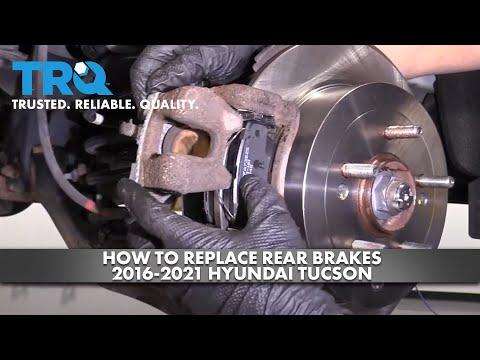
How to Replace Rear Brake Pads and Rotors on a 2016-2021 Hyundai Tucson (Trim: Limited)
Step-by-step DIY guide with EPB service mode, tools, parts, torque specs, and safety tips
How to Replace Rear Brake Pads and Rotors on a 2016-2021 Hyundai Tucson (Trim: Limited)
Step-by-step DIY guide with EPB service mode, tools, parts, torque specs, and safety tips for 2016, 2017


🔧 Tucson - Rear Brake Pad & Rotor Replacement
This repair replaces the rear brake pads and rear brake rotors on your Tucson. Rear brakes use an electronic parking brake, so the parking brake motors must be retracted before the calipers are removed.
Difficulty Level: Intermediate | Estimated Time: 2-3 hours
⚠️ Safety & Precautions
- ⚠️ Your Tucson has an electronic parking brake, also called EPB. Do not force the rear caliper pistons back unless the EPB is in service mode.
- ⚠️ Use jack stands every time the vehicle is lifted. Never rely on a floor jack alone.
- ⚠️ Wear safety glasses and gloves. Brake dust and rust can irritate your skin and eyes.
- ⚠️ Do not press the brake pedal while the caliper is removed.
- ⚠️ Keep brake cleaner away from painted surfaces.
- ⚠️ Battery disconnect is not required, but keep the ignition off once EPB service mode is active.
🔧 Required Tools
You'll need the following tools for this repair:
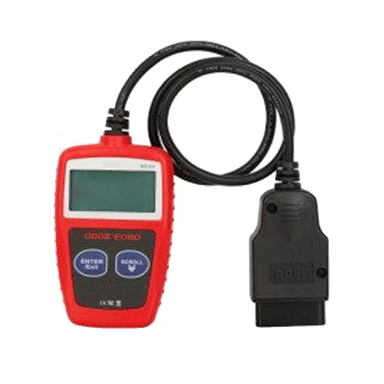
- OBD-II scan tool with Hyundai EPB service mode (specialty)
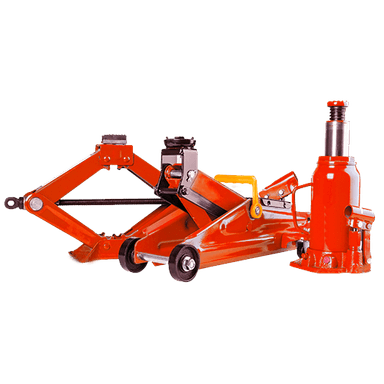
- Floor jack (rated 2-ton minimum)
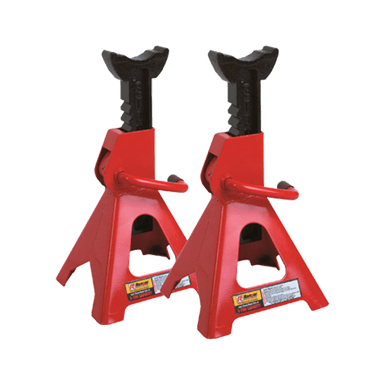
- Jack stands (rated 2-ton minimum)
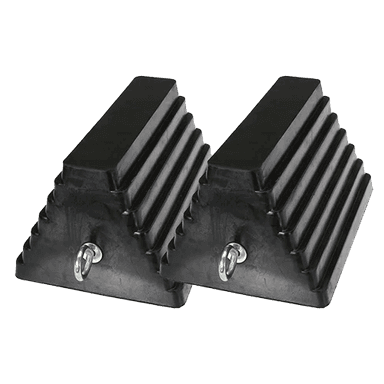
- Wheel chocks
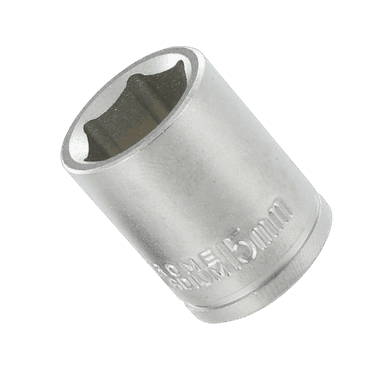
- 21mm lug nut socket
- Ratchet wrench 3/8-inch drive
- Ratchet wrench 1/2-inch drive
- 14mm socket
- 17mm wrench
- 17mm socket
- Torque wrench 3/8-inch drive
- Torque wrench 1/2-inch drive
- Brake caliper piston compressor (specialty)
- Impact screwdriver No. 3 Phillips (specialty)
- No. 3 Phillips bit
- Rubber mallet
- Wire brush
- Brake parts cleaning brush
- Bungee cord
- Flat-blade screwdriver
- Brake cleaner aerosol can
- Shop towels
- Nitrile gloves
- Safety glasses
🔩 Required Parts
HowToo sells all the parts you need for this repair:
- Rear brake pad set - Qty: 1
- Rear brake rotors - Replace in pairs - Qty: 2
- Rear brake hardware kit - Qty: 1
- Brake caliper slide pin grease - Qty: 1
- Brake cleaner aerosol can - Qty: 1-2
📋 Before You Begin
- 🅿️ Park your Tucson on a flat, solid surface.
- 🅿️ Place the transmission in Park and leave the parking brake released.
- 🧱 Put wheel chocks in front of and behind the front wheels.
- 🔍 A scan tool is required to place the electronic parking brake into service mode. This tells the parking brake motors to back off safely.
- 🧰 Loosen the rear wheel lug nuts slightly before lifting the vehicle.
- 📌 Do one side at a time so the other side can be used as a reference.
🔨 Step-by-Step Instructions
Follow these steps in order:
Step 1: Put the EPB in Service Mode
- Plug the OBD-II scan tool with Hyundai EPB service mode into the diagnostic port under the driver-side dash.
- Turn the ignition ON without starting the engine.
- Use the scan tool and select Hyundai > Tucson > Parking Brake/EPB > Maintenance Mode/Open EPB.
- Wait until the scan tool confirms the rear parking brake motors are fully retracted.
- Turn the ignition OFF, but do not apply the parking brake.
- Do not skip this step.
Step 2: Loosen the Rear Wheel Lug Nuts
- Use the 21mm lug nut socket and 1/2-inch drive ratchet wrench to loosen each rear lug nut about half a turn.
- Do not remove the lug nuts yet.
Step 3: Lift and Support the Rear of the Vehicle
- Use the floor jack to lift the rear of your Tucson at the rear jacking point.
- Place the jack stands under the proper rear support points.
- Lower the vehicle gently onto the jack stands.
- Give the vehicle a small shake by hand to confirm it is stable.
Step 4: Remove the Rear Wheels
- Use the 21mm lug nut socket to remove the rear lug nuts.
- Remove both rear wheels and place them flat under the side of the vehicle as an added safety backup.
Step 5: Remove the Rear Caliper
- Use the 14mm socket to remove the upper and lower rear caliper slide pin bolts.
- If a slide pin spins, hold it steady with the 17mm wrench.
- Lift the caliper off the bracket.
- Hang the caliper from the suspension using the bungee cord.
- Do not let the caliper hang by the rubber brake hose.
Step 6: Remove the Old Brake Pads and Hardware
- Use the flat-blade screwdriver to gently pry the old brake pads out of the caliper bracket.
- Remove the old metal pad clips from the bracket by hand or with the flat-blade screwdriver.
- These clips are anti-rattle hardware. They help the pads slide smoothly and stay quiet.
Step 7: Remove the Caliper Bracket
- Use the 17mm socket and 1/2-inch drive ratchet wrench to remove the two caliper bracket bolts.
- Remove the caliper bracket and set it on a clean surface.
- These bolts may be tight, so keep the socket straight to avoid rounding the bolt heads.
Step 8: Remove the Rear Rotor
- Use the impact screwdriver No. 3 Phillips with the No. 3 Phillips bit to remove the rotor retaining screw if equipped.
- If the rotor is stuck from rust, tap the rotor hat with the rubber mallet.
- Pull the rotor straight off the hub.
- Hit the rotor, not the studs.
Step 9: Clean the Hub Face
- Use the wire brush to clean rust from the wheel hub face.
- Use brake cleaner aerosol can and shop towels to wipe the hub clean.
- The hub face must be flat and clean so the new rotor does not wobble.
Step 10: Install the New Rotor
- Clean both sides of the new rotor with the brake cleaner aerosol can and shop towels.
- Slide the new rotor onto the hub.
- Reinstall the rotor retaining screw if equipped using the No. 3 Phillips bit.
- Torque the rotor retaining screw to 4-6 Nm (35-53 in-lbs).
Step 11: Service the Caliper Bracket
- Use the brake parts cleaning brush and brake cleaner aerosol can to clean the caliper bracket where the pad clips sit.
- Install the new rear brake hardware clips by hand.
- Pull the slide pins out by hand, wipe them clean with shop towels, and apply a light coat of brake caliper slide pin grease.
- Slide pins are small guide pins that let the caliper move evenly as the pads wear.
Step 12: Reinstall the Caliper Bracket
- Place the caliper bracket over the new rotor.
- Start both bracket bolts by hand to prevent cross-threading.
- Use the 17mm socket and torque wrench 1/2-inch drive to tighten the bracket bolts.
- Torque to 79-98 Nm (58-72 ft-lbs).
Step 13: Install the New Brake Pads
- Apply a thin layer of brake caliper slide pin grease only to the pad ears where they touch the hardware clips.
- Do not get grease on the pad friction material or rotor face.
- Slide the new inner and outer brake pads into the bracket by hand.
- The pads should move smoothly without being loose.
Step 14: Compress the Caliper Piston
- Use the brake caliper piston compressor to slowly push the caliper piston straight back into the caliper.
- Because the EPB is already in service mode, the piston should compress smoothly.
- If it does not move, stop and confirm EPB service mode with the OBD-II scan tool with Hyundai EPB service mode.
- Slow pressure protects the brake system.
Step 15: Reinstall the Rear Caliper
- Place the caliper over the new pads and bracket.
- Start the slide pin bolts by hand.
- Use the 14mm socket and torque wrench 3/8-inch drive to tighten the caliper slide pin bolts.
- Torque to 22-32 Nm (16-24 ft-lbs).
Step 16: Repeat on the Other Side
- Repeat Steps 5 through 15 on the opposite rear brake.
- Use the same tools and torque specs.
- Replace rear pads and rotors as a pair to keep braking even.
Step 17: Reinstall the Rear Wheels
- Install each rear wheel by hand.
- Thread all lug nuts by hand first.
- Use the 21mm lug nut socket to snug the lug nuts in a star pattern.
Step 18: Lower the Vehicle and Torque the Lug Nuts
- Use the floor jack to lift the vehicle slightly off the jack stands.
- Remove the jack stands.
- Lower the vehicle fully to the ground.
- Use the 21mm lug nut socket and torque wrench 1/2-inch drive to tighten the lug nuts in a star pattern.
- Torque to 107-127 Nm (79-94 ft-lbs).
Step 19: Exit EPB Service Mode
- Turn the ignition ON without starting the engine.
- Use the OBD-II scan tool with Hyundai EPB service mode and select Hyundai > Tucson > Parking Brake/EPB > Close EPB/End Maintenance Mode.
- Wait for the scan tool to confirm completion.
- Turn the ignition OFF.
Step 20: Seat the Brake Pads
- Press the brake pedal slowly 5-10 times until it feels firm.
- Use your foot only. Do not start driving until the pedal is firm.
- Start the engine and confirm the brake warning light turns off.
✅ After Repair
- ✅ Test the electronic parking brake several times while parked.
- ✅ Check that the brake pedal feels firm before moving the vehicle.
- ✅ Drive slowly in a safe area and test the brakes at low speed.
- ✅ Listen for scraping, grinding, or clunking noises.
- ✅ Recheck lug nut torque after the first short drive.
- ✅ Bed in the new pads with several gentle stops from 30-40 mph. Avoid hard braking for the first 200 miles unless needed for safety.
💰 DIY vs Shop Cost
Shop Cost: $350-$550 (parts + labor)
DIY Cost: $120-$240 (parts only)
You Save: $230-$310 by doing it yourself!
Shop labor rates vary but typically run $100-$150/hour. This repair takes a shop approximately 1.5-2.0 hours.
🎯 Ready to get started?
HowToo makes it easy: same-day/2-day shipping on every part, plus all the tools and specialty tools you need! Check out the parts and tools sections below to add everything to your cart.
Guide for Disc Brake Pad Set replace for these Hyundai vehicles
| Year Make Model | Sub Model | Engine | Body Style |
|---|---|---|---|
| 2021 Hyundai Tucson | Limited | - | - |
| 2021 Hyundai Tucson | SE | - | - |
| 2021 Hyundai Tucson | Sport | - | - |
| 2021 Hyundai Tucson | Ultimate | - | - |
| 2020 Hyundai Tucson | Limited | - | - |
| 2020 Hyundai Tucson | SE | - | - |
| 2020 Hyundai Tucson | Sport | - | - |
| 2020 Hyundai Tucson | Ultimate | - | - |
| 2019 Hyundai Tucson | Limited | - | - |
| 2019 Hyundai Tucson | SE | - | - |
| 2019 Hyundai Tucson | Sport | - | - |
| 2019 Hyundai Tucson | Ultimate | - | - |
| 2018 Hyundai Tucson | Limited | - | - |
| 2018 Hyundai Tucson | SE | - | - |
| 2018 Hyundai Tucson | Sport | - | - |
| 2017 Hyundai Tucson | Eco | - | - |
| 2017 Hyundai Tucson | Limited | - | - |
| 2017 Hyundai Tucson | SE | - | - |
| 2017 Hyundai Tucson | Sport | - | - |
| 2017 Hyundai Tucson | Value | - | - |
| 2016 Hyundai Tucson | Eco | - | - |
| 2016 Hyundai Tucson | Limited | - | - |
| 2016 Hyundai Tucson | SE | - | - |
| 2016 Hyundai Tucson | Sport | - | - |