














How to Replace Rear Brake Pads and Rotors on a 2011-2018 Ram 1500
Step-by-step instructions with tools, parts, torque specs, and safety tips
How to Replace Rear Brake Pads and Rotors on a 2011-2018 Ram 1500
Step-by-step instructions with tools, parts, torque specs, and safety tips for 2011, 2012, 2013, 2014, 2015, 2016, 2017, 2018


🔧 Rear Brake Pads and Rotors - Replacement
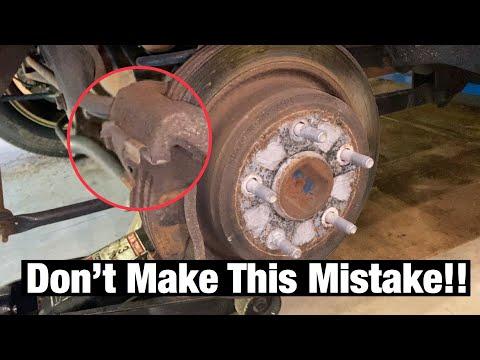
On your Ram 1500, the rear brake pads and rotors are serviced together. The rear rotor is a “drum-in-hat” design, so you must make sure the parking brake is fully released before removing the rotor. If the rotor is stuck, the parking brake shoes may need a little adjustment off.
Difficulty Level: Intermediate | Estimated Time: 2-4 hours
⚠️ Safety & Precautions
- Work on a flat surface and chock the front wheels.
- Keep the parking brake fully released before removing the rear rotors.
- Support the truck with jack stands before removing wheels. Never rely on a jack alone.
- Brake dust can be harmful. Wear safety glasses and a dust mask if needed.
- Do not press the brake pedal with a caliper removed.
- If your truck has any electronic parking brake function, retract it before service. If not, release the parking brake manually.
🔧 Required Tools
You'll need the following tools for this repair:
- Floor jack (rated 3-ton minimum)
- Jack stands (rated for truck weight)
- Wheel chocks
- 21mm lug nut socket
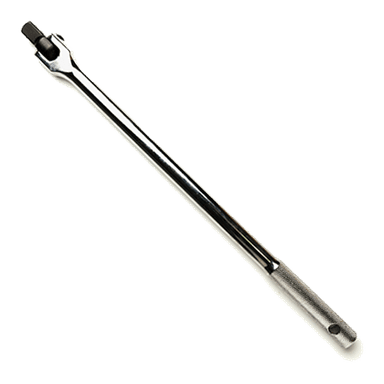
- 1/2-inch drive breaker bar
- 3/8-inch drive ratchet
- 13mm socket
- 18mm socket
- Torque wrench
- Flathead screwdriver
- Brake caliper piston tool (specialty)
- Bungee cord or mechanic's wire
- Wire brush
- Brake cleaner
- Micrometer or brake rotor gauge
- Safety glasses
- Mechanic gloves
🔩 Required Parts
HowToo sells all the parts you need for this repair:
- Rear brake pad set - Qty: 1
- Rear brake rotors - Replace in pairs - Qty: 2
- Brake hardware kit - Qty: 1
- Brake cleaner - Qty: 1
📋 Before You Begin
- Park on level ground and set the transmission in Park.
- Release the parking brake before removing the rear rotors.
- Loosen the rear lug nuts before lifting the truck.
- Raise the rear and support it securely on jack stands.
🔨 Step-by-Step Instructions
Follow these steps in order:
Step 1: Remove the rear wheels
- Use the 21mm lug nut socket and breaker bar to loosen the lug nuts before lifting, then remove them fully after the truck is safely on stands.
- Remove both rear wheels and set them aside.
Step 2: Remove the caliper
- Use the 13mm socket to remove the rear caliper guide pin bolts.
- Lift the caliper off the bracket and hang it with a bungee cord or mechanic's wire.
- Do not let the caliper hang by the hose.
- Torque for caliper guide pin bolts on reassembly: 24 Nm (18 ft-lbs).
Step 3: Remove the caliper bracket
- Use the 18mm socket and breaker bar to remove the caliper bracket bolts.
- Remove the bracket from the axle flange.
- Torque for caliper bracket bolts on reassembly: 148 Nm (109 ft-lbs).
Step 4: Remove the rotor
- Pull the rotor straight off the hub.
- If it is stuck, use the flathead screwdriver to back off the parking brake adjuster through the access slot in the backing plate.
- Tap the rotor hat gently if needed.
- If the rotor has a retaining screw, remove it with the appropriate driver before pulling the rotor off.
Step 5: Inspect the parking brake and hub
- Use the wire brush to clean rust from the hub face.
- Inspect the parking brake shoes inside the rotor hat for lining wear, cracking, or oil contamination.
- Check rotor thickness and compare the new rotor to the old one.
Step 6: Install the new rotor
- Spray the new rotor with brake cleaner to remove shipping oil.
- Install the rotor onto the hub.
- If equipped, install the rotor retaining screw and snug it down.
- Make sure the rotor sits flat.
Step 7: Install new pads and hardware
- Remove the old pad clips from the bracket.
- Install the new hardware from the brake hardware kit.
- Apply a thin film of brake grease to the pad contact points if included with the pad kit.
- Install the new rear brake pads in the bracket.
Step 8: Compress the caliper piston and reinstall the caliper
- Use the brake caliper piston tool (specialty) to push the piston back into the caliper.
- Set the caliper over the new pads and bracket.
- Install the guide pin bolts with the 13mm socket.
- Torque the guide pin bolts to 24 Nm (18 ft-lbs).
Step 9: Reinstall the wheels
- Put the wheels back on and hand-start the lug nuts.
- Lower the truck enough for the tires to touch the ground, then use the torque wrench and 21mm socket to tighten the lug nuts in a star pattern.
- Torque the lug nuts to 176 Nm (130 ft-lbs).
Step 10: Pump the brake pedal
- Press the brake pedal slowly several times until it becomes firm.
- This seats the caliper pistons and pads against the rotors.
- Do this before moving the truck.
✅ After Repair
- Check brake fluid level in the master cylinder.
- Test the brake pedal feel before driving.
- Test at low speed first and listen for abnormal noise.
- Recheck lug nut torque after about 50-100 miles.
- New brake pads need a short break-in period. Avoid hard stops for the first 200 miles if possible.
💰 DIY vs Shop Cost
Shop Cost: $450-$850 (parts + labor)
DIY Cost: $180-$360 (parts only)
You Save: $270-$490 by doing it yourself!
Shop labor rates vary but typically run $100-$150/hour. This repair takes a shop approximately 2-4 hours.
🎯 Ready to get started?
HowToo makes it easy: same-day/2-day shipping on every part, plus all the tools and specialty tools you need! Check out the parts and tools sections below to add everything to your cart.
🔧 Rear Brake Pads and Rotors - Replacement
On your Ram, the rear pads and rotors are serviced together. The rear rotor sits over the parking brake shoes, so the parking brake must be fully released before removal. If the rotor is stuck, the parking brake adjuster may need to be backed off slightly.
Difficulty Level: Intermediate | Estimated Time: 2-4 hours
⚠️ Safety & Precautions
- Work on level ground and chock the front wheels.
- Support the truck with jack stands before removing the wheels.
- Fully release the parking brake before removing the rear rotors.
- Do not press the brake pedal with a caliper removed.
- Wear safety glasses and gloves. Brake dust is harmful.
- If any caliper hardware is corroded, replace it before reassembly.
🔧 Required Tools
You'll need the following tools for this repair:
- Floor jack (rated 3-ton minimum)
- Jack stands (rated for truck weight)
- Wheel chocks
- 21mm lug nut socket
- 1/2-inch drive breaker bar
- 3/8-inch drive ratchet
- 13mm socket
- 18mm socket
- Torque wrench
- Flathead screwdriver
- Brake caliper piston tool (specialty)
- Bungee cord or mechanic's wire
- Wire brush
- Brake cleaner
- Safety glasses
- Mechanic gloves
🔩 Required Parts
HowToo sells all the parts you need for this repair:
- Rear brake pad set - Qty: 1
- Rear brake rotors - Replace in pairs - Qty: 2
- Brake hardware kit - Qty: 1
- Brake cleaner - Qty: 1
📋 Before You Begin
- Park on level ground and set the transmission in Park.
- Release the parking brake fully.
- Loosen the rear lug nuts before lifting the truck.
- Raise the rear and support it securely on jack stands.
🔨 Step-by-Step Instructions
Follow these steps in order:
Step 1: Remove the rear wheels
- Use the 21mm lug nut socket and breaker bar to loosen the lug nuts before lifting, then remove them after the truck is safely on stands.
- Remove both rear wheels.
Step 2: Remove the caliper
- Use the 13mm socket to remove the rear caliper guide pin bolts.
- Lift the caliper off the bracket and hang it with a bungee cord or mechanic's wire.
- Do not let the hose carry the weight.
- Torque on reassembly: 24 Nm (18 ft-lbs).
Step 3: Remove the caliper bracket
- Use the 18mm socket and breaker bar to remove the bracket bolts.
- Remove the caliper bracket from the axle flange.
- Torque on reassembly: 148 Nm (109 ft-lbs).
Step 4: Remove the rotor
- Pull the rotor straight off the hub.
- If it is stuck, use the flathead screwdriver to back off the parking brake adjuster through the access slot in the backing plate.
- Tap the rotor hat lightly if needed.
Step 5: Clean and inspect
- Use the wire brush to clean rust from the hub face.
- Inspect the parking brake shoes inside the rotor hat.
- Check the rotor surface and compare the new rotor to the old one.
Step 6: Install the new rotor
- Spray the new rotor with brake cleaner to remove shipping oil.
- Install the rotor onto the hub.
- If equipped, reinstall the rotor retaining screw.
- Make sure the rotor sits flat on the hub.
Step 7: Install new pads and hardware
- Remove the old pad clips from the bracket.
- Install the new hardware from the brake hardware kit.
- Install the new rear brake pads in the bracket.
Step 8: Compress the caliper and reinstall
- Use the brake caliper piston tool (specialty) to push the piston fully back into the caliper.
- Set the caliper over the new pads and reinstall it.
- Install the guide pin bolts with the 13mm socket.
- Torque to 24 Nm (18 ft-lbs).
Step 9: Reinstall the wheels
- Install the wheels and hand-start the lug nuts.
- Lower the truck until the tires touch the ground.
- Use the torque wrench and 21mm socket to tighten the lug nuts in a star pattern.
- Torque to 176 Nm (130 ft-lbs).
Step 10: Pump the brake pedal
- Press the brake pedal several times until it feels firm.
- This seats the pads against the rotors before driving.
- Do not move the truck until the pedal firms up.
✅ After Repair
- Check the brake fluid level.
- Test brake feel at low speed first.
- Listen for rubbing or clicking noises.
- Recheck lug nut torque after 50-100 miles.
- New pads need a short break-in period. Avoid hard stops for the first 200 miles if possible.
💰 DIY vs Shop Cost
Shop Cost: $450-$850 (parts + labor)
DIY Cost: $180-$360 (parts only)
You Save: $270-$490 by doing it yourself!
Shop labor rates vary but typically run $100-$150/hour. This repair takes a shop approximately 2-4 hours.
🎯 Ready to get started?
HowToo makes it easy: same-day/2-day shipping on every part, plus all the tools and specialty tools you need! Check out the parts and tools sections below to add everything to your cart.
Guide for Disc Brake Pad Set replace for these Ram vehicles
| Year Make Model | Sub Model | Engine | Body Style |
|---|---|---|---|
| 2018 Ram 1500 | - | - | - |
| 2017 Ram 1500 | - | - | - |
| 2016 Ram 1500 | - | - | - |
| 2015 Ram 1500 | - | - | - |
| 2014 Ram 1500 | - | - | - |
| 2013 Ram 1500 | - | - | - |
| 2012 Ram 1500 | - | - | - |
| 2011 Ram 1500 | - | - | - |