








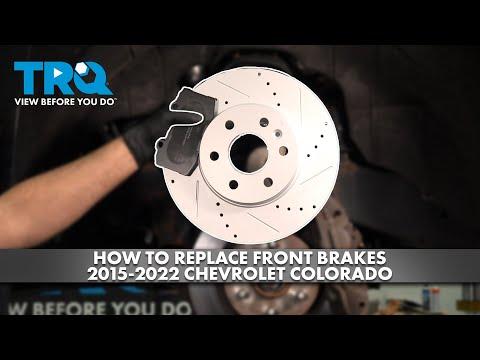







How to Replace Front Brake Pads on a 2016-2018 Chevrolet Colorado (DIY Guide)
Step-by-step instructions with required tools/parts, safety tips, and torque specs for caliper bolts and lug nuts
How to Replace Front Brake Pads on a 2016-2018 Chevrolet Colorado (DIY Guide)
Step-by-step instructions with required tools/parts, safety tips, and torque specs for caliper bolts and lug nuts for 2016, 2017, 2018


🔧 Colorado - Front Brake Pad Replacement
Replacing the front brake pads restores safe stopping power and prevents rotor damage when pads get thin. On your Colorado, this is a straightforward caliper-and-bracket style setup: remove the caliper, swap pads, and reassemble with the correct torque.
Difficulty Level: Intermediate | Estimated Time: 1.5-3 hours
⚠️ Safety & Precautions
- 🛑 Support the truck with jack stands; never rely on a jack alone.
- 🧤 Wear safety glasses and mechanic gloves; brake dust and rust fall easily.
- 🔥 Brakes can be hot; let everything cool before touching calipers/rotors.
- 🚫 Do not press the brake pedal while a caliper is off the rotor.
- 🧴 Brake fluid can damage paint; keep rags handy and wipe spills fast.
- 🔌 Battery disconnect is not required for this repair.
🔧 Required Tools
You'll need the following tools for this repair:
- Floor jack (rated 3-ton minimum)
- Jack stands (rated 3-ton minimum)
- Wheel chocks
- Lug wrench (22mm)
- Ratchet (3/8" drive)
- Ratchet (1/2" drive)
- Socket set (metric)
- Breaker bar (1/2" drive)
- Torque wrench (10-200 ft-lbs range)
- C-clamp brake piston compressor
- Flat-blade screwdriver
- Bungee cord
- Wire brush
- Brake cleaner spray
- Catch pan
- Shop rags
- Safety glasses
- Mechanic gloves
🔩 Required Parts
HowToo sells all the parts you need for this repair:
- Front brake pad set - Qty: 1
- Front brake pad hardware kit (clips/shims) - Qty: 1
- Brake lubricant (silicone-based) - Qty: 1
- Brake fluid (DOT 3) - Qty: 1 quart
📋 Before You Begin
- Park on level ground, put the transmission in 1st gear, and set the parking brake.
- Place wheel chocks behind the rear tires.
- Loosen the front lug nuts 1/2 turn using a 22mm lug wrench before lifting.
- Pop the hood and locate the brake fluid reservoir; if it’s very full, be ready to remove a little with rags if fluid rises when you compress the piston.
- Take a quick photo of pad/clip layout.
🔨 Step-by-Step Instructions
Follow these steps in order:
Step 1: Lift and secure the front end
- Use a floor jack (rated 3-ton minimum) to lift the front of the truck at the front jacking point.
- Set the truck down onto jack stands (rated 3-ton minimum) under the frame points.
- Give the truck a gentle push to confirm it’s stable.
Step 2: Remove the front wheels
- Remove the lug nuts using a 22mm lug wrench.
- Remove both front wheels and set them aside.
Step 3: Access the caliper and remove the caliper bolts
- Turn the steering so you can see the back of the caliper more easily.
- Remove the two caliper slide pin bolts using a ratchet and socket set (metric).
- If they’re tight, use a breaker bar (1/2" drive) carefully.
Step 4: Remove the caliper and support it
- Lift the caliper off the rotor. If it’s stuck, gently pry with a flat-blade screwdriver.
- Hang the caliper from the suspension using a bungee cord.
- Do not let the caliper hang by the rubber brake hose.
Step 5: Remove the old brake pads and hardware
- Slide the pads out of the bracket by hand.
- Remove the pad clips (hardware) from the bracket.
- Clean the bracket pad-contact areas using a wire brush and brake cleaner spray into a catch pan.
Step 6: Compress the caliper piston
- Place one old pad against the piston face (this protects the piston).
- Use a C-clamp brake piston compressor to slowly push the piston back into the caliper.
- Watch the brake fluid reservoir level under the hood as you compress.
- Go slow to avoid overflowing fluid.
Step 7: Install new pad hardware and lubricate contact points
- Install the new clips from the front brake pad hardware kit onto the bracket.
- Apply a thin film of brake lubricant (silicone-based) where the pad ears touch the clips.
- Do not get lubricant on the pad friction material or rotor.
Step 8: Install the new front brake pads
- Install the inner and outer pads into the bracket.
- If one pad has a wear indicator, install it in the same position as the original setup.
Step 9: Reinstall the caliper
- Lower the caliper back over the new pads.
- Install the caliper slide pin bolts using a ratchet and socket set (metric).
- Tighten to Torque to 35 Nm (26 ft-lbs).
Step 10: Reinstall wheels and torque lug nuts
- Put the wheels back on and hand-thread the lug nuts.
- Lower the truck off the jack stands (rated 3-ton minimum) using the floor jack (rated 3-ton minimum).
- Tighten lug nuts in a star pattern using a torque wrench: Torque to 190 Nm (140 ft-lbs).
Step 11: Pump the brake pedal and check fluid
- With the truck on the ground, press the brake pedal slowly 10-15 times until it feels firm.
- Check the reservoir and top off with brake fluid (DOT 3) if needed.
- Clean any spilled fluid with shop rags.
✅ After Repair
- Start the engine and confirm the brake pedal stays firm.
- Do a slow test in a safe area: gentle stops from 5-10 mph first.
- Listen for abnormal grinding; light “whoosh” is normal with new pads.
- Bed-in the pads: make 6-10 moderate stops from 30-40 mph, allowing a little cool-down between stops.
- Recheck brake fluid level after the test drive.
💰 DIY vs Shop Cost
Shop Cost: $250-$450 (parts + labor)
DIY Cost: $60-$180 (parts only)
You Save: $190-$270 by doing it yourself!
Shop labor rates vary but typically run $100-$150/hour. This repair takes a shop approximately 1.5-3 hours.
🎯 Ready to get started?
HowToo makes it easy: same-day/2-day shipping on every part, plus all the tools and specialty tools you need! Check out the parts and tools sections below to add everything to your cart.
Assumption: Torque specs shown are for the common Colorado front caliper slide-pin setup; some packages use different fastener sizes—match the exact bolts you remove and torque accordingly.
Guide for Disc Brake Pad Set replace for these Chevrolet vehicles
| Year Make Model | Sub Model | Engine | Body Style |
|---|---|---|---|
| 2018 Chevrolet Colorado | - | - | - |
| 2017 Chevrolet Colorado | - | - | - |
| 2016 Chevrolet Colorado | - | - | - |