









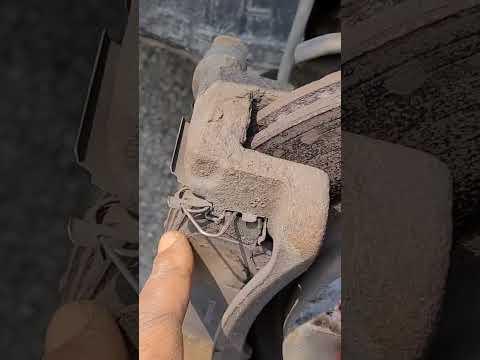







How to Replace Front Brake Pads and Rotors on a 2014-2019 Nissan Rogue (Trim: SV)
Step-by-step DIY brake job with tools, parts list, torque specs, safety tips, and cost savings
How to Replace Front Brake Pads and Rotors on a 2014-2019 Nissan Rogue (Trim: SV)
Step-by-step DIY brake job with tools, parts list, torque specs, safety tips, and cost savings for 2014, 2015, 2016, 2017, 2018, 2019


🔧 Rogue - Front Brake Pads & Rotors Replacement
You’ll be removing the front wheels, taking off the brake calipers and brackets, then swapping the pads and rotors on your Rogue. This restores braking power and stops vibration or grinding when braking.
Difficulty Level: Beginner-Intermediate | Estimated Time: 3-4 hours
⚠️ Safety & Precautions
- 🛑 Always support the vehicle with jack stands; never rely on the jack alone.
- 🧯 Work on a cool brake system; hot rotors and calipers can burn you.
- 😷 Brake dust is harmful; avoid breathing it in and use brake cleaner, not compressed air, to clean.
- 🔒 Keep the transmission in Park and set the parking brake before lifting the front.
- 🔋 Battery disconnect is not required for this job.
- 🧠 Do one side at a time so you can look at the other side as a reference.
🔧 Required Tools
You'll need the following tools for this repair:
- Floor jack (rated 3-ton minimum)
- Jack stands (rated 3-ton minimum, Qty: 2)
- Wheel chocks
- Lug wrench or 21mm socket
- 3/8" drive ratchet
- 1/2" drive ratchet
- 1/2" drive breaker bar
- Torque wrench 3/8" drive (5-80 ft-lbs range)
- Torque wrench 1/2" drive (50-150 ft-lbs range)
- 14mm socket
- 17mm socket
- Flathead screwdriver (medium)
- C-clamp (6" or larger) or disc brake piston tool
- Wire brush (small, steel)
- Bungee cord or mechanics wire
- Shop rags
- Safety glasses
- Mechanic gloves
🔩 Required Parts
HowToo sells all the parts you need for this repair:
- Front brake pad set - Qty: 1 (replace in pairs)
- Front brake rotors - Qty: 2 (replace in pairs)
- Front brake hardware kit (pad clips/shims) - Qty: 1
- Brake cleaner spray - Qty: 2 cans
- High-temperature brake grease - Qty: 1 tube
- Anti-seize compound - Qty: 1 small tube
- Shop towels or paper towels - Qty: 1 pack
📋 Before You Begin
- 🅿️ Park the Rogue on a flat, solid surface. Put the transmission in Park and set the parking brake.
- 🧱 Place wheel chocks behind both rear wheels to prevent rolling.
- 📦 Loosen (but do not remove) the front wheel lug nuts one turn before lifting.
- 📚 Keep your new parts nearby and open the boxes to confirm they match the old parts.
🔨 Step-by-Step Instructions
Follow these steps in order:
Step 1: Lift and support the front of your Rogue
- Use the lug wrench or 21mm socket to loosen each front wheel lug nut about one turn while the vehicle is still on the ground.
- Position the floor jack under the front center jacking point (front crossmember behind the radiator area) and lift until both front wheels are off the ground.
- Place jack stands under the pinch welds just behind each front wheel and slowly lower the vehicle onto the stands using the floor jack.
- Give the Rogue a firm push at a corner to be sure it is stable on the stands.
Step 2: Remove the front wheels
- Use the lug wrench or 21mm socket with 1/2" ratchet to remove all front wheel lug nuts.
- Pull both front wheels straight off and set them aside safely.
- Lay wheels flat so they can’t roll away.
Step 3: Inspect the front brake setup
- You’ll see the rotor (large disc) and the caliper (clamp-looking part) over the rotor attached to a bracket.
- Note the brake hose routing and pad clips so you can reinstall the same way later.
Step 4: Remove the brake caliper
- Use a flathead screwdriver to gently pry between the pad and rotor to create a little space. This makes caliper removal easier.
- From the back of the caliper, use a 14mm socket with 3/8" ratchet to remove the upper and lower caliper slide bolts.
- Carefully slide the caliper off the bracket and rotor. If it’s tight, wiggle it gently.
- Hang the caliper from the spring or strut using a bungee cord or mechanics wire. Do not let it hang by the rubber brake hose.
Step 5: Remove the brake pads and hardware
- Slide the old pads out of the caliper bracket by hand.
- Remove the metal pad retaining clips from the caliper bracket; these will be replaced with new ones from the hardware kit.
- Inspect the pads so you understand how the new ones should sit in the bracket.
Step 6: Remove the caliper bracket
- Use a 17mm socket with 1/2" breaker bar to remove the two large caliper bracket bolts on the back side of the steering knuckle.
- Take the caliper bracket off the rotor and set it on a clean surface.
- Factory spec for these bolts on your Rogue is: Torque to 137 Nm (101 ft-lbs) during reassembly.
Step 7: Remove the old rotor
- If the rotor slides off easily, pull it straight off the hub.
- If it is stuck from rust, spray the hub center with brake cleaner, then tap around the rotor hat (center area) using a rubber mallet from the back side until it loosens.
- Avoid hitting the dust shield too hard.
Step 8: Clean the hub surface
- Use a wire brush to clean rust and debris from the face of the hub where the rotor sits. A wire brush is a small steel-bristle brush for removing rust.
- Wipe the hub clean with brake cleaner and shop rags.
- Apply a very thin film of anti-seize compound on the hub surface to help prevent future rotor sticking. Keep it away from wheel studs and rotor friction surface.
Step 9: Install the new rotor
- Spray both sides of the new rotor with brake cleaner to remove protective oil, then wipe dry with shop rags.
- Slide the new rotor onto the hub, making sure it sits flat.
- Temporarily install one lug nut by hand using the lug wrench to hold the rotor snug against the hub while you work.
Step 10: Prepare and install the caliper bracket
- Use a wire brush to clean the areas on the bracket where the pad clips sit.
- Install new pad retaining clips from your hardware kit into the caliper bracket by hand until they click into place.
- Apply a thin layer of brake grease to the areas of the clips where the pads will slide. Brake grease is a high-temp lubricant made for brake parts.
- Position the bracket over the rotor and line up the bolt holes.
- Install the two 17mm caliper bracket bolts by hand, then tighten with a 17mm socket and 1/2" ratchet.
- Finish by tightening both bolts with a 1/2" torque wrench to 137 Nm (101 ft-lbs).
Step 11: Inspect and lube the caliper slide pins
- Pull the rubber boots at the ends of the caliper bracket slightly and slide the pins out by hand.
- Wipe the pins clean with a rag and inspect for rust or pitting.
- Apply a thin, even coat of brake grease to each pin and slide them back in until they move smoothly.
- Pins should move freely, not stick.
Step 12: Install the new brake pads
- Compare new pads to old ones to confirm same shape and size.
- Install the inner and outer pads into the new clips on the bracket by sliding them into place by hand until they sit flat and snug.
- If one pad has a wear indicator tab (small metal finger), match its position to the original pad (usually on the inner pad).
Step 13: Compress the caliper piston
- Place an old brake pad against the caliper piston face.
- Use a C-clamp between the back of the caliper and the old pad to slowly push the piston back into the caliper. A C-clamp is a screw-type clamp that tightens by turning a handle.
- Go slowly and make sure the piston goes in straight. Stop if you feel sudden hard resistance.
- Check brake fluid reservoir; fluid may rise as piston compresses.
Step 14: Reinstall the caliper over the new pads
- Position the caliper over the new pads and bracket, making sure it clears the pad edges.
- Align the caliper slide bolt holes with the pins in the bracket.
- Install the 14mm slide bolts by hand, then tighten with a 14mm socket and 3/8" ratchet.
- Use a 3/8" torque wrench to tighten both slide bolts to 34 Nm (25 ft-lbs).
Step 15: Repeat on the other side
- Repeat Steps 4–14 on the other front wheel.
- Do not mix old and new pads or rotors.
Step 16: Reinstall the front wheels
- Remove the temporary lug nut holding the rotor.
- Install each wheel onto the hub and start all lug nuts by hand.
- Snug the lug nuts in a star pattern with the lug wrench or 21mm socket and 1/2" ratchet, but do not fully torque yet.
Step 17: Lower the vehicle and torque the lug nuts
- Use the floor jack to lift the front slightly, remove the jack stands, then lower the Rogue fully to the ground.
- Use a 1/2" torque wrench with 21mm socket to tighten each lug nut in a star pattern to 108 Nm (80 ft-lbs).
Step 18: Pump the brake pedal
- Sit in the driver’s seat and slowly press and release the brake pedal several times until it feels firm. This seats the pads against the rotors.
- Do this before putting the vehicle in gear.
✅ After Repair
- 🚗 Start the engine and press the brake pedal a few more times to confirm it feels firm and consistent.
- 🔍 Check around both front calipers and hoses for any leaks or rubbing hoses.
- 🧪 Take a short, gentle test drive: start with low-speed stops (20–30 km/h), then gradually increase speed once you’re confident the brakes feel normal.
- 🛑 For the first 300–500 km, avoid very hard braking unless necessary. This “beds in” the pads and rotors for best life and performance.
- 🔁 After the test drive, recheck the lug nut torque to 108 Nm (80 ft-lbs).
💰 DIY vs Shop Cost
Shop Cost: $450-$750 (parts + labor)
DIY Cost: $150-$300 (parts only)
You Save: $300-$450 by doing it yourself!
Shop labor rates vary but typically run $100-$150/hour. This repair takes a shop approximately 1.5-2.0 hours.
🎯 Ready to get started?
HowToo makes it easy: same-day/2-day shipping on every part, plus all the tools and specialty tools you need! Check out the parts and tools sections above to add everything to your cart.
Guide for Disc Brake Pad Set replace for these Nissan vehicles
| Year Make Model | Sub Model | Engine | Body Style |
|---|---|---|---|
| 2019 Nissan Rogue | S | - | - |
| 2019 Nissan Rogue | SL | - | - |
| 2019 Nissan Rogue | SV | - | - |
| 2019 Nissan Rogue | SL Hybrid | - | - |
| 2019 Nissan Rogue | SV Hybrid | - | - |
| 2018 Nissan Rogue | S | - | - |
| 2018 Nissan Rogue | SL | - | - |
| 2018 Nissan Rogue | SV | - | - |
| 2018 Nissan Rogue | SL Hybrid | - | - |
| 2018 Nissan Rogue | SV Hybrid | - | - |
| 2017 Nissan Rogue | S | - | - |
| 2017 Nissan Rogue | SL | - | - |
| 2017 Nissan Rogue | SV | - | - |
| 2017 Nissan Rogue | SL Hybrid | - | - |
| 2017 Nissan Rogue | SV Hybrid | - | - |
| 2016 Nissan Rogue | S | - | - |
| 2016 Nissan Rogue | SL | - | - |
| 2016 Nissan Rogue | SV | - | - |
| 2015 Nissan Rogue | S | - | - |
| 2015 Nissan Rogue | SL | - | - |
| 2015 Nissan Rogue | SV | - | - |
| 2014 Nissan Rogue | S | - | - |
| 2014 Nissan Rogue | SL | - | - |
| 2014 Nissan Rogue | SV | - | - |