









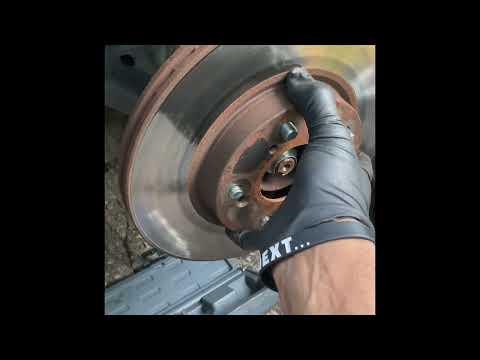







How to Replace Front Brake Pads and Rotors on a 2013-2015 Honda Civic (DIY Guide) (Trim: EX-L | Engine: Inline 4 1.8L | Body: Sedan)
Step-by-step instructions with required tools/parts, torque specs, safety tips, and brake bedding procedure
How to Replace Front Brake Pads and Rotors on a 2013-2015 Honda Civic (DIY Guide) (Trim: EX-L | Engine: Inline 4 1.8L | Body: Sedan)
Step-by-step instructions with required tools/parts, torque specs, safety tips, and brake bedding procedure for 2013, 2014, 2015


🔧 Civic - Front Brake Pads & Rotor Replacement
You’ll remove the front wheels, swap the brake pads, and replace the front rotors, then reassemble and torque everything correctly. This restores safe stopping power and prevents vibration/pulsation caused by worn pads or warped rotors.
Difficulty Level: Intermediate | Estimated Time: 2-4 hours
Assumption: stock front single-piston calipers with rotor retaining screws.
⚠️ Safety & Precautions
- 🛑 Work on level ground and support the Civic with jack stands before going under/working at the wheels.
- 🛑 Do not press the brake pedal while a caliper is off the rotor.
- 🛑 Brakes may be hot; let parts cool before touching.
- 🛑 Brake dust is unhealthy; avoid blowing it with compressed air. Use brake cleaner instead.
- 🛑 Watch the brake fluid level while compressing pistons; it can overflow the reservoir.
🔧 Required Tools
You'll need the following tools for this repair:
- Floor jack (rated 2-ton minimum)
- Jack stands (rated 2-ton minimum)
- Wheel chocks
- Lug wrench or 19mm socket
- 3/8" drive ratchet
- 1/2" drive breaker bar
- Torque wrench (20-150 ft-lbs range)
- 12mm socket
- 17mm socket
- Phillips #3 screwdriver
- Impact driver (specialty)
- Large C-clamp
- Wire brush
- Small bungee cord
- Brake parts cleaner
- Shop towels
- Nitrile gloves
- Safety glasses
🔩 Required Parts
HowToo sells all the parts you need for this repair:
- Front brake pad set - Qty: 1
- Front brake rotors - Qty: 2
- Front brake pad hardware kit (abutment clips) - Qty: 1
- Brake caliper slide pin grease - Qty: 1
- Brake cleaner spray - Qty: 2
- DOT 3 brake fluid - Qty: 1 quart
📋 Before You Begin
- Park on level ground, shift to Park, and set the parking brake.
- Place wheel chocks behind the rear wheels.
- Crack the front lug nuts loose 1/4 turn before lifting (use 19mm socket).
- Open the hood and locate the brake fluid reservoir. Keep the cap on, but check the fluid level so you can prevent overflow while compressing the caliper piston.
- Set your new rotors aside; clean both faces with brake parts cleaner and shop towels to remove protective oil.
🔨 Step-by-Step Instructions
Follow these steps in order:
Step 1: Lift and secure the front of the car
- Use a floor jack to lift the front jack point, then place jack stands under the proper support points.
- Remove the front wheels using a 19mm socket.
Step 2: Remove the caliper (the part that squeezes the pads)
- Turn the steering wheel to give yourself more room at the side you’re working on.
- Remove the two caliper slide bolts using a 12mm socket.
- Lift the caliper off the bracket and hang it from the strut spring with a small bungee cord (never let it hang by the rubber brake hose).
Step 3: Remove the old pads and hardware
- Slide the old inner and outer pads out of the bracket by hand.
- Remove the stainless hardware/abutment clips from the bracket.
- Clean the bracket pad “lands” (where clips sit) with brake parts cleaner and a wire brush.
Step 4: Remove the caliper bracket (the pad holder)
- Remove the two bracket bolts using a 17mm socket and a breaker bar.
- Set the bracket aside on a clean surface.
Step 5: Remove the rotor
- If equipped with rotor retaining screws, remove them using a Phillips #3 screwdriver.
- If the screws are stuck, use an impact driver (specialty) to avoid stripping.
- Pull the rotor straight off. If it’s rust-stuck, tap the rotor hat firmly (not the studs) with the handle end of your breaker bar while pulling.
- Clean the hub face (where the rotor sits) with a wire brush and brake parts cleaner so the new rotor sits flat.
Step 6: Install the new rotor
- Place the new rotor onto the hub.
- Reinstall rotor retaining screws (if used) with a Phillips #3 screwdriver. Torque to 9 Nm (80 in-lbs).
- Tip: One lug nut hand-tight holds the rotor flat.
Step 7: Reinstall the caliper bracket and prep the slide pins
- Reinstall the caliper bracket bolts using a 17mm socket.
- Torque to 108 Nm (80 ft-lbs).
- Pull the slide pins out of the bracket (they’re the smooth pins the caliper glides on), wipe them clean with shop towels, then apply a thin coat of brake caliper slide pin grease.
- Reinsert the slide pins and make sure they move smoothly.
Step 8: Install new pad hardware and pads
- Install new abutment clips onto the bracket by hand.
- Install the new pads into the bracket (inner pad usually has a wear indicator or spring clip, depending on pad design).
Step 9: Compress the caliper piston
- Place an old pad against the piston face, then use a large C-clamp to slowly push the piston back into the caliper.
- Go slowly and watch the brake fluid reservoir level under the hood; remove a little fluid if it’s close to overflowing (use shop towels to protect paint).
- Tip: Slow compression helps protect seals.
Step 10: Reinstall the caliper
- Lower the caliper over the new pads/rotor.
- Install the caliper slide bolts using a 12mm socket.
- Torque to 34 Nm (25 ft-lbs).
Step 11: Reinstall wheels and torque lug nuts
- Reinstall the wheels and snug the lug nuts using a 19mm socket.
- Lower the Civic off the jack stands using the floor jack.
- Torque lug nuts in a star pattern using a torque wrench: Torque to 108 Nm (80 ft-lbs).
Step 12: Seat the pads before driving
- With the engine off, pump the brake pedal 10-15 times until it feels firm.
- Check brake fluid level and top off with DOT 3 brake fluid if needed.
- Look around both front calipers for any signs of leaking.
✅ After Repair
- Do a slow test drive in a safe area. Confirm the pedal is firm and the Civic stops straight.
- Listen for grinding/squealing. A light “shhh” is normal for new pads.
- Brake break-in (bedding): make 6-10 moderate stops from ~30 mph down to ~5 mph, with 30-60 seconds between stops to cool slightly. Avoid hard panic stops for the first 200 miles.
- Recheck lug nut torque after 25-50 miles using a torque wrench: Torque to 108 Nm (80 ft-lbs).
💰 DIY vs Shop Cost
Shop Cost: $450-$850 (parts + labor)
DIY Cost: $150-$350 (parts only)
You Save: $300-$500 by doing it yourself!
Shop labor rates vary but typically run $100-$150/hour. This repair takes a shop approximately 1.5-2.5 hours.
🎯 Ready to get started?
HowToo makes it easy: same-day/2-day shipping on every part, plus all the tools and specialty tools you need! Check out the parts and tools sections below to add everything to your cart.
Guide for Disc Brake Pad Set replace for these Honda vehicles
| Year Make Model | Sub Model | Engine | Body Style |
|---|---|---|---|
| 2015 Honda Civic | EX | Inline 4 1.8L | Coupe |
| 2015 Honda Civic | EX | Inline 4 1.8L | Sedan |
| 2015 Honda Civic | EX-L | Inline 4 1.8L | Sedan |
| 2015 Honda Civic | EX-L | Inline 4 1.8L | Coupe |
| 2015 Honda Civic | LX | Inline 4 1.8L | Coupe |
| 2015 Honda Civic | LX | Inline 4 1.8L | Sedan |
| 2015 Honda Civic | Natural Gas | Inline 4 1.8L | Sedan |
| 2014 Honda Civic | EX | Inline 4 1.8L | Coupe |
| 2014 Honda Civic | EX | Inline 4 1.8L | Sedan |
| 2014 Honda Civic | EX-L | Inline 4 1.8L | Sedan |
| 2014 Honda Civic | EX-L | Inline 4 1.8L | Coupe |
| 2014 Honda Civic | LX | Inline 4 1.8L | Coupe |
| 2014 Honda Civic | LX | Inline 4 1.8L | Sedan |
| 2014 Honda Civic | Natural Gas | Inline 4 1.8L | Sedan |
| 2013 Honda Civic | EX | Inline 4 1.8L | Coupe |
| 2013 Honda Civic | EX | Inline 4 1.8L | Sedan |
| 2013 Honda Civic | EX-L | Inline 4 1.8L | Sedan |
| 2013 Honda Civic | EX-L | Inline 4 1.8L | Coupe |
| 2013 Honda Civic | LX | Inline 4 1.8L | Coupe |
| 2013 Honda Civic | LX | Inline 4 1.8L | Sedan |
| 2013 Honda Civic | Natural Gas | Inline 4 1.8L | Sedan |