









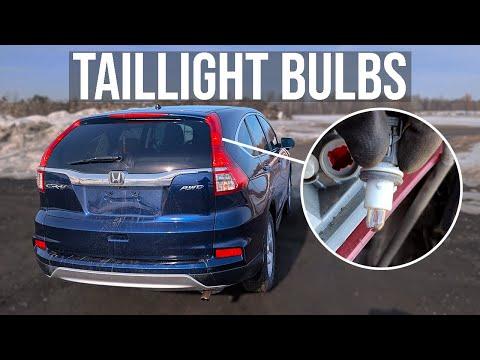






How to Replace Both Taillight Bulbs on a 1997-2014 Honda CR-V
Step-by-step instructions with tools, parts, safety tips, and after-repair checks
How to Replace Both Taillight Bulbs on a 1997-2014 Honda CR-V
Step-by-step instructions with tools, parts, safety tips, and after-repair checks for 1997, 1998, 1999, 2000, 2001, 2002, 2003, 2004, 2005, 2006, 2007, 2008, 2009, 2010, 2011, 2012, 2013, 2014


🔧 Taillight Bulbs - Bulb Replacement
The rear taillight bulbs on your CR-V are replaced from inside the cargo area by removing the access cover and the taillight housing fasteners. Since bulbs dim at about the same rate, it’s best to replace both sides at the same time.
Difficulty Level: Beginner | Estimated Time: 0.5-1 hour
⚠️ Safety & Precautions
- Turn the ignition OFF and make sure the lights are switched off before starting.
- Let the bulbs cool down first. Halogen bulbs can get very hot.
- Do not touch the glass portion of the new bulbs with bare fingers.
- Use a trim tool gently. The plastic clips and studs can break if forced.
- No battery disconnect is required for this repair.
🔧 Required Tools
You'll need the following tools for this repair:
- 10mm socket
- Ratchet
- Short extension
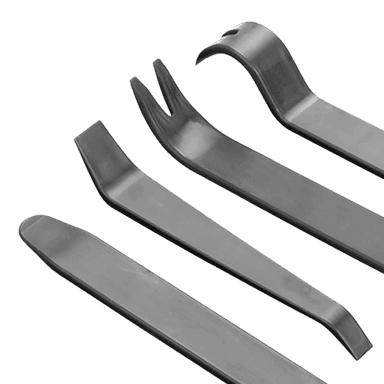
- Plastic trim removal tool
- Gloves
- Safety glasses
🔩 Required Parts
HowToo sells all the parts you need for this repair:
- Rear taillight bulb - Replace in pairs - Qty: 2
📋 Before You Begin
- Park on a flat surface and set the parking brake.
- Open the rear hatch.
- Keep the key away from the vehicle so the lights stay off.
🔨 Step-by-Step Instructions
Follow these steps in order:
Step 1: Open the rear hatch and access the taillight area
- Open the hatch fully.
- Move any cargo out of the way so you can reach the inside rear corner of the body panel.
- Locate the access cover behind each taillight assembly.
Step 2: Remove the interior access cover
- Use the plastic trim removal tool to gently pry off the access cover.
- Set the cover aside where it will not get scratched.
Step 3: Remove the taillight housing fasteners
- Use a 10mm socket and ratchet to remove the retaining nuts from the taillight assembly.
- Keep the nuts together so they do not get lost.
- Support the lamp while removing the last nut.
Step 4: Pull the taillight assembly straight back
- Carefully pull the taillight housing straight out from the body.
- If it feels stuck, wiggle it gently by hand. Do not pry hard against the paint.
- The housing is held by alignment pins, so it may need a little steady pull.
Step 5: Remove the bulb socket
- Twist the rear bulb socket counterclockwise by hand to unlock it.
- Pull the socket out of the taillight housing.
Step 6: Replace the bulb
- Remove the old bulb from the socket.
- Install the new bulb of the same type into the socket.
- Make sure the bulb is seated fully and straight.
- Do not force the bulb.
Step 7: Reinstall the socket and taillight housing
- Insert the socket back into the taillight housing and twist clockwise to lock it in place.
- Set the taillight housing back into position on the body.
- Install the nuts by hand first, then tighten with the 10mm socket and ratchet.
- Tighten snugly only — do not overtighten the plastic-mounted housing.
Step 8: Reinstall the access cover and repeat on the other side
- Snap the interior access cover back into place.
- Repeat the same steps for the other taillight bulb.
✅ After Repair
- Turn the ignition ON and check both taillights.
- Check brake lights, turn signals, and reverse lights while you are back there.
- If one bulb does not work, recheck the socket orientation and bulb seating.
💰 DIY vs Shop Cost
Shop Cost: $120-$220 (parts + labor)
DIY Cost: $20-$40 (parts only)
You Save: $100-$180 by doing it yourself!
Shop labor rates vary but typically run $100-$150/hour. This repair takes a shop approximately 0.5-1 hour.
🎯 Ready to get started?
HowToo makes it easy: same-day/2-day shipping on every part, plus all the tools and specialty tools you need! Check out the parts and tools sections below to add everything to your cart.
Guide for Tail Light Bulb replace for these Honda vehicles
| Year Make Model | Sub Model | Engine | Body Style |
|---|---|---|---|
| 2014 Honda CR-V | - | - | - |
| 2013 Honda CR-V | - | - | - |
| 2012 Honda CR-V | - | - | - |
| 2011 Honda CR-V | - | - | - |
| 2010 Honda CR-V | - | - | - |
| 2009 Honda CR-V | - | - | - |
| 2008 Honda CR-V | - | - | - |
| 2007 Honda CR-V | - | - | - |
| 2006 Honda CR-V | - | - | - |
| 2005 Honda CR-V | - | - | - |
| 2004 Honda CR-V | - | - | - |
| 2003 Honda CR-V | - | - | - |
| 2002 Honda CR-V | - | - | - |
| 2001 Honda CR-V | - | - | - |
| 2000 Honda CR-V | - | - | - |
| 1999 Honda CR-V | - | - | - |
| 1998 Honda CR-V | - | - | - |
| 1997 Honda CR-V | - | - | - |