















2007-2011 Nissan Altima Hybrid No-Charge Repair: Test DC/DC Converter (Not Alternator) (Engine: Inline 4 2.5L)
Step-by-step 12V charging diagnosis with multimeter tests, fuse checks, battery/terminal fixes, and safety tips
2007-2011 Nissan Altima Hybrid No-Charge Repair: Test DC/DC Converter (Not Alternator) (Engine: Inline 4 2.5L)
Step-by-step 12V charging diagnosis with multimeter tests, fuse checks, battery/terminal fixes, and safety tips for 2007, 2008, 2009, 2010, 2011


🔧 Altima - Charging System (No Alternator) Verification & Repair Path
Your Altima Hybrid does not use a conventional belt-driven alternator like a normal gas Altima. The 12V battery is charged by a DC/DC converter (built into the hybrid inverter/converter system), so “alternator replacement” usually means verifying the 12V system, fuses, and DC/DC output.
Difficulty Level: Beginner (testing) / Advanced (converter replacement) | Estimated Time: 0.5–1.5 hours (testing)
⚠️ Safety & Precautions
- ⚠️ High voltage hybrid system can cause severe injury or death. Do not open or disassemble any orange-cabled components.
- ⚠️ Keep metal tools away from the 12V battery positive terminal to prevent short circuits.
- ⚠️ If you smell burning plastic, see melting at fuse links, or have intermittent power loss, stop and have it towed.
- Battery disconnect is not required for the voltage tests below, but it is required for some fuse/terminal cleaning work.
🔧 Required Tools
You'll need the following tools for this repair:
- Digital multimeter
- 10mm socket
- 3/8" ratchet
- 3" socket extension
- Trim clip removal tool
- Needle-nose pliers
- Wire brush battery terminal cleaner
- Battery charger (12V)
- Safety glasses
- Nitrile gloves
🔩 Required Parts
HowToo sells all the parts you need for this repair:
- 12V battery - Qty: 1
- Battery terminal anti-corrosion pads - Qty: 2
- Battery terminal protectant spray - Qty: 1
- Fusible link / main fuse block - Qty: 1
📋 Before You Begin
- Park on level ground, shift to Park, and set the parking brake.
- Turn the car OFF and remove the key fob from the vehicle area.
- If you’ll clean/remove battery terminals: disconnect the negative terminal first using a 10mm socket.
- Tip: Write down radio presets if needed.
🔨 Step-by-Step Instructions
Follow these steps in order:
Step 1: Confirm the symptom (what “not charging” means)
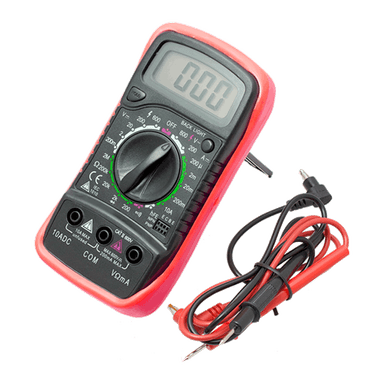
- Use a digital multimeter to measure voltage at the 12V battery posts (not the cable clamps).
- With the car OFF: if voltage is around 12.4–12.7V, the battery is reasonably charged; if it’s below ~12.2V, the battery may be weak or discharged.
- Put the car in READY mode (hybrid system on). Measure again with the digital multimeter.
- In READY, you typically should see about 13.5–14.5V. If it stays near 12V, the DC/DC converter may not be charging.
Step 2: Check for loose/corroded battery terminals (common, easy fix)
- If you see white/green crusty buildup, that’s corrosion and it can block charging.
- Turn the car OFF.
- Use a 10mm socket and 3/8" ratchet to loosen and remove the negative (-) terminal first, then the positive (+) terminal.
- Use a wire brush battery terminal cleaner to clean the inside of the clamps and the battery posts until shiny.
- Reinstall the positive terminal first, then the negative terminal. Tighten with a 10mm socket (snug; do not over-tighten and crack the battery post).
Step 3: Inspect the main fuse/fusible link (charging power path)
- Open the under-hood fuse area and remove the cover using a trim clip removal tool if needed.
- Look for a main fusible link / high-amp fuse assembly near the battery/fuse box area.
- Use needle-nose pliers to pull the related smaller fuses for a quick visual check (metal strip inside should be unbroken).
- If the main fusible link looks heat-damaged or melted, replace the fusible link / main fuse block (this is a common “no power/no charge” root cause after a jump-start event).
Step 4: Re-test charging voltage in READY
- Use the digital multimeter again at the battery posts.
- If you now have 13.5–14.5V in READY, the charging function is working and the issue was likely connection/fuse/battery related.
- If you still have ~12V in READY, the issue is likely in the hybrid charging system (DC/DC converter/inverter) and is not a safe DIY “alternator swap.”
Step 5: If the 12V battery is weak, replace it and re-check
- Remove the battery terminals using a 10mm socket (negative first).
- Remove the hold-down hardware using a 10mm socket, 3/8" ratchet, and 3" socket extension.
- Install the new 12V battery, reinstall the hold-down, and reconnect positive first then negative.
- Install battery terminal anti-corrosion pads and apply battery terminal protectant spray.
✅ After Repair
- Start the car to READY and confirm charging voltage is 13.5–14.5V using a digital multimeter.
- Confirm the battery/charge warning lights are off.
- If the 12V battery keeps going dead, have the hybrid system scanned for codes (DC/DC converter and inverter related codes matter here).
💰 DIY vs Shop Cost
Shop Cost: $150–$350 (diagnosis + battery/terminal service) / $2,000–$5,000+ (inverter/DC-DC related repair)
DIY Cost: $0–$250 (testing supplies or 12V battery)
You Save: $150–$350+ by doing it yourself!
Shop labor rates vary but typically run $100-$150/hour. This repair takes a shop approximately 0.5–1.5 hours for testing.
🎯 Ready to get started?
HowToo makes it easy: same-day/2-day shipping on every part, plus all the tools and specialty tools you need! Check out the parts and tools sections below to add everything to your cart.
Guide for Vehicle Battery replace for these Nissan vehicles
| Year Make Model | Sub Model | Engine | Body Style |
|---|---|---|---|
| 2011 Nissan Altima | - | Inline 4 2.5L | - |
| 2010 Nissan Altima | - | Inline 4 2.5L | - |
| 2009 Nissan Altima | - | Inline 4 2.5L | - |
| 2008 Nissan Altima | - | Inline 4 2.5L | - |
| 2007 Nissan Altima | - | Inline 4 2.5L | - |